Sanity testing has come a long way from manual smoke tests. (Recent research by Ehsan et) reveals that sanity tests are now critical for catching RESTful API issues early—especially authentication and endpoint failures—before expensive test suites run. The study found that teams implementing proper sanity testing reduced their time-to-detection of critical API failures by up to 60%. 

But here’s where it gets interesting:  

Sanity testing is no longer just limited to checking if your API responds with a 200 status code. The testing tools on the market are now using Large Language Models to synthesize sanity test inputs for deep learning library APIs, reducing manual overhead while increasing accuracy.  

We’re witnessing the start of intelligent sanity testing. 

Wait, before you get ahead of yourself, let’s set some context first. 

What are sanity checks in API testing? 

The definition of sanity checks is: 

Sanity checks are used as a quick, focused, and shallow test (or a group of tests) performed after minor code changes, bug fixes, or enhancements to an API. 

The purpose of these sanity tests is to verify that the specific changes made to the API are working as required.  And that they haven’t affected any existing, closely related functionality. 

Think of it as a “reasonable” check. It’s not about exhaustive testing, but rather a quick validation. 

Main features of sanity tests in API testing: 

•  Narrow and Deep Focus: It concentrates on the specific API endpoints or functionalities that have been modified or are directly affected when a change is made.  

•  Post-Change Execution: In most cases it’s performed after a bug fix, a small new feature implementation, or a minor code refactor. 

•  Subset of Regression Testing: While regression testing aims to ensure all existing functionality remains intact, sanity testing focuses on the impact of recent changes on a limited set of functionalities. 

•  Often Unscripted/Exploratory: While automated sanity checks are valuable, they can also be performed in an ad-hoc or random manner by experienced testers, focusing on the immediate impact of changes. 

Let’s put it in a scenario: Example of a sanity test 

Imagine you have an API endpoint /user/{id} that retrieves user details. A bug is reported where the email address is not returned correctly for a specific user. 

•  Bug fix: The Developer deploys a fix. 

•  Sanity check: You would quickly call /users/{id} for that specific user (and maybe a few others to ensure no general breakage) to verify that the email address is now returned correctly.  

The goal here is not to re-test every single field or every other user scenario, but only the affected area. 

Why do we need them? 

Sanity checks are crucial for several reasons: 

1️⃣ Early Detection of Critical Issues: They help catch glaring issues or regressions introduced by recent changes early in the development cycle. If a sanity check fails, it indicates that the build is not stable, and further testing would be a waste of time and resources 

2️⃣ Time and Cost Savings: By quickly identifying faulty builds, sanity checks prevent the QA team from wasting time and effort on more extensive testing (like complete regression testing) on an unstable build.  

3️⃣ Ensuring Stability for Further Testing: A successful sanity check acts as a gatekeeper, confirming that the API is in a reasonable state to undergo more comprehensive testing. 

4️⃣ Focused Validation: When changes are frequent, sanity checks provide a targeted way to ensure that the modifications are working as expected without causing immediate adverse effects on related functionality 

5️⃣ Risk Mitigation: They help mitigate the risk of deploying a broken API to production by catching critical defects introduced by small changes. 

6️⃣ Quick Feedback Loop: Developers receive quick feedback on their fixes or changes, allowing for rapid iteration and correction. 

Difference Between Sanity and Smoke Testing 

While both sanity and smoke testing are preliminary checks performed on new builds, they have distinct purposes and scopes:


Feature Sanity Testing Smoke Testing
Purpose  To verify that specific, recently changed or fixed functionalities are working as intended and haven't introduced immediate side effects.  To determine if the core, critical functionalities of the entire system are stable enough for further testing. 
Scope Narrow and Deep: Focuses on a limited number of functionalities, specifically those affected by recent changes.  Broad and Shallow: Covers the most critical "end-to-end" functionalities of the entire application. 
When used  After minor code changes, bug fixes, or enhancements.  After every new build or major integration, at the very beginning of the testing cycle. 
Build Stability  Performed on a relatively stable build (often after a smoke test has passed).  Performed on an initial, potentially unstable build. 
Goal  To verify the "rationality" or "reasonableness" of specific changes.  To verify the "stability" and basic functionality of the entire build. 
Documentation  Often unscripted or informal; sometimes based on a checklist.  Usually documented and scripted (though often a small set of high-priority tests). 
Subset Of  Often considered a subset of Regression Testing.  Often considered a subset of Acceptance Testing or Build Verification Testing (BVT). 
Q-tip  Checking if the specific new part you added to your car engine works and doesn't make any unexpected noises.  Checking if the car engine starts at all before you even think about driving it. 

In summary: 

•  You run a smoke test to see if the build “smokes” (i.e., if it has serious issues that prevent any further testing). If the smoke test passes, the build is considered stable enough for more detailed testing. 

•  You run a sanity test after a specific change to ensure that the change itself works and hasn’t introduced immediate, localized breakage. It’s a quick check on the “sanity” of the build after a modification. 

Both are essential steps in a good and effective API testing strategy, ensuring quality and efficiency throughout the development lifecycle. 

Reddit users are the best, here’s why: 

How do you perform sanity checks on APIs?

Here is a step-by-step, simple guide on using a codeless testing tool. 

Step 1: Start by Identifying the “Critical Path” Endpoints 

As mentioned earlier, you don’t have to test everything.  

You have to identify the handful of API endpoints that are responsible for the core functionality of your application. 

Ask yourself, you’re the team responsible: “If this one call fails, is the entire application basically useless?” 

Examples of critical path endpoints: 

Examples: 

•  POST /api/v1/login → Can users log in? 

•  GET /api/v1/users/me → Can users retrieve their profile? 

•  GET /api/v1/products → Can users see key data? 

•  POST /api/v1/cart → Can users complete a core action like adding items? 

•  Primary Data Retrieval: GET /api/v1/users/me or GET /api/v1/dashboard - Can a logged-in user retrieve their own essential data? 

•  Core List Retrieval: GET /api/v1/products or GET /api/v1/orders - Can the main list of data be displayed? 

•  Core Creation: POST /api/v1/cart - Can a user perform the single most important “create” action (e.g., add an item to their cart)? 

Your sanity suite should have maybe 5-10 API calls, not 50! 

Step 2: Set Up Your Environment in the Tool 

Codeless tools excel at managing environments. Before you build the tests, create environments for your different servers (e.g., Development, Staging, Production). 

•  Create an Environment: Name it for e.g. “Staging Sanity Check.” 

•  Use Variables: Instead of hard-coding the URL, create a variable like {{baseURL}} and set its value to 

e.g. https://staging-api.yourcompany.com.  

This will make your tests reusable across different environments. 

•  Store Credentials Securely: Store API keys or other sensitive tokens as environment variables (often marked as “secret” in the tool).

Step 3: Build the API Requests Using the GUI 

This is the “easy” part. You don’t have to write any code to make the HTTP request. 

  1. Create a “Collection” or “Test Suite”: Name it, for example, “API Sanity Tests.”

  2. Add Requests: For each critical endpoint we identified in Step 1, create a new request in your collection. 

  3. Configure each request using the UI

       • Select the HTTP Method (GET, POST, PUT, etc.). 

      •  Enter the URL using your variable: {{baseURL}}/api/v1/login. 

      •  Add Headers (e.g., Content-Type: application/json). 

      •  For POST or PUT requests, add the request body in the “Body” tab. 

You have now managed to create the “requests” part of your sanity suite 

Step 4: Add Simple, High-Value Assertions  

A request that runs isn’t a test. A test checks that the response is what you expect. Codeless tools have a GUI for this.  

For each request, add a few basic assertions: 

Add checks like: 

•  Status Code: Is it 200 or 201? 

•  Response Time: Is it under 800ms? 

•  Response Body: Does it include key data? (e.g., “token” after login) 

•  Content-Type: Is it application/json? 

qAPI does it all for you with a click! Without any special request. 

Keep assertions simple for sanity tests. You don’t need to validate the entire response schema, just confirm that the API is alive and returning the right kind of data. 

Step 5: Chain Requests to Simulate a Real Flow 

APIs rarely work in isolation. Users log in, then fetch their data. If one step breaks, the whole flow breaks. 

Classic Example: Login and then Fetch Data 

1. Request 1: POST /login 

• In the “Tests” or “Assertions” tab for this request, add a step to extract the authentication token from the response body and save it to an environment variable (e.g., {{authToken}}).  

Most tools have a simple UI for this (e.g., “JSON-based extraction”). 

2. Request 2: GET /users/me 

• In the “Authorization” or “Headers” tab for this request, use the variable you just saved.  

For example, set the Authorization header to Bearer {{authToken}}. 

Now you get a confirmation that the endpoints work in isolation, but also that the authentication part works too. 

Step 6: Run the Entire Collection with One Click 

You’ve built your small suite of critical tests. Now, use the qAPIs “Execute” feature. 

•  Select your “API Sanity Tests” collection. 

•  Select your “Staging” environment. 

•  Click “Run.” 

The output should be a clear, simple dashboard: All Pass or X Failed

Step 7: Analyze the Result and Make the “Go/No-Go” Decision 

This is the final output of the sanity test. 

•  If all tests pass (all green): The build is “good.” You can notify the QA team that they can begin full, detailed testing. 

•  If even one test fails (any red): The build is “bad.” Stop! Do not proceed with further testing. The build is rejected and sent back to the development team. This failure should be treated as a high-priority bug. 

The Payoff: Why Sanity Check Matters 

By following these steps, you create a fast, reliable “quality gate.” 

•  For Non-Technical Leaders: This process saves immense time and money. It prevents the entire team from wasting hours testing an application that was broken from the start. It gives you a clear “Go / No-Go” signal after every new build. 

•  For Technical Teams: This automates the most repetitive and crucial first step of testing. It provides immediate feedback to developers, catching critical bugs when they are cheapest and easiest to fix. 

For a more technical deep dive into the power of basic sanity validations, this GitHub repository offers a good example.  

While it focuses on machine learning datasets, the same philosophy applies to API testing: start with fast, lightweight checks that catch broken or invalid outputs before you run full-scale validations.  

It follows all the steps we discussed above, and with a sample in hand, things will be much easier for you and your team. 

Why are sanity checks important in API testing? 

Sanity checks are important in API testing because they quickly validate whether critical API functionality is working after code changes or bug fixes. They act as a fast, lightweight safety layer before we get into deeper testing. 

But setting them up manually across tools, environments, and auth flows is time-consuming. 

Source:(code intelligence, softwaretestinghelp.com, and more)

That’s where qAPI fits in. 

qAPI lets you design and automate sanity tests in minutes, without writing code. You can upload your API collection, define critical endpoints, and run a sanity check in one unified platform. 

Here’s how qAPI supports fast, reliable sanity testing: 

•  Codeless Test Creation: Add tests for your key API calls (like /login, /orders, /products) using a simple GUI—no scripts required. 

•  Chained Auth Flows: Easily test auth + protected calls together using token extraction and chaining. 

•  Environment Support: Use variables like {{baseURL}} to switch between staging and production instantly. 

•  Assertions Built-In: Set up high-value checks like response code, body content, and response time with clicks, not code. 

• One-Click Execution: Run your full sanity check and see exactly what passed or failed before any detailed testing begins. 

Whether you’re a solo tester, a QA lead, or just getting started with API automation, qAPI helps you implement sanity testing the right way—quickly, clearly, and repeatedly. 

Sanity checks are your first line of defense. qAPI makes setting them up as easy as running them. 

Run critical tests faster, catch breakages early, and stay ahead of release cycles—all in one tool. 

Hate writing code to test APIs? You’ll love our no-code approach 

When someone asks “How would you scale a REST API to serve 10,000 requests?”, they’re really asking how to keep the API fast, reliable, and affordable under heavy load. 

This question comes up because REST APIs—especially in Node.js—are easy to build but harder to scale. Everything works fine with 10 requests per second, but as you try to scale to 10,000+ requests per second, your setups will show all the red flags. 

This tutorial will walk you through the most practical, repeatable and effective ways to handle REST APIs on qAPI that will help you improve your API testing lifecycle. 

“Scaling a REST API to handle tens of thousands of requests per second is less about chasing a specific number and more about building the right foundations early. “ 

What we see across multiple APIs don’t fail because of bad logic; they fail because they were designed for today’s traffic, but not tested tomorrow’s growth.  

REST APIs dominate because they’re simple enough for beginners yet powerful enough for Netflix-scale systems. While GraphQL, SOAP, and RPC have their strengths, REST hits the sweet spot of simplicity, tooling support, and developer familiarity that makes it the default choice for 70% of modern APIs. 

So let’s see how teams should actually handle them. 

What should teams do? 

Step 1:The first principle is understanding what your application server is actually good at.  

Event-driven servers are designed to handle large numbers of concurrent connections efficiently, but the only catch is that they have to be used correctly.  

They excel at I/O-heavy workloads, such as handling HTTP requests, calling databases, or talking to other services. Problems begin when CPU-heavy or blocking operations are introduced into request paths.  

When that happens, concurrency drops sharply and latency increases rapidly. The lesson here is simple: keep request handling lightweight and push heavy computation out of the critical path. 

Step 2: Next, plan for horizontal scaling from day one.  

What I mean is instead of relying on a single powerful server, you should build your own system so multiple identical instances can serve traffic in parallel. This will help to add capacity gradually and recover easily from failures.  

Horizontal scaling only works when your API is stateless. Every request should carry all the information needed to process it, without depending on in-memory sessions or server-specific state. 

Step 3: Once the API layer is sound, attention must shift to the database. 

Because this is where most systems hit their limits. APIs can often handle high request rates, but databases cannot tolerate inefficient queries at scale.  

Poor indexing, unbounded queries, or mixing heavy reads and writes in a single datastore can quickly become your worst enemy. To scale safely, queries must be predictable, indexed, and measured.  

In many cases, separating read and write workloads or reducing database dependency through smarter access patterns makes a bigger difference than optimizing application code. 

Step 4: Caching is one of the most effective tools for reducing load and improving performance.  

Not every request needs fresh data, and many responses are identical across users or time windows. By caching these responses at the right layers, you remove the need for unnecessary computation and database traffic.  

This helps to reduce latency for users and increases capacity for handling truly dynamic requests. In short, effective caching is intentional, with clear rules around expiration, invalidation, and scope. 

Here’s why Rate Limiting is Important for APIs 

As traffic grows, protecting the system becomes just as important as serving it. Rate limiting ensures that no single client or integration can overload your API, whether through misuse, bugs, or unexpected retries.  

It’s quite clear that without respectable limits, small failures can bring large outages. With limits in place, the system can slow down gracefully instead of collapsing like dominoes.  

API Testing is where many teams underestimate risk. Because APIs will behave well in development but fail under real-world conditions as local tests lack concurrency, volume, and failure scenarios.  

When APIs scale the retries overlap, timeouts compound, and small delays create more issues. This is why scalable systems validate not just correctness, but behavior under load. Performance characteristics, error handling, and edge cases must be understood before users discover them. 

Observability ties everything together.  

You cannot scale what you cannot see. Tracking latency, error rates, and traffic patterns at the endpoint level allows teams to detect stress before it turns into downtime. More importantly, it helps identify which parts of the system break first under pressure.  

When teams rely only on general metrics, failures will feel sudden and mysterious to you. But when visibility is built in, scaling will give you a controlled process rather than the prior. 

Ultimately, scaling an API is not a single decision or a one-time optimization. It is the result of strategic architectural choices that prioritize statelessness, ensure performance, and system-wide resilience. Teams that scale successfully do not wait for traffic to expose weaknesses; they design for those weaknesses in advance. 

The goal is not to handle a specific number of requests per second. The goal is to build an API that continues to behave predictably as usage grows, complexity increases, and conditions change. When that mindset is in place, scale becomes an engineering problem you can plan for, not a crisis you react to. 

HTTP Methods and why you need to know them 

HTTP Methods

Here’s what trips up even experienced developers, we a similar pattern and listed down some of the major problems that they frequently face: 

GET requests with hidden side effects If your GET endpoint is able to logs analytics, updates counters, or does anything beyond returning data, you’ll break caching. So, clients and CDNs expect GET to be safe and repeatable. 

POST vs. PUT confusion When clients retry to execute failed POST requests, duplicates are created. PUT is replaces safely. Choosing the wrong method means users accidentally ordering the same item twice. 

Non-idempotent DELETE operations If deleting a resource once works but deleting it again returns an error, clients can’t retry safely. Well-designed DELETE operations handle “already gone” gracefully. 

The Simple Process that teams should have: Thinking About Retries 

Every production incident teaches you the same lesson: network calls fail, and clients retry. 

Network calls fail, and clients retry.

Before you finalize any endpoint, ask yourself: 

  • If this request times out, can the client safely retry? 
  • Will retrying create duplicate records? 
  • Does DELETE fail on the second attempt, or handle it gracefully? 

qAPI tip: Send the same POST request twice. If it creates two resources, document that behavior. Your API consumers need to know. 

The Mistakes That Cost Production Incidents 

Chatty APIs Requiring 10 requests to render one screen. Each round trip will add latency, and the chances of failure increase. 

God Endpoints Too much dependency on one endpoint: POST /processEverything. It becomes harder to test APIs and much harder to maintain. 

Leaky Abstractions Exposing database JOIN results directly as API responses. Your internal schema becomes a public contract. 

Ignoring HTTP Semantics Teams use POST for everything or returning 200 OK with error payloads. This confuses clients and breaks caching. 

No Pagination Returning unbounded arrays that crash mobile apps when users scroll. 

Tight Coupling Designing APIs around one specific client. When that client changes, your API breaks. 

qAPI tip: We recommend that if your tests require a complex multi-step setup, your API design might be the problem. So ensure your so-called “good” APIs are testable. 

Now that you know what to do and what not to do, here’s a checklist to keep handy. 

Best Practices Checklist for REST APIs 

Implementation Phase
Testing Phase
Deployment Phase

Why REST API Automation, Why Now: The Economic Case 

Two hard realities drive the case for automated (API) testing: 

  1. Downtime is punishingly expensive. Industry analyses put the average cost of IT downtime at $5,600 to ~$9,000 per minute, and regulated verticals can exceed $5M per hour when you factor revenue loss, SLA penalties, and reputational damage. [atlassian.com] 
  2. Defects get exponentially more expensive the later you find them. NIST/IBM research has long shown that finding/fixing defects after release can cost up to 30× more than catching them early—exactly what automated, continuous testing is designed to prevent. [public.dhe.ibm.com] 

If your pipelines aren’t automatically validating API behavior at every merge and deploy, you’re effectively accepting a higher probability of costly production incidents. 

Automated API testing offers four decisive advantages

  1. Speed: API tests run faster (seconds vs. minutes) and integrate earlier in the pipeline, giving developers feedback per commit/PR. Faster feedback shortens lead time and lowers change failure rate—direct DORA wins.  
  2. Stability: API tests don’t break on CSS tweaks or DOM reshuffles; they validate the system’s contract and behavior, not presentation details—reducing false failures.  
  3. Coverage: You can test edge cases and error paths that are hard to reach via UI. With service virtualization, you can also simulate unavailable dependencies to test negative flows and peak loads safely.  
  4. Security: API tests can continuously validate auth, rate limits, data exposure, and other OWASP API risks—a critical gap when most organizations lack full inventories yet face rising attack traffic.  

The Hidden Tax You Can Eliminate: Endless Test Maintenance 

Many organizations have/are “automate everything” and ended up with the maintenance spiral: brittle assertions, hardcoded payloads, failing tests after harmless changes. The result is toil: engineers stop trusting tests, and CI becomes noisy. 

What actually breaks the cycle: 

  1. Contractaware assertions: Tie tests to API intent (schema/semantics), not to fragile field order or presentation quirks—so additive, backwardcompatible changes don’t fail.  
  2. Changeaware test selection: Detect what changed (new field vs. contract break) and run only impacted tests; surface remediation context in PRs before a full CI redout. (This is the same “shiftleft” logic that improves DORA throughput and stability.)  
  3. Behaviorlearning: Use real execution data to learn valid variability ranges and common call patterns, so your suite flags true regressions instead of benign drift (critical as AIdriven API traffic increases).  

When teams adopt these patterns, maintenance drops, signaltonoise improves, and developers treat CI failures as actionable reality, not background hum. 

Some Predictions: The Next 24 Months of Automated API Testing 

  1. APIfirst → AIfirst APIs. As agents and copilots become consumers of APIs, the volume, frequency, and variability of calls will grow—change aware and behavior learning testing will go from “its nice” to groundbreaking.  
  2. From tools to platforms. Testing will integrate tightly with API catalogs, gateways, and observability—blurring the line between design time testingpreprod checks, and runtime conformance. Organizations that centralize inventory and governance will have outsized reliability gains, addressing the full inventory gap.  
  3. Safety and speed converge. High performers will continue proving there’s no tradeoff between speed and quality (DORA). Expect leaders to emphasize test impact analysisruntime informed tests, and security validations in CI to keep change failure rates low while increasing deployment frequency.  
  4. Ops economics will rule decisions. With downtime costs at $5.6k–$9k/min and remediation at ~$591k per incident, CFOs will favor investments that demonstrably reduce incidents and MTTR—and automated API testing tied to DORA metrics will be central to that argument.  

Final Word 

The software market is building on a simple truth: APIs are where business happens—and automated API testing is how you protect that business while moving faster. The data is unambiguous: API adoption and AIdriven traffic are rising, visibility gaps persist, incidents are frequent and expensive, and high performers prove that speed and stability can (and should) rise together.  

If you modernize testing around contracts, change awareness, behavior learning, and CI/CD guardrails, you’ll break the maintenance spiral, reduce risk, and ship confident changes continuously. That’s the future customers (and CFOs) will reward.  And you can do all that and still some more with ease on qAPI. 

The product is a hit but now you have new problems. How much traffic can the current APIs handle? How many APIs need changes? And how do you track it over time? 

These questions aren’t easy to answer, but as a founder/product owner, a goal that everyone would like to find themselves in.  

You’ve just reached your 3-year goal in a single year. Now it’s time to lock in and make decisions that  will lay the foundation for the product’s future. Congrats — now your APIs are about to get absolutely hammered. 

According to SQmagazine many companies now handle 50–500M API calls per month at an average. That’s ~19–193 requests/second peaks are often 5–15x higher. 

But with this growth there are a few key areas that we should be on the lookout for, let’s look at this closely: 

How Do You Scale API Traffic Without Breaking Performance or Blowing Up Cloud Costs? 

As API traffic grows, most teams hit the same wall: at some point in time: systems that usually worked at a few hundred requests per second start slowing down, error rates increase. 

This is a classic API scalability problem, but the issue isn’t related to volume; it’s that high-traffic APIs behave very differently under pressure than they do in normal conditions. 

A big part of this comes down to how the API is scaled. Many teams start with Vertical Scaling—adding more CPU or memory to a single server. While this provides short-term relief, it has hard limits and gets expensive fast. 

Horizontal scaling, on the other hand,  allows you to add more instances as traffic grows by spreading the load across multiple machines..  

 But here’s the catch: horizontal scaling works best when APIs are stateless, This means any request can be handled by any instance without relying on local memory or session data.

Context: Stateless design is what makes an API truly scalable at high traffic levels. 

Load balancing is the most effective way to manage costs. Instead of overloading one server, a load balancer distributes incoming API requests evenly across healthy instances. When traffic spikes, auto-scaling groups can spin up new instances automatically and remove them when demand drops.  

This ensures your high-traffic APIs stay responsive without forcing you to pay for peak-capacity hardware all year long. Your goal as a product owner isn’t just to survive a single traffic spike; it’s to handle fluctuating traffic every single day. 

The biggest mindset shift is designing for change, not just for peak numbers. Many teams size infrastructure for “maximum traffic” and hope it covers future growth. In reality, API traffic growth is uneven.  

Flash sales, product launches, partner integrations, and viral campaigns create sudden bursts that basic setups can’t handle efficiently.  

By building scalable APIs that expand automatically, your performance stays stable while API cost optimization. 

How Should API Design and Governance Evolve as You Go from One Team to Many? 

As teams grow from a single squad to multiple cross-functional groups, the challenge of scaling APIs shifts from infrastructure to design consistency and governance. 

However, once infrastructure stops being the limiting factor, a different problem emerges: API design issues. When every team defines its own API patterns, surface conventions, error formats, and versioning strategies, the ecosystem becomes a mess.  

This design gap slows down – integration, increases cognitive load for developers, and kills reusability.  Research shows that without strong API governance, reusability can drop by more than 30% in large organizations. 

To solve this, teams must scale along two dimensions: the system (to handle workload growth) and the design (to maintain consistency).  

On the design side, teams must adopt API style guides that define URL structures, pagination schemes, error objects, naming consistency, pagination standards, authentication flows, and versioning rules.  

These guides help you ensure in future that whether API X was built by Team A or Team B, it behaves predictably and integrates cleanly. 

Design governance should also be followed by a dedicated group for review processes and contract-first validation. Rather than detecting breaking changes in staging or production, teams should validate API contracts early, ideally during CI runs. This prevents minor changes, like a renamed field or changed response order, from becoming major issue at scale.  

Companies with formal API governance and contract validation report fewer integration failures and smoother scaling during peak traffic events, according to API industry reports. 

Testing Your APIs: What is the Ideal Way? 

 We’ve looked at how to grow your APIs infrastructure, manage costs, and handle design and governance specifications. Once these are done, the only challenge that remains is testing them. 

With API testing, you put your APIs through a series of tests to ensure they work as designed. To test the limitations, there are several types of tests, so mature teams don’t just check if the API works. 

They will confirm if it is reliable, secure, and delivers on its business promise. This is how teams should plan to test their APIs once the design process begins. 

1. Run Functional Tests  

Functional tests ensure the API always matches the expected output. 

Focus Area Example
Endpoint Behavior If you ask for information (GET), you will get information. If you ask to change something (POST/PUT), you should confirm the change happened exactly as requested.
HTTP Method Ensure measures are in place to validate that unauthorized POST requests are rejected with a 405 Method Not Allowed, and that PUT is used for full replacements rather than partial updates (which should be PATCH).
Expected Schema Validate that the response structure for a successful transaction includes all required fields, as specified in the OpenAPI/Swagger documentation.

2. Check Data Accuracy & Integrity 

Let’s look at it closely, because wrong data spreads silently and is extremely hard to fix later. So when your API usage grows ensure to run data accuracy checks. Here are some examples that you can use as a reference: 

Focus Area Example
Calculated Values If an API calculates sales tax or discounts, test the logic against known financial benchmarks. For example, updating a customer’s address must reflect that exact change in the database immediately.
Persistence Verification After a PUT /inventory/{sku} update, run a follow-up query on the database layer (or a separate read-only API) to confirm the write transaction committed the value correctly.
Data Type Fidelity Validate that fields intended as a Big Decimal (e.g., currency) are not accidentally converted to floating-point numbers, which introduces rounding errors that are invisible at the surface level.

3. Business Logic Validation 

To build high-quality software, teams will have to go beyond to see if an API returns a response and focus on enforcing real business logic through API testing. Business logic refers to the rules and workflows that reflect how a real application should behave in real use cases.  

 When business logic fails, entire processes—from order handling to payments—can break your product, even if the API itself technically “works.” 

Focus Area Example
Workflow In a typical order lifecycle, confirming that an order status cannot transition directly from PENDING to SHIPPED without first passing through PROCESSING.
Eligibility Checks If a customer is tagged as “Bronze”, the API should automatically reject any request for “Platinum-only” features, even if the request is technically valid in every other way.
Rate Limiting & Limits If an API allows 10 withdrawals -per minute—the first 10 go through successfully, but the 11th request must be blocked with a 429 Too Many Requests error.

Another key measure is integrating automated testing into the development workflow. API automation enables teams to run these logic-focused tests every time code changes are made, giving fast, reliable feedback without adding manual burden.  

Automated API tests run in seconds compared with much slower UI tests, sometimes up to 35× faster, enabling more frequent checks and broader coverage across business rules and edge conditions.  

This drastically improves confidence in releases because of the logic paths that matter most—such as eligibility checks for premium features or rate limiting thresholds—are deployed at scale with less to no human intervention. 

Teams should also treat API testing as an important flagging metric, and start to define it’s own guardrails to ensure product stability and increase customer retention. Because APIs operate independently from user interfaces, it is a good practice to test API logic before the UI is even built, allowing logic issues to be caught early when they are cheaper and easier to fix.  

Early testing of business logic through automated testing tools integrated into CI/CD pipelines ensures that every change reinforces—or at least does not break—the expected real-world behavior.  

Finally, “teams should measure and evolve their API testing strategy”  

Because at the end of the day, enforcing business logic in API testing is not optional—it’s essential to sustainable software quality and fast delivery cycles, and robust automated testing practices are the most effective ways to achieve stability at scale. 

4.Performance & Reliability 

Focus Area Example
Latency Consistency Measure the 95th and 99th percentile response times, not just the average to check the average consistency.
Stress Testing & Saturation Put load that exceeds documented throughput (e.g., sending 150% of expected peak traffic) to confirm the API returns 503 Service Unavailable, rather than corrupting data or crashing.

How Do You Test APIs With Incomplete Documentation? 

 In short: You don’t—at least not by following the docs.  

Outdated or missing docs  forces teams to guess behavior, hunt for old specs or re-learn things the system already knows. 

 Instead, teams should observe how the API actually behaves (we’ve already talked about this above) by sending real requests, inspecting real responses, and treating runtime behavior as a reference point.  

With qAPI’s AI summarizer, you get a complete AI -assistance that makes it easier for you to populate documentation end-to-end and understand what the API is designed to do. 

How Do You Test for API Chaining? 

You test them as one continuous flow, not as separate calls, because that’s how real users experience the system. In most applications, one API depends on data from another, so a single failure can break the entire journey. 

Example (E-commerce Checkout): 

  1. POST /cart/checkout → returns a temporary checkoutId 
  1. POST /payment/{checkoutId} → returns paymentTransactionId 
  1. GET /order/{paymentTransactionId} → verify status is PROCESSING 

The most critical test here is what happens when something fails. If the payment is declined in step 2, the system should clean up properly—mark the cart as abandoned or roll back the checkout—rather than leaving the order in an incomplete state.  

This matters a lot because broken workflows cause data inconsistencies, failed orders, and customer frustration – something businesses ignores when growth becomes too big to handle. 

Wrapping up 

Growing teams often assume API scaling is a future problem—something to solve once traffic explodes or systems slow down.  

Just like Google search has shifted from “pages” to “answers,” new systems have shifted from UI-driven flows to API-driven architectures. If you’re not testing APIs with scale in mind early on, you’re already digging your own grave. 

Mature teams don’t wait for failures to tell them their APIs don’t scale. They instrument, test, and observe continuously. This level of ownership turns API testing from a defensive task into a strategic advantage: it tells teams where they will break next, not just where they broke last time. 

Your approach to scaling APIs depends on what you want to protect.  

If it’s reliability, you focus on load, rate limits, and graceful failure. If it’s velocity, you invest in automated testing that runs on every change and across every dependent service. If it’s cost and performance, you measure real request patterns instead of assumptions.  

It is simple if you state out what you want. 

We’re in a similar messy middle with APIs as we are with AI-driven search: patterns are changing faster than best practices can keep up.

Teams that start treating API testing as a first-class scaling strategy today will have a massive advantage tomorrow.— When the growth hits, you won’t be guessing. You’ll already know. 

After many years, AI has made it possible to develop and deploy application in days. 

With just a couple of tools, API development was streamlined; you can design, test, and deploy if you have the right set of tools. A solo developer or a team could develop an application and backend without breaking a sweat. 

What started out as revolutionary has now created its own set of problems. 

Only a fraction of people are able to deploy on time and maintain upkeep. 

When we are creating and developing APIs much faster than we did, designing alone isn’t enough. Instead, we are avoiding the work we must put in testing them, the visibility needed to see how APIs perform in actual traffic.  

API testing is non-negotiable in 2026. 

What is wrong with the way people are testing their APIs? 

If you visit Reddit or StackOverflow, there’s a massive drop in the questions we’ve asked around API testing and effective ways to do it. For example, here’s a user asking a basic question. 

I agree with people’s thoughts presented in such forums, because there’s no clear cut or right step-by-step approach to API testing. 

How does one know what’s the best tool or the best API testing method is? And how does one develop and replicate that practice? 

So, here’s this blog post to make it simple. 

API testing manual or automated? 

First things first, testing is just not about doing functionality checks.  

The problem is that we don’t test in ways that scale. 

Either the teams are all in with manual testing practices, running in circles and are already exhausted. Or they are spending time rechecking or validating what their automated testing tool missed. 

The first thing that we already talked about is flaky tests, which reduces confidence in the entire CI/CD process. These tests pass intermittently—often succeeding on reruns without changes—due to race conditions, shared or unstable test data, inconsistent environments, or unreliable external dependencies.  

The result is clogged pipelines, delayed deployments, and a growing tendency for engineers to ignore legitimate failures. 

The second bottleneck is excessive test maintenance. Teams often spend 40-60% of their QA time simply repairing broken tests. This occurs when tests are basic: they rely on hardcoded data, make overly precise assertions, are tightly coupled to implementation details, or use expired fixtures.  

Even a minor change in the application can thus trigger widespread test failures, slowing down release cycles and accruing significant technical debt. 

A snowball effect, for all the wrong reasons. 

The third issue is dangerous coverage gaps. While happy-path scenarios are usually well-tested, critical areas such as error handling, edge cases, security checks, and performance under load remain insufficiently covered.  

This happens because maintenance burdens crowd out the creation of new tests, and it is difficult to safely simulate complex real-world conditions. Consequently, bugs and vulnerabilities often go undetected until they reach production. 

We’re just hitting the major concerns while the list goes on and on. 

As API testing is  often still a semimanual checkpoint near the end of a release: 

• Collections run locally or via Postman before deployment. 

• A single nightly run rather than per commit feedback.  

• No hard quality gates on API suites. 

Often led to the said problems and more 

Little or no performance/load testing 

While functional tests answer, “does it work?” and performance tests answer, “will it still work when it matters?” Many teams never systematically test and just pick one in random: 

• Assume a peak traffic simulation before a major sale. 

• You randomly pick a long-running test to check for obvious memory leaks and miss the rest. 

• A partial load test on a complex workflow, without realistic concurrency. 

The result? You have results and you have a new set of problems. 

And the worst part is, you don’t know how to connect the dots, because data is cluttered. 

How Microservices Multiply the Problem 

Microservices architecture multiplies testing complexity because multiple teams start building services independently. This leads to variation in coding standards, testing procedures, and tooling​. 

This further affects the environment configuration drift between dev, test, and production creating hard-to-debug issues​. 

Next, performance testing becomes distributed – QA teams are now forced to verify individual service functions and smooth inter-service communication​. 

Test interdependencies grow – one service’s failure leads to across integration tests.​ 

This is why API performance issues are so hard to diagnose in microservices environments—and why many teams delay addressing them altogether. In fact, 43% of enterprises report postponing API testing initiatives due to insufficient technical capability, not lack of intent. 

Adoption Gaps: The Skills & Coverage Problem 

Despite criticality, 91% of developers and testers say API testing is critical, yet  50% lack the tools and processes to effectively automate it. The adoption landscape reveals:​ 

How to simplify and eliminate these problems 

My take. You need to reduce and simplify. 

After all, like me, you’ve been on the internet and in some cases for a longer period than me. Add your years of reading, YouTube, podcasts, and even Reddit scrolls, and you would have consumed enough to know what you’ve just been convinced enough that this is the way it has to be. 

So, you’d want to start by reflecting on what is killing your teams. 

Time? Budget? Complexity? Context switching? And you’ve seen the end result it has. 

You already have somewhat a clear idea of what needs to go, now you need to see what a good replacement can be. 

You should start with a simplified API testing tool. 

Read, apply, examine why it works or why it does not 

You don’t want to just jump into a tool. You want to understand why they’re good. Or why they’re not good. You want to be able to explain your choice in specific details.  

That’s why we’re running a free trial for all the new users and enterprises.  

There’s no way around it. You have to make a lot of strategic decisions (some good, some bad, but mostly wise) before your need becomes obsolete. 

Every time you do, every time you analyze your work, you’re practicing and building a system that will help you and your team immensely. 

Judgment only improves with volume. You want to do run 100 tests. Write 100 test cases. Generate 100 reports. Edit endpoints 100 times on the dashboard.  

And when AI does most of the legwork, running an extra 160 tests doesn’t feel like a thing, and you feel like you’re only getting started. That’s what qAPI does for you. 

Final thoughts  

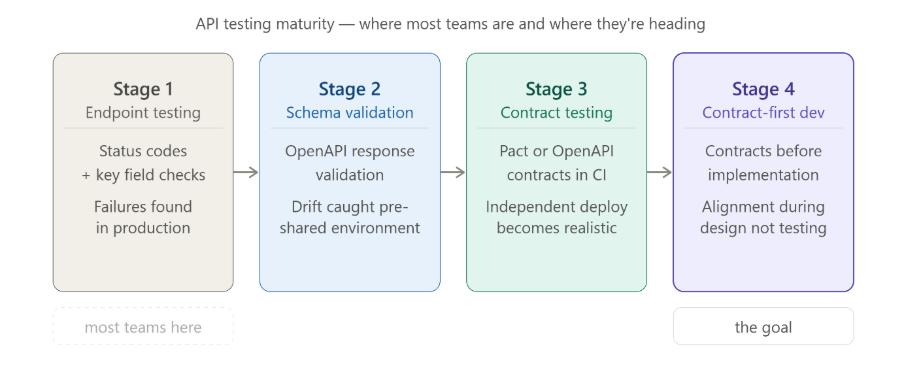
Industry data shows that formal API contract testing adoption remains low. The reason is not awareness—it’s friction. Today contract testing requires additional frameworks, cross-team coordination, and ongoing maintenance. 

In a world where everyone can create, this creates an adoption barrier that rarely clears. 

qAPI embeds contract validation directly into everyday API testing through schema validation. This removes the need for parallel tooling and allows teams to detect breaking changes early, without increasing operational complexity or requiring specialized DevOps investment.  

The companies that will win are the once that slow down, make the change and move on. 

Reduce Noise in Engineering Pipelines 

One of the most common complaints from engineering teams is that automated testing produces too much acceptable content that we usually forget. Tests pass, fail, and rerun—yet real production issues still escape. 

The root cause that I see is a small testing focus. Many tools validate endpoints in isolation, missing failures that only appear across business workflows. 

qAPI shifts testing from endpoint verification to end-to-end API workflows. It puts the work by aligning test coverage with how systems actually operate. This improves signal quality and allows engineering teams to trust test results as a basis for release decisions. 

Address the Test Maintenance Costs 

At scale, test automation often becomes a cost centre. Enterprises routinely spend close 60% or more of QA capacity maintaining existing tests rather than improving quality. 

For you and your team this means: 

• Slower release cycles 

• Increasing QA headcount without proportional gains 

• Growing frustration across engineering teams 

qAPI reduces maintenance effort by eliminating script-heavy test design and relying on schemas and flows that naturally evolve with the system. This doesn’t eliminate maintenance—but it meaningfully reduces it, allowing QA capacity to shift toward coverage, performance, and risk mitigation. 

The ROI comes from smart allocation of effort, not from cost-cutting. 

Stabilize your CI/CD as a Governance Mechanism 

CI/CD pipelines are often framed as productivity tools, but at the top level, they are looked as governance mechanisms. When pipelines are unreliable, teams bypass controls, and quality reduces drastically. 

qAPI improves pipeline reliability by producing deterministic results tied to contracts and flows rather than fragile assertions. For leadership, this means pipelines regain their role as trusted quality gates, enabling faster decision-making without compromising standards. 

qAPI provides a combined view of API interactions across services, enabling teams to see dependencies, execution paths, and failure propagation. This visibility supports better architectural decisions and reduces dependence on old data. 

By applying intelligence in adaptive ways—simplifying test creation, highlighting impactful changes, and improving failure analysis—without affecting system behavior or removing human oversight, qAPI keeps you in complete control and free of efforts. 

When we talk about contract testing, it often looks and sounds more complicated than it actually is. The term itself has grown layers of jargon over the years, which is why many teams either misunderstand it or avoid it altogether.  

At its core, contract testing is simply about verifying that two systems can reliably communicate with each other—without having to deploy and run both systems at the same time. 

To understand it clearly, in this article we’ll discuss how contract testing helps to place them in context alongside other testing levels. 

Let’s talk about unit tests first; they work on a single function or method. It checks whether a small piece of logic behaves correctly in isolation. Unit tests are fast, deterministic, and sufficient for validating internal logic. The only problem is that they stop at the boundaries of a single codebase. 

On the other hand, a contract test operates one level above unit tests. It is concerned not with internal logic, but with how one service will interact with another service.  

If you are a restaurant and it depends on the chef, a contract test allows you to define and verify what that interaction will look like—even if chef is not working or not yet hired. 

In practical terms, this means you can simulate chef’s expected behavior based on an agreed contract. If you specify: 

• What request restaurant will send 

• What response restaurant expects in return 

• Under which parameters that response should be returned 

If chef later changes something(like the menu) that violates this agreement—such as removing a field, changing a response code, or altering behavior—the contract test fails immediately.  

You can see the breakage early, clearly, and in isolation, rather than finding it days later during integration testing or, worse, in production. 

This is why teams need to realize the value of contract testing: it detects communication failures before services are integrated. 

What is the difference Between Contract Tests and Integration Tests 

A common point of confusion is the difference between contract tests and integration tests. 

With an integration test requires both restaurant and chef to be fully implemented, deployed, configured, and running. It validates that real services can talk to each other in a real environment.  

While integration tests are valuable, they are comparatively slower, fragile, and harder to debug because failures can be caused by environment issues, data setup problems, or unrelated changes in either service. 

Contract tests completely avoids these problems. They allow each service to be tested independently, based on a shared agreement.  

This makes contract tests faster, more reliable, and more easier to maintain as time passes, especially in microservice architectures where dozens or hundreds of services can grow at once. 

Now, let’s clear the air by explaining how schema tests are different 

Why Schema Tests Are Often Mistaken for Contract Tests? 

We see many QA teams believing they are doing contract testing because they validate API schemas. This is an understandable mistake—but it is still a very big mistake. 

Why? Because schema tests verify structure, not behavior. They can confirm requests and responses to a defined format: correct data types, required fields present, and to check if allowed values are respected.  

This is useful, but it does not prove that two systems actually agree on how the API should behave in real scenarios. 

A schema test will tell you that a field exists. A contract test shows you when and why that field matters

For example, a schema might say that a status field is optional. A consumer, however, may rely on that field being present to drive business logic. Removing it may still pass schema validation—but it will break the consumer. Schema tests won’t catch this. Contract tests will. 

This is why it is worth researching deeper whenever schema validation is being treated as “contract testing.” Without setting strong interaction expectations, teams are only validating grammar – not meaning. 

Let’s understand how contract testing actually addresses this challenge in the real system. 

The Core Principles of Contract Testing 

It’s no surprise: Independent verification is the first principle. Instead of waiting for all services to be deployed and tested together, each service verifies its responsibilities independently.  

This reduces feedback cycles and prevents late-stage surprises. 

Your Consumer–provider contracts is the second principle.  

The consumer states what it needs, and the provider ensures it can meet those needs. If both sides satisfy the same contract, integration should and will work as expected.  

Backward compatibility protection is another critical upside that teams can get. Contract tests make it immediately visible when a change—such as removing a field or altering a response—will break existing consumers.  

This helps teams to evolve APIs safely instead of relying on assumptions about “non-breaking changes.” 

Finally, automation is essential. Contract tests are most effective when they run automatically as part of your CI/CD pipeline. Every change is validated against existing contracts, ensuring that breaking changes are caught early, when they are cheapest to fix. 

Why Contract Tests Belong in the Testing Pyramid 

For a large majority of testers and developers contract tests often feel like they don’t fit neatly into the traditional testing pyramid. 

But that’s mostly because the pyramid was designed for monoliths, not for distributed systems. 

In architecture systems we see now, contract tests act as the bridge between unit tests and integration tests. They reduce the need for excessive end-to-end testing while still providing strong system compatibility. 

Without contract tests, teams can either: 

• Blindly trust on slow, brittle end-to-end tests, or 

• Deploy changes with false confidence based on schema validation alone 

Neither of these options are good for business. 

The Real Goal of Contract Testing 

Contract testing is not about adding more tests. It is about reducing uncertainty. 

When done well, contract tests allow teams to: 

• Develop services in parallel without fear 

• Detect breaking changes before integration 

• Scale APIs without slowing delivery 

In other words, contract tests exist to answer one simple but critical question: 

“If this service changes today, who or what will it break tomorrow?” 

Once teams understand that you will have no backlog and no burnout. 

How Contract Testing Works in Practice  

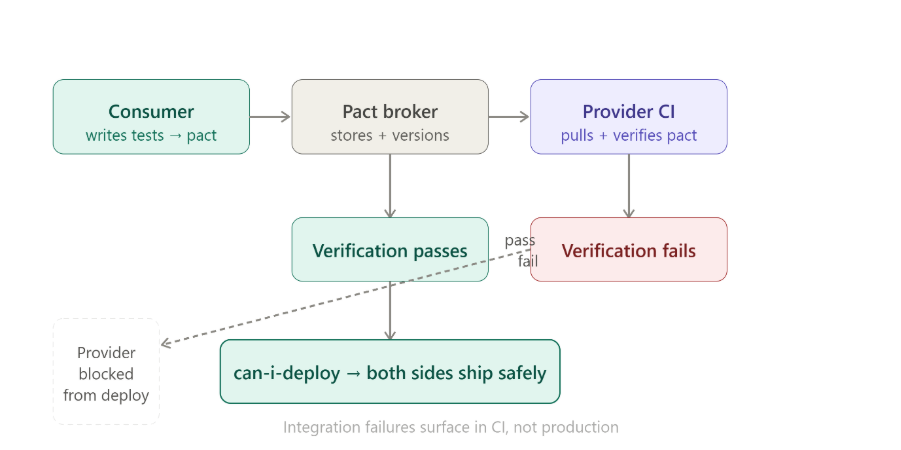
At a high level, contract testing follows a Consumer-Driven Contract (CDC) approach. This means the system that uses an API defines what it needs, and the system that provides the API proves it can meet those expectations. 

Let’s walk through what this looks like step by step. 

Step 1: The Consumer Defines Its Expectations 

Everything starts with the consumer—because in distributed systems, breakage is always seen by the consumer first

When you’re building Service A and it depends on Service B, you already have assumptions in your head: 

• Which endpoint you’ll call 

• Which fields you rely on 

• Which response codes you handle 

• Which error cases matter 

Contract testing simply makes those assumptions clear. 

From a developer’s perspective, this usually happens inside consumer tests. You write tests that simulate calling Service B, but instead of hitting a real service, you describe the interaction in a contract format—often as a pact file or schema-backed interaction definition. 

This contract includes: 

• The HTTP method and endpoint 

• Required headers or auth behavior 

Example request payloads 

• Expected response status codes 

• Required response fields and their meanings 

At this stage, you are not testing whether Service B actually works. You are documenting what you expect it to do

Step 2: Consumer Tests Generate and Publish Contracts 

Once these consumer tests run, they generate a contract which is usually a machine-readable file that describes the expected interactions. 

This file can prove everything. It is sent to a contract repository or broker that both teams can access. Importantly, this happens automatically as part of the consumer’s CI pipeline

From a developer’s workflow perspective, this feels natural: 

• You change code 

• Tests run 

• Contracts update if expectations change 

If you intentionally modify how you use an API. 

For example, let’s say you start relying on a new field—that change is reflected immediately in the contract.  

No meetings, no emails, but you have results. 

Step 3: Providers Verify Against the Published Contracts 

Now the responsibility shifts to the provider. 

When service B pulls the published contracts and runs provider verification tests, these tests check whether the provider can satisfy every contract that consumers can depend on. 

If the provider passes verification: 

• It has proven that it still supports all existing consumers 

• It is safe to deploy from a contract perspective 

If verification fails, it means something meaningful: 

• A field was removed 

• A response code changed 

• Behavior no longer matches expectations 

At this point, developers have clear options: 

• Fix the provider to restore compatibility 

• Update the consumer and version the API 

• Introduce backward compatibility logic 

The failure is early, isolated, and actionable—which is exactly what you want. 

Step 4: Resolving Issues Without Slowing Teams Down 

One of the biggest advantages of contract testing is how cleanly it handles mismatches. 

Instead of discovering breakage during integration or production testing, teams can respond deliberately: 

• Providers can introduce non-breaking extensions 

• Breaking changes can be gated behind new API versions 

• Consumers can migrate incrementally 

This turns API evolution into a controlled process instead of a risky guessing game. 

Handling Multi-Version APIs and Feature Flags 

Real systems don’t stand still, and contract testing supports that reality well. 

When APIs grow, contracts can be versioned alongside code. Older contracts remain valid until consumers migrate, while new contracts define new behavior. Providers can support multiple versions simultaneously and verify compatibility independently. 

Feature flags add another layer of safety. New behavior can be introduced behind a flag, with contracts clearly written for that path. Once consumers are ready, the flag can be rolled out confidently—knowing the contract has already been validated. 

It’s all about reducing risk without reducing speed. As it allows you to: 

• Refactor APIs safely 

• Deploy independently 

• Avoid breaking consumers you don’t even know exist 

• Replace guesswork with executable agreements 

When contract testing is in place, API changes stop being scary. They become routine, predictable, and boring—in the best possible way. 

Isnt’ that what you and your team needs? 

And now, the testing industry needs to take the next logical step: Letting a smart tool to fill the gap. 

How qAPI Makes Contract Testing Simple 

qAPI removes the manual work from contract testing. That means you don’t have fuss about the work needed for running tests, qAPI can provide all that and support 24×7 for all your API testing needs 

With qAPI, teams can: 

• Generate contracts directly from OpenAPI specs 

• Auto-create contract tests for requests and responses 

• Validate schema changes on every build 

• Run contract tests in CI/CD without writing code 

• Share contracts across teams in one workspace 

When a change breaks the contract, qAPI flags it instantly—before it reaches production. So have complete visibility on what’s happening, less doubt and more confidence.  It’s easy to be a skeptic, there’s so much to care and figure out about: API privacy, data safety and what not. 

After all, the stakes are always high, it’s just the technicality that’s overly bloated contract testing is necessary and it can be a cakewalk without any serious implications. 

You can take care of your APIs and contract tests all one place with qAPI.  

It’s the same story with every company starting out or a older one that’s attempting to restructure their processes. They have a problem choosing the ideal QA test management platform.  

Every CTO and tech team now claims to be agile and completely on cloud, but the real problem isn’t technology it’s about how companies approach using it. In the last few months, we have worked with leaders and teams who didn’t experiment but still managed to scale. 

Why? Because they were able to make bets based on the decisions they made on what they wanted to achieve and how. Across any vertical, be it healthcare, IT, or manufacturing, there was a common pattern. Teams got lean and simplified their API testing process, which took transformation seriously and decided to use tools that simplify rather than complicate. 

The teams that get this right follow one principle: simplify first, automate second. 

Here are some lessons from those who managed to scale after choosing qAPI for their QA test management platform. 

What Is a Test Management Platform? 

Test Management Platform is all about where you handle your software testing needs for planning, testing, and monitoring the testing activities, which will be finally used for product quality and assurance. 

As a test management platform, QA teams expect a way to get things streamlined and move faster along the entire software development lifecycle. The goal here is to find issues and implement their fixes. 

But here’s where most teams get stuck: They implement a tool that just adds another layer of complexity. The magic happens when your test management platform becomes the quality intelligence layer that makes Jira smarter about what “done” really means. 

You will get the following answers 

• What exactly are we testing for this release? 

• Which requirements are already covered — and which are not? 

• How much risk are we carrying into production? 

• Are failures isolated issues, or symptoms of a larger gap? 

What’s the difference between a test management tool and a test automation tool? 

Now that you know how a test management tool works and what its purpose is, let’s clear the air by showing how different it is from a test automation tool. 

What Test Automation Tools Actually Do 

Test automation is the practice of using software tools and scripts to automatically execute tests, validate outcomes, and report results. Instead of a tester repeatedly clicking through the same workflows, an automated test completes those checks automatically by checking that an application is working as expected after every code change.  

These automation frameworks are designed to: 

• Validate behavior across builds 

• Catch regressions early 

• Run large test suites in minutes instead of days 

• Provide fast feedback to developers 

How Test Management and Automation Are Meant to Work Together 

When these tools are properly connected, the workflow becomes much simpler — and much calmer. 

Here’s how high-performing teams should operate: 

1️⃣ Plan and prioritize in the test management platform. List down requirements, risks, and test scope. 

2️⃣ Execute via automation as automation frameworks run tests continuously through CI/CD. 

3️⃣ Sync results automatically as test results flow back into the management platform in real time. 

4️⃣Analyze impact as it will help teams to see which features are affected, what’s still untested, and where risk is concentrated. 

5️⃣ Decide with confidence based on the impact you must decide the next step. Go / no-go decisions are based on coverage and impact. 

Important Features of a Modern Test Management Platform 

1️⃣ Jira/ALM Sync That Just Works

is no longer a nice-to-have — it’s essential. Because so many engineering organizations use Jira as their central project hub, a test management platform must sync bi-directionally with Jira issues so that updates to requirements, defects, and tests flow seamlessly across tools.  

Employees using more than 10 apps report communication issues at 54%, versus 34% for those using fewer than 5 apps, showing how tool fragmentation directly harms coordination.​ 

A Deloitte-cited study found that organizations that improve collaboration and streamline how people work see around 40% improvement in project turnaround times, largely by reducing status-chasing and rework.​

2️⃣ Ability to trace requirements to releases

A core capability that lets teams map tests to features and defects. When test cases are directly linked to user stories and bugs, it’s possible to see coverage at a glance — not just raw pass/fail counts.  

This traceability is a major helper between a simple test case repository and a true quality command center. An IEEE study showed that more complete requirements traceability correlates with a lower expected defect rate in the delivered software, providing empirical evidence that traceability boosts quality.​ 

3️⃣ Unified Results Dashboard 

Where manual and automated test outcomes appear together is also essential. In the absence of a single view, teams waste time switching between tools and adding data manually.  

With such dashboards, when data flows in real time, stakeholders can understand quality trends, identify regressions early, and make data-driven decisions rather than relying on intuition and educated guesses.  

Why do we say that because people will spend less time assembling reports and more time acting on them. Businesses that promote strong collaboration and shared visibility are up to five times more likely to be high-performing. 

4️⃣Version history & change control

As your test suites evolve, teams will change, and codebases will shift, it’s critical to know not just what changed but also why and when. Version history lets teams audit the evolution of tests, understand test maintenance impact, and prevent regressions caused by untracked edits. Without this, test suites will drift and you will lose trust over time. 

Role-based collaboration is another key feature. Different stakeholders interact with quality data in different ways: developers need technical detail, QA teams want execution context, and product owners want high-level coverage and risk metrics. Platforms that allow tailored views and permissions help teams work together without confusion or noise. 

Especially for teams aiming to scale, cloud-native architecture is vital. Legacy on-premises test management systems can become a huge problem under heavy workloads, whereas cloud platforms scale elastically, reduce administrative overhead, and support distributed teams working across geographies and pipelines. 

In practice, when these foundational features are in place, teams start to experience measurable improvements in efficiency and visibility. With qAPI test management isn’t about collecting test cases — it’s about turning testing data into insight and predictable outcomes. If a platform can’t offer these core capabilities, then your exposed to risks and achieving nothing more than a digital notebook rather than a strategic quality partner. 

Can Test Management Integrate with Automated Testing Tool? 

Yes, and with qAPI, it is built-in. 

In a traditional setup, you might struggle to connect a test management tool with separate automation scripts (like Selenium) and a CI server. But with qAPI, this integration is seamless because the platform handles both the execution and the management of tests. 

• Capturing and Reporting Results: Instead of needing a third-party plugin to “fetch” results, qAPI provides real-time reporting natively. Whether you are running a functional API test or a load test, the results (pass/fail status, latency, payload data) are instantly visible in the qAPI dashboard. 

• Workflow Integration (CI/CD): qAPI is designed to fit into your existing DevOps pipeline. It offers native integrations and webhooks for tools like Jenkins, Azure DevOps, and GitHub Actions

The Workflow: When your CI pipeline triggers a qAPI test suite via a simple cURL command or plugin → qAPI executes the tests in the cloud → Results are sent back to the pipeline to either pass the build or stop it if bugs are found. 

• What “Automation Support” Looks Like in qAPI: It means you don’t have to context-switch. You can view your test execution history, analyze failure logs, and manage your test data (CSV/Excel) all within the same interface where you built the automation. 

Measuring the ROI of qAPI as a Test Management Tool 

When moving to an intelligent platform like qAPI, ROI isn’t just about saving money—it’s about velocity and risk reduction. 

• Faster Release Cycles: With features like AutoMap, teams can reduce test creation time by up to 50%. Instead of manually stitching workflows together, qAPI automates the connections. 

• Reduced Manual Overhead (Efficiency): qAPI’s no-code/low-code interface allows manual testers and business analysts to contribute to automation. This removes the bottleneck of relying solely on SDETs for every single test script. 

• Infrastructure Savings (Cost): With Virtual User Balance (VUB), you only pay for the load you generate. There is no need to maintain expensive, idle servers for load testing. 

Why qAPI Fits Startups and Small Teams 

We often see small teams often thinking they are stuck with open-source tools that require heavy setup and maintenance (like hosting your own server) because enterprise tools are too expensive. qAPI as a B2C tool bridges this gap. 

• Low Barrier to Entry: qAPI is cloud-native (SaaS). A small team can sign up and start testing immediately without needing to install servers or configure complex databases. 

• All-in-One Capability: Small teams rarely have the budget for three separate tools (one for functional testing, one for load testing, and one for reporting). qAPI offers Functional, Load, and Reporting in a single license, making it a cost-effective powerhouse for lean teams. 

• Scalability: You can start small with functional testing and, as your user base grows, instantly scale up to load testing using the same scripts you already wrote. 

In 2026, a test management platform can’t just be a place to store test cases. It needs to act as the command center for your entire automation strategy

The line between managing tests and executing them is disappearing. Teams no longer have the patience—or the budget—for stacks that require stitching together plugins, maintaining brittle Selenium glue code, or running load tests on completely separate infrastructure. That model simply doesn’t scale. 

What Actually Matters When Choosing a Platform 

1️⃣ Consolidation drives real ROI The highest-performing teams reduce tool sprawl, not expand it. Platforms like qAPI, which bring functional validation, load testing, and reporting into a single workflow, eliminate context switching and operational drag. Fewer tools mean faster feedback—and faster releases. 

2️⃣ Automation should be native, not bolted on Automation only works when it fits naturally into your pipeline. Look for platforms that plug directly into CI/CD systems like Jenkins and GitHub Actions, without requiring custom scripts or fragile integrations. If automation feels like extra work, adoption will stall. 

3️⃣ ROI must be provable, not assumed Modern QA leaders don’t justify tools with intuition. They use metrics. Time saved through automated mapping, reduced infrastructure costs via on-demand virtual users, and faster release cycles all translate directly into business impact. 

A Simple Decision Checklist 

Before committing to any tool, ask yourself: 

• Integration: Does this platform work seamlessly with our existing DevOps stack? 

• Scalability: Can we move from basic functional checks to real-world load testing without rewriting tests? 

• Usability: Can manual testers meaningfully contribute to automation without a steep learning curve? 

If the answer isn’t “yes” across all three, the platform will become a bottleneck. 

The Bottom Line 

The future of test management isn’t about managing more artifacts. It’s about building and managing with quality and fewer problems

If your current setup feels too cluttered, slow, or overly complex, it may be time to rethink the foundation. qAPI, as an API test management platform, doesn’t just improve testing—it’s redefining how teams are shipping software. 

A note from Raoul Kumar, Director of Platform Development & Success, Qyrus 

 As this year comes to a close, I want to begin with a simple but heartfelt thank you.

To every tester, developer, and team that chose qAPI—tried it, challenged it, broke it, and helped shape it—this journey would not have been possible without you. 2025 was not just a year of shipping features. It was a year of listening deeply, questioning assumptions, and doubling down on what truly matters: helping teams test APIs with confidence, clarity, and speed—without friction. 

This is our look back at what we built, why we built it, and what the world of real testing taught us along the way. 

Here’s to everything we learned in 2025—and to an even stronger 2026 ahead.


Raoul Kumar
Director of Platform Development & Success, Qyrus 

It Started With a Problem We Knew Too Well 

We’ve been testers. We’ve seen the frustration of juggling tools that weren’t designed for QA teams.  

We’ve seen how API testing was often treated as an afterthought — complex, code-heavy, and disconnected from real business flows. 

So we asked a simple but powerful question: What if API testing actually worked the way testers think? 

Not just functional checks. Not just scripts. But end-to-end confidence — from functional to process to performance — all in one place. 

That question became qAPI. 

A Strong Start: Reimagining qAPI from the Inside Out 

We started the year by asking ourselves a hard question: 

Is qAPI truly aligned with how teams test APIs today—or how they need to test them tomorrow? 

That insight led directly to the qAPI rebrand and UI refresh. We had decided then that the goal wasn’t just to improve UI/UX.  It was go a step ahead and make an easy to use and seamless.  

To answer that we began with one of the largest internal, cross-functional gatherings we’ve ever had. Engineering, product, sales, marketing, and customer teams came together with one shared goal: to deeply understand how qAPI fits into real testing workflows — and how it could do even more. 

It was a session to show how the new platform works end-to-end, how no-code automation can remove barriers for testers, how developers can move faster without sacrificing quality, and how organizations can eliminate manual overhead without losing control. 

We answered several questions, gave a live demo, and helped our teams understand and get used to the qAPI application. With this, we got the push we needed as the word spread internally and to other folks in the testing space.

It worked in our favour because-

We Listened Closely: What the Market Needs

As teams globally started running their API tests with qAPI, we saw a different kind of problem that they faced.

Tests existed, but teams didn’t always trust them. Failures were sometimes caused by timing issues, shared environments, unstable data, or inconsistent API responses rather than real regressions.

This created a problematic situation for teams, as they either ignored failures or spent too much time trying to determine whether a test was lying. At this stage, we realized we needed to solve this so teams could gain predictability and structure.

This is where our development team shifted focus toward improving how teams manage environments, validate responses, and maintain consistency across APIs. So that APIs can have clear response structures, better handling of test data, and cleaner separation between environments, which helped reduce noise and make failures meaningful again.

Read more about Shared workspaces.

Around this time, we also released the Beautify feature in qAPI. It may seem small, but it addressed a real pain: the code developers write is mostly messy/hard to read. Whether you’re testing APIs or preparing to deploy, beautify ensures your code is always clean and structured.

Reliability, Scale, and the Pressure to Move Faster

In the next few months we saw a growing concern around reliability, users asking questions like: “This API works but how to check it’s limitations?” “Will the API be stable and work under real traffic?”

When we interacted with testers and other users, they told us

That they wanted a way to flood the service with multiple requests and test it to identify any lapse in performance under load. But because current load testing methods felt disconnected—heavy tools, separate workflows, and long setup times. Our teams decided to solve this by creating a pay-as-you-go load testing feature update Virtual User Balance (VUB).

The goal was never to replace performance engineering. It was to close the gap between correctness and scale—so teams could catch performance issues before they reached production.

We gave away free 500 virtual users no questions asked just to get the ball rolling!

Next, we also hosted a webinar to address the misconceptions holding teams back. In our session, “Debunking the Myths of API Testing,” we removed the confusion surrounding API quality—challenging the persistent ideas that it is too complex, requires heavy coding, or is secondary to UI testing. By breaking down these barriers, we demonstrated how qAPI , an end-to-end API testing tool can make API testing accessible and essential for early bug detection, empowering teams to shift left with confidence.

Watch the Webinar Here  

APIs Moved to the Center Stage 

At API World (September 3–5)APIdays London (September 22–25)StarWest (September 23–25), and APIdays India (October 8–9) We had some interesting conversations with engineering leaders who described their problems.  

We used those problem statements to demonstrate the power of qAPI. By showing attendees how they can execute end-to-end tests—seamlessly transitioning from functional, process to performance load within a single interface—we proved that you don’t need a complex, disjointed toolchain to build scalable APIs. 

A snippet from API world 

Raoul Kumar took the stage twice—first with a hands-on workshop on using agentic orchestration to test APIs, and later with a keynote that explored the future of API testing through a no-code, cloud-first lens.  

At APIdays India, Ameet Deshpande gave a talk that really resonated with the crowd. He explained why old ways of testing just can’t keep up with today’s complex, AI-powered world. He stated that we need smarter, AI-led tools to manage the workload. The next day, Ameet hosted a workshop along with Punit Gupta, where attendees saw qAPI in action. They learned how using AI “agents” to run tests can help them check much more of their software and ship it faster. 

These conversations directly influenced our push toward shared workspaces in qAPI, enabling teams to collaborate, manage environments, and scale testing together — rather than working in disconnected groups. 

With this update teams can now easily view and make changes in dedicated environments and the other involved teammates can directly access the updated APIs without having to check with each other and get the updated dataset. 

Developers at the Center 

APIdays India, Bengaluru – Oct 8–9 

India’s scale demands a different approach to quality. Through talks and hands-on workshops, Qyrus demonstrated how agentic orchestration can dramatically expand API test coverage without slowing delivery. 

Year End Blog 3 qAPI

Our team spent two energizing days connecting with developers, QA leaders, and digital architects who are building API-first systems for one of the world’s fastest-growing digital economies. Ameet Deshpande’s talk on why API testing needs to change struck a strong chord, highlighting how traditional QA struggles in AI-driven, highly connected ecosystems, and why agentic orchestration and multimodal testing are becoming essential.  

That thinking came to life during a packed, hands-on workshop with Ameet and Punit Gupta, where attendees saw firsthand how directing AI agents can dramatically expand API test coverage and accelerate delivery.  

HackCBS 8.0, New Delhi – Nov 8–9 

We partnered with India’s largest student-run hackathon reminded us why accessibility matters. Students embraced API testing as an enabler — validating ideas faster and building with confidence from day one. 

Being surrounded by thousands of passionate student builders, innovators, and problem-solvers was a powerful reminder of why quality and experimentation matter from day one.  

Through hands-on workshops led by Punit Gupta and engaging conversations at our booth, we introduced qAPI as a practical, developer-friendly way to test and validate prototypes faster without slowing creativity. What stood out most was the curiosity and confidence with which students approached API testing, asking thoughtful questions and immediately applying what they learned to their ideas.  

Before we ended the year, we added a few more updates! 

Import via cURL 

Developers already use cURL to debug APIs. Turning that into an automated test used to mean manual rework. With Import via cURL, a working command becomes a test in seconds—closing the gap between manual checks and automation. 

Expanded Code Snippets 

By adding C# (HttpClient) and cURL snippets, testers and developers can now share executable logic—not screenshots or assumptions. Testing feeds development instead of running parallel to it. 

AI Summaries 

As workflows grow complex, understanding why a test exists becomes harder than running it. AI Summaries make tests readable, explainable, and safer to maintain—especially during onboarding and incident reviews. 

As we step back and look at everything that unfolded over the year—the product decisions we made, the conversations we had across global stages, and the feedback we heard directly from developers and testers—a clear pattern emerges. Each update solved the problems we’d seen repeatedly — in conversations, workshops, and real customer workflows. 

Year End Blog 4 qAPI

Over the past year, qAPI has grown from an API testing tool into a platform teams rely on every day—across development, QA, and delivery—to move faster with confidence. What started as a way to simplify API testing has evolved into something much bigger: a system that helps teams design better APIs, test earlier, collaborate more effectively, and trust their releases in increasingly complex environments. 

As we look ahead, the ambition only grows. The coming year will bring deeper intelligence, tighter workflows, and even more ways for developers and testers to work in sync—without friction, without guesswork, and without compromising quality. 

Thank you for building with us, challenging us, and shaping qAPI along the way. There’s a lot more coming—and we’re just getting started. 

If there’s one thing developers, testers, and SDETs will agree on in 2026, it’s this: API automation is no longer optional.  

A API automating testing strategy is a plan that ensures the speed and reliability of your APIs , the goal is to identify high-intent issues that are most likely to hurt once the team and application grows. Whether you’re building microservices, mobile apps, or enterprise backend systems, automating your API testing process will be the most promising move you make and help you clear issues much faster. 

API Testing Issues

  Across Reddit, StackOverflow, and Quora, the same complaints appear repeatedly: 

• “How do I easily import and automate my existing API tests?” 

• “What free tools can I trust for automation or load testing?” 

• “How do I connect backend API testing with front-end workflows?” 

This guide answers those exact questions — with real forum insights, practical workflows, tool comparisons, and how qAPI fits into modern testing stacks. 

API Automation Testing Is Essential  

On Reddit’s r/softwaretesting, a user recently posted: “My team spends 30% of every sprint manually testing the same API endpoints. We’re moving slow and still finding bugs in production. Is this normal?” 

The answer is: it’s common, but it’s not normal.  

What users get wrong is that API automation isn’t just about “testing faster.” It’s about building a safety net that allows your team to work efficiently. 

API Testing

One Quora answer explains it best: 

• Manual API testing = exploratory, ad hoc 

• API automation = consistent, repeatable, CI/CD-friendly 

This distinction matters because teams that rely only on manual tests are shipping blind. If we compare it to the release velocity teams globally are working towards, that’s a deal-breaker. 

The transition from manual-heavy testing to API-first automation isn’t just a surfacing now; it’s a response to deep architectural and workflow changes happening across the software industry for more than a decade. 

1️⃣ Microservices Usage are Exploding  

Current systems we develop and use are no longer monolithic. They’re divided into dozens or hundreds of microservices, and every service exposes multiple APIs. Which clearly means: 

More endpoints, More integrations, More dependencies, More failure points 

A single release can impact 15–30 upstream or downstream services — something manual testing cannot reliably validate. So, it’s just poetic that API testing automation becomes the only scalable way to maintain confidence across distributed systems. 

2️⃣ CI/CD Pipelines Demand Fast, Stable Feedback

Companies are moving toward high-frequency deployments, and CI/CD pipelines expect tests to run faster without any human intervention. 

Manual API tests simply do not fit into the CI/CD loop.

3️⃣ AI-Generated Code Introduces New Types of Hidden Risk

With Copilot, Replit AI, Lovable, and LLM-based code generation tools everywhere, teams are shipping more code, faster — but not always more reliable code. 

AI-generated functions often introduce: 

• unhandled edge cases 

• silent schema drift 

• subtle regressions 

• missing validation logic 

Without an API testing automation tool, these issues will show up late in QA or worse — in production. 

4️⃣UI Tests Can’t Handle Modern Complexity 

Teams everywhere have learned the hard way that relying on UI tests for backend validation leads to slow execution and late-stage bug discovery. 

As systems become more distributed, UI tests reveal symptoms, not root causes. API tests go deeper by validating logic at the source, reducing the cost and complexity of debugging. 

API Load Testing Methods — What Users Ask & Need 

Performance testing is one of the most searched API topics on Reddit’s r/devops and r/softwaretesting. 

We saw the recurring questions: 

❓ “How do I simulate 1k–50k virtual users?” 

❓ “What’s the best way to integrate load tests into CI/CD?” 

❓ “How do I track p95 / p99 latency under heavy traffic?” 

Traditional vs Modern Load Testing 

Traditional vs Modern Load Testing

Users often confuse peak vs spike load (a top-ranking question on multiple forums). 

• Peak load = sustained high traffic 

• Spike load = sudden unexpected traffic burst 

Load testing is no longer optional— it’s essential for mobile-heavy APIs, fintech apps, e-commerce, and B2B SaaS workflows. 

The Import Advantage — The Fastest Way to Kick-Start API Automation

When teams search for the best import API testing tools for software testing, they’re all looking for the same thing: “How do I move fast without rebuilding everything from scratch?” 

And honestly, that’s the biggest psychological barrier in API automation today. 

You’ll see it everywhere on Reddit, Slack groups, and testing forums — people frustrated because they’ve already built hundreds of requests inside Postman, Swagger, or cURL… and now every “new tool” expects them to rebuild those tests manually. 

That’s not just tedious. It’s demotivating. It’s why so many teams delay automation for months. 

Import-based automation tool qAPI eliminates that. 

Why Import Features Matter More Than Ever in 2025 

Currently, teams don’t have the time and bandwidth to start from zero. They need automation now — and the fastest path is through smart importing. 

“How do I import Postman or Swagger collections directly into my automation tool?” 

This is the #1 question asked across Quora, Reddit, and Stack Overflow. 

Today’s API automation testing tools come with native import support. You upload a Postman file, OpenAPI spec, Swagger doc, or even a cURL snippet — and the tool instantly generates your test suite. 

“Can I re-use existing API tests without manual reconfiguration?” 

This is where great tools stand apart from the merely “popular import API testing tools.” 

Basic import = list of endpoints. Smart import = usable, runnable workflows. 

qAPI Features

Because qAPI can: 

• Detect environment variables 

• Identify authentication flows 

• Chain dependent requests 

• Build functional workflows automatically 

This is why testers say importing API specs cuts setup time by up to 60%.  

And that’s why qAPI’s import features are now the defining safeguards of the best import API testing tools for software testing. 


Why Import + Automation = A Strategic Advantage 

Importing clubbed along with Automation it’s what makes large-scale API automation realistic for small and large teams alike. 

Smart Import System

A smart import system will help you: 

• Launch automation in hours, not months 

• Avoid rewriting years of Postman work 

• Maintain consistent test coverage across microservices 

• Accelerate regression testing 

• Automatically support CI/CD pipelines 

For busy QA teams, this is the difference between falling behind releases and being ahead of them. 

How You Should Solve the Biggest User Pain Points 

Every pain point testers mention online led to a specific design choice in modern platforms — especially unified, smart-import tools. Here are some of the major one’s that will help you out. 

Pain Point #1: “I’m a manual QA, and I don’t know how to code.” 

Many subscribers say this is what stops them from trying automation. 

The Solution: Use a 100% no-code visual builder where workflows feel more like user journeys than scripts. If you can describe a scenario, you can automate it. 

Pain Point #2: “We have years of Postman collections. Migration will take forever.” 

This is the fear that blocks API automation from even starting. 

The Solution, Import everything in qAPI: 

• Postman 

• OpenAPI 

• Swagger 

• cURL 

• JSON definitions 

AI converts those imports into clean, maintainable workflows — in minutes, not weeks. 

Pain Point #3: “We use one tool for functional tests and another for load tests.” 

This fragmentation is one of the most common frustrations in online communities. 

The Solution: qAPI is a unified platform where you can: 

1️⃣ Build a functional test 

2️⃣ Add virtual users 

3️⃣ Instantly turn it into a load test 

One workflow. Multiple testing modes. Zero duplication. 

This solves a major market gap that current tools miss and aligns perfectly with how fast paced engineering teams work. 

Why This Matters for You 

If you’re a QA lead, tester, or developer, here’s the real benefit: 

You finally get time back. You finally get clarity. You finally get automation that feels doable, not daunting. 

With qAPI the Import capabilities remove the intimidation factor from API automation. Unified workflows eliminate juggling multiple tools. And the No-code features remove the fear of getting left behind. 

This is why testers today look specifically for: 

• API automation testing tools with strong import support 

• Popular import API testing tools that reduce setup time 

• API load testing methods that reuse the same workflows 

Free import API testing tools for software testing to get started quickly 

The industry is shifting. Tools are evolving. So is qAPI to help with your growing needs And teams that adopt import-first automation gain speed, consistency, and quality — all without burning out their testers. 

How qAPI Solves the Biggest Pain Points 

Based on Reddit threads and user conversations, qAPI stands out for solving: 

1️⃣ No-code automation workflows

Testers without scripting expertise can automate and build end-to-end flows. 

2️⃣ Full import support

Postman, Swagger, OpenAPI, Insomnia, cURL — all in one platform. 

3️⃣ Integrated load testing

You can start with free virtual users, analyze p95/p99 latency, and correlate client and server metrics. You can refine your testing further by adding as many virtual users as you can. 

4️⃣ AI assistance

Generate tests, validate responses, detect missing parameters, catch schema drift. 

5️⃣ Unified dashboards

Automation + load + regression all in one place. Users get detailed information for each and every test they run helping them understand the API performance stretched over a period of time. 

Conclusion: Why qAPI Is Built for 2025 API Automation Needs 

Here’s what the teams in API landscape in 2025 demand for: 

• Faster releases 

• Scalable automation 

• Powerful load testing 

• Seamless imports 

• AI-assisted efficiency 

Whether you’re migrating Postman suites, handling high-traffic microservices, or scaling test automation across teams, qAPI unifies everything — import, automation, load, and AI — in a single platform. 

It’s built for testers who want to do more with less friction. It’s built for devs who want CI/CD-ready pipelines. It’s built for teams who want a true API-first testing strategy

FAQs Inspired by Real Searches on Reddit, Quora & StackOverflow 

1️⃣ How do I automate API regression tests using Postman imports?

Import your Postman collection → auto-generate test suites → configure assertions → schedule runs in CI/CD. qAPI supports this. 

2️⃣ Are AI-based API automation helpers reliable?

AI-based assistants excel at generating tests, identifying missing assertions and detecting schema changes. They’re not perfect, but with qAPI, you can drastically reduce manual effort. 

3️⃣ How do I troubleshoot flaky API load tests?

Check dynamic parameters, rate limiting, server throttling and environment instability. qAPI can visually correlate error spikes with server metrics to isolate root causes faster. 

4️⃣ How do I schedule imported API tests in CI/CD pipelines?

Two options: 

• CLI/automation runner tools 

• Native CI plugins (GitHub Actions, GitLab, Jenkins) 

Most modern AI-driven platforms, including qAPI, provide both. 

APIs are business drivers. 

The global market growth for APIs is set to cross the 1 Billion US Dollar market capitalization by 2026. The real question here is why is the market growing so big? It’s one thing to develop APIs and completely other to make money of them.  

Yes, there are companies who are actively making money off their APIs. The important thing here is to understand the difference is the key to leveraging what APIs hold and that’s where Functional API testing becomes crucial. 

We did a small survey of 50 participants where we found some interesting revelations. Many surveyed members dealt with APIs, and some made even money from their APIs. Example The largest payment gateway providers, Tech unicorns and etc. 

Strikingly the one thing was common across all successful API implementations. They created frameworks and invested in API Functional testing tool that set the scale for them. 

What Is Functional API Testing?  

API testing is the process of validating whether an API works as expected — correctly, reliably, securely, and under different conditions. Instead of testing through the UI, API testing checks the core logicdata flows, and interactions between services that power your application. 

And Functional testing focuses only on your API functions it ensures that it works from the business and users’ point of view. 

Functional testing validates: 

• The response correctness 

• Cross validates the Input/output behavior 

• Ensures if the business logic is met 

• Checks status codes 

Why Should You Invest in a Functional API Testing Tool? 

During our survey we noticed that a lot of API users, they just build APIs. But the way the APIs are tested is inefficient or lacks a collective outcome. 

They’re just checking status codes and hoping everything else works. 

That’s the problem. 

In our conversations and surveys with API teams, one pattern kept repeating: 

Developers need to build APIs fast… but structured, automated API testing remains unclear for some. 

And that gap becomes expensive — delay in releases, hidden logic failures, contract breaks in microservices, and production incidents that should’ve been caught earlier. 

So here are some real questions developers ask (and the answers they actually need) 

Why do API tests fail even when the UI works? 

Because UI tests can’t identify API failures. A loading spinner can mask a 500 error. This is why with functional API tests you can get the visibility— and you fix issues before users see them. 

It exposes broken contract fields, inconsistent logic, or microservice failures long before users ever experience them. This gap is exactly why teams eventually adopt deeper API-first testing practices: you can’t rely on the UI to tell you whether the backend is healthy. 

What are the best API testing tools for automation?

Depends on your stack.  

When teams begin evaluating tools for automation, they quickly discover that “best API testing tool” depends entirely on their workflow.  

Code-first teams often prefer libraries like Rest Assured, Karate, or Postman fraeworks because they align with developer-centric pipelines. Teams wanting easier API handling qAPI, where low-code workflows, shared workspaces, and faster onboarding matter more than writing assertions by hand.  

The real upside though, is toward with qAPI because it provides scripting flexibility with cloud-native, automation-ready execution — a space where developer dependency is removed. As the application is skilled enough to take care of all the test cases and coding aspect. 

Why do we say that 

How do you test 1000+ API endpoints efficiently? 

Things become significantly more challenging when you’re staring at an API surface with 1000+ endpoints. At that scale, manual test creation is let’s just say not ideal.  

The only sustainable approach is automation-first: import your OpenAPI or Postman collections, let AI generate a baseline suite, and then refine coverage using analytics, usage patterns, and risk scoring. 

qAPI does that by offering parallel execution and contract testing — the moment your API schema drifts, dozens of downstream services can break. So qAPI helps by automatically generating tests from imports, mapping coverage gaps, and running tests completely end-to-end in just a few clicks. 

What’s the alternative to Postman for large teams? 

Look for: RBAC, version control, CI/CD gates, audit trails, and centralized reporting.  Postman is great for development and debugging — but large teams face issues: 

• Lack of true role-based permissions 

• Hard to maintain large collections 

• Limited workflow testing 

• Collaboration friction 

• Slow performance in giant workspaces 

• Complex CI/CD setups 

If Postman is for building APIs, qAPI is for building and testing APIs end-to-end at scale. It’s less about “replacing Postman” and more about evolving from a development tool to a testing platform that is affordable and built for scale. 

How do you test APIs for mobile vs web? 

Mobile APIs behave differently: they must handle network drops, offline caching, token refresh logic, background sync, and device-level fragmentation.  

Web APIs on the other hand, run on more predictable networks and face browser-level constraints like CORS, cookie handling, and session expiry.  

Your Testing strategies must adapt accordingly. Tools that allow network load testing, Functional API testing, chained workflows, and multi-environment validation—such as qAPI—are particularly useful here, because they capture all the needed edge cases mobile teams deal with daily. 

Can AI really automate API testing accurately? 

Yes — when guided by humans. AI excels at generating tests, detecting flakiness, and suggesting repairs. But coverage strategy, business logic validation, and risk-based prioritization still require human insight.  

qAPI treats AI as a co-pilot instead of a replacement — increasing the speed and accuracy of testing while keeping engineers in control to drive the overall quality and testing outcome. 

Versioning Conflicts How to Handle Them? 

With the pace of APIs changes it’s hard as new fields appear, old parameters get removed, and validation rules shift quietly. The problem? Your test suite doesn’t automatically know this happened. So tests suddenly fail — not because the system is broken, but because the contract changed. 

Teams search for this constantly because manual tracking is impossible. What’s needed is automated detection of what changed, why it changed, and how it affects existing tests. That’s why a version-aware testing tool matters as it can catch contract drift before it becomes a production issue. 

Flaky Endpoints — when tests fail for reasons unrelated to the code 

Flaky API tests are the biggest source of frustration in QA especially when running functional API tests, we’ve seen it as a common point among all the surveyed teams. There was a pattern: You run a test → it passes. You run it again → it fails. Nothing changed. 

This usually happens because: 

• The database returns inconsistent data 

• Upstream services respond slowly 

• Test environments aren’t stable 

Teams search for this because flaky tests destroy trust. 

 What they need is a way to identify patterns behind failures — not just rerun tests 10 times hoping they pass. 

qAPI helps by analysing run history and pinpointing where problem repeats. 

How do you handle breaking changes across API versions during functional testing? 

Versioning issues happen when an API’s request/response schema changes, but dependent services or tests still expect the old format. The solution is to: 

• Test every version of the API that is still in use 

• Automatically detect schema drift using contract testing 

• Maintain version-specific test suites or test conditions 

• Fail tests early when incompatible changes appear 

Why do some API tests pass sometimes and fail other times ? 

Even a small delay can cause timeouts, inconsistent data states, or partial responses. The way teams write their test cases can make teams lose confidence because they pass one moment and fail the next.  

The solution is to stabilize dependencies, create dedicated datasets, add retries where appropriate, and use mocks for unreliable integrations. Once this is done, functional tests become far more predictable. 

How can you simulate API rate limiting in functional API tests? 

When applications send too many requests too quickly, APIs intentionally throttle them. Functional API Testing tools ensures your system can retry correctly, slow down gracefully, or notify the user instead of crashing.  

Teams can simulate rate limits by sending parallel bursts of requests, recreating rate-limit headers, or using qAPI that can run controlled traffic spikes. This is especially important for fintech, e-commerce, and consumer apps. 

How do you automate OAuth or JWT authentication in API testing? 

Authentication is no longer a simple API key. You now deal with: 

• OAuth 2.0 authorization flows 

• JWT tokens with expiry rules 

• Role-based or scope-based permissions 

To automate auth: 

• Auto-generate tokens inside your test suite 

• Store secrets securely per environment 

• Refresh tokens programmatically 

• Test endpoints under different roles/scopes 

This is where many functional tests break after long periods of stability. 

Why do large Postman collections get slow, and how do you scale them? 

Postman works great initially — until the collection crosses 300+ requests. Symptoms include: 

• Slow run times 

• Very large JSON files 

• Hard-to-track assertions 

• Increased maintenance effort 

Teams scale beyond Postman by using qAPI to: 

• Break collections into modules 

• Run tests in parallel 

• Skip rewriting test cases 

• Shifting to schema-based / automated test generation 

This becomes important choice for teams as they hit microservices-level scale. 

How do you measure which APIs are covered by your tests? 

Most organizations don’t know their coverage percentage. 

To fix this: 

• Capture coverage at endpoint + method level 

• Visualize missing test cases 

• Identify untested error scenarios 

• Map coverage across environments 

Coverage analytics gives your QA and engineering a clear, shared picture of risk — something long missing in API testing tools

Why do API tests pass in dev but fail in staging or production? 

Environment inconsistencies are extremely common: different configs, missing data, disabled services, or outdated versions. An API test that passes in dev may hit a slightly different setup in staging, causing failures that look like bugs but aren’t.  

Teams can solve this by syncing environment variables, standardizing configurations, validating endpoints before running tests, and maintaining consistent datasets. This reduces false failures and speeds up debugging dramatically. 

How do you stop flaky API tests from breaking your CI/CD pipeline? 

CI/CD instability often comes from slow APIs, wrong sequencing, token failures, and flaky dependencies. When tests randomly fail in CI, teams start ignoring real issues. To prevent this, teams should use smoke tests to validate health, run high-value tests early, remove unstable integration tests, and re-run only failed tests intelligently. This reliable CI/CD testing strategy will allow teams to release faster without compromising quality. 

How can you speed up regression testing for 500–1000+ APIs? 

Regression cycles stretch into hours, pipelines slow down, and releasing confidently becomes harder with every added endpoint. This is exactly where modern functional API testing platforms make a difference — and where qAPI is created to excel. 

qAPI handles large-scale regression intelligently: tests run in parallel across the cloud, suites are generated from imports or AI-driven workflows, and only impacted tests execute when an API changes. Instead of waiting for full suites to run, teams get instant signals on what matters.  

Coverage gaps become visible, environment stays in sync, and even complex workflows remain maintainable without heavy scripting. 

Excellent point. The key is to provide value and solve the reader’s problem first, then subtly position qAPI as the ideal tool for implementing the solution. 

How to Architect an API Functional Testing Strategy That Actually Works 

Start Going Beyond Status Codes: Validate the Whole Transaction   

A “200 OK” means nothing if the data is wrong. Your tests must validate the entire contract: status, headers, response time, and the JSON payload itself. Is the `order_id` a string or an integer? Is `created_at` in the right format?   

So, you catch data integrity issues before they corrupt downstream systems. 

Systematically Test Happy Paths and Sad Paths   

Of course, test that a valid payment goes through. But also test: 

– What happens with an expired credit card?  

– A duplicate transaction ID?  

– A request with a missing auth token?  

qAPI can auto-generate these negative test cases from your API spec. 

Mock Your Dependencies from Day One   

Don’t let your testing rely on a staging environment that’s always down or a third-party API that’s rate-limited. Use mock servers to simulate dependencies.   

The result: Your tests are fast, reliable, and can run anywhere — including a developer’s laptop in 30 seconds. This is a core meaning of “shift-left” testing. 

Make Tests a Non-Negotiable CI/CD Gate   

If a developer can merge code that breaks an API contract, your safety net has failed. Your core functional tests must run on every commit or pull request. No exceptions.   

You should catch breaking changes in minutes, not days. This single practice can slash bug leakage by up to 80%. 

Make the move 

Adopting this architectural approach isn’t just “better testing” it’s the right move. 

Functional API testing is no longer just about checking status codes. It’s about proving your business logic across distributed systems, managing change at speed, and delivering reliable experiences in a world where microservices evolve daily.  

With AI-assisted test creation, codeless automation, contract validation, and cloud-native execution, qAPI helps teams shift from reactive defect hunting to proactive quality engineering. 

The teams that invest in functional API testing today will be the ones shipping faster, fixing earlier, and building more resilient systems tomorrow. And qAPI makes that shift not only possible, but effortless. 

Do you know that more than 55% of the global internet traffic comes from mobiles, and the market share of applications developed as mobile-first is 35% higher than any other segment. 

The datapoints clearly show, and the change in user behaviour shows that people today prefer using apps. There’s a reasonable probability that you’re reading this on your mobile device. 

Why? Because it has the highest engagement, 88% of mobile time is spent in apps. Testing the performance of your mobile application is the only way to ensure that your product has a space in the market.  

Mobile Device website traffic

Global mobile traffic 2025| Statista 

Your mobile app might have a beautiful UI, do what it’s built for, and be live in the app store. But you get a review that a user is abandoning the app within a few days. 

Not ideal feedback, right? 

We’re in a competitive market where users abandon an app if it takes more than 3 seconds to loadPerformance testing for mobile apps is not just another item on your checklist; it’s the safeguard measure for your user experience and product life. 

But testing mobile performance is tricky. It’s not just about how fast your server responds. It’s a complex interplay of the user’s device, their network connection, and your backend services. 

This guide will help you understand why performance testing tools for mobile apps are important, and we’ll break down: 

Performance Testing Tools

• Why mobile performance testing for mobile applications is different. 

• The key metrics you actually need to measure. 

• A clear overview of the best performance testing tools for mobile apps. 

• A modern, step-by-step strategy to implement in your team. 

Let’s dive in. 

Why Mobile Performance Testing is Different (And More Important Than Ever) 

Mobile devices come in thousands of shapes and sizes, which makes consistent testing almost impossible. This fragmentation is especially true for Android, which has more than 24,000 device models in 2025 and holds around 70–72% of the global market. iOS is more controlled with 28–29%, but both platforms update and behave differently. Because new models keep appearing every year, most QA teams end up testing only 10–20% of real devices, unless they use large cloud device farms—leaving many untested phones vulnerable to crashes. 

Different OS versions make things even harder. Android users run many versions at the same time—some even 10+ years old—while iOS is more consistent, with over 81% of users on iOS 17 or newer. Still, each OS handles rendering, animations, and memory differently, so versions need to be tested separately. 

Phones also slow down due to heat and battery limits. When devices get hot or run low on power, they automatically reduce CPU speed—sometimes cutting performance by 50%. Older devices (about 25% of the market in 2025) struggle even more. Testing on real devices matters because throttling and battery issues often occur 40% more often on phones than in desktop simulators. 

The Network: 3G, 4G, 5G, Wi-Fi, Latency, and Packet Loss 

If devices are unpredictable, networks are even more chaotic. Real users jump between weak 3G spots (still 20% of rural traffic), busy 4G towers, and fast but inconsistent 5G networks (now 63% adoption in cities). Public Wi-Fi can slow down apps with 200ms delays, and even good 5G often delivers 20–50ms latency instead of the promised 10ms. 

Latency and packet loss quietly break apps without anyone noticing why. Even modern 5G networks can see 5–10% packet loss during busy hours. Travelers face even worse conditions, with roaming causing up to 15% loss as their signal shifts between carriers.  

This is why mobile performance testing must simulate real network conditions—slow 3G, unstable Wi-Fi, high latency—because these environments reveal more problems than a stable office connection. 

The Backend: Throughput, Concurrency, and Traffic Spikes 

Mobile apps rely heavily on backend APIs, and these APIs need to handle large amounts of traffic smoothly. Slow or poorly optimized endpoints can cause response times to jump from 200ms to several seconds, which frustrates users—most will leave an app if it takes more than 3 seconds to respond. 

When many users are active at once, concurrency causes even more issues. A single mobile app may trigger 10 or more API calls at the same time, and underpowered servers can start failing at just 1,000+ users, causing 20–30% of requests to break. 

Traffic spikes—like a flash sale or viral post—are even more dangerous.  

A sudden 10x increase in users can overload servers, causing timeouts and major slowdowns. For e-commerce apps, this can cost over $100K per hour* in lost sales. This is why backend teams use load-testing capability from qAPI to simulate high traffic and uncover weak points before real users experience them. 

Let’s say you’re testing a web app on a desktop with a stable Wi-Fi connection is one thing. Testing a mobile app is another beast entirely. You are battling what we call the “Triangle of Unpredictability”: the device, the network, and the backend. 

Diagram: A Venn diagram showing three overlapping circles labeled “Client-Side (Device),” “Network,” and “Server-Side (API).” The middle center is labeled “User Experience.” 

1. The Client-Side (The Device): Is your user on the latest iPhone or a 3-year-old Android with limited memory? A slow app on a high-end device is a performance bug. A fast app that drains the battery is also a performance bug. 

2. The Network: Your user could be on a stable 5G connection one minute and a spotty 3G network in a subway the next. Your app must be resilient to high latency and packet loss. 

3. The Server-Side (The APIs): These are the workhorses. If your APIs are slow to deliver data, your app will feel sluggish, no matter how optimized the client-side code is. 

What to Actually Measure: Key Mobile API Performance Metrics 

“Make the app faster” is just a blind comment a team can make. You need to measure specific, actionable metrics. Here are the ones that matter most:

Mobile Api performance metrics

5 Mobile Performance API Tests Every Team Should Run 

Different tests uncover different problems—slow backend APIs, crashes on older devices, long-term memory leaks, or failures during traffic bursts. Below is a deep yet easy-to-understand breakdown of the five-core performance API test types every mobile team should run in 2025 and 2026. 

1️⃣ Load Testing  

Load testing shows how your app and APIs behave under expected real-world usage, while 90% of the teams run these tests but they run it at the basic. For example: 

• 1,000 concurrent users checking out 

• A small chunk of 500 users logging in at the same time to check results 

• A typical day’s traffic pattern replicated strategically 

It will help answer: 

• Will the app stay responsive during normal work hours? 

• Are the APIs fast enough for real-world traffic? 

• Do any endpoints slow down at even at medium volume? 

Mobile apps generate more API calls per user session than web apps. Example, let’s say: 

• Home screen loads about 6–12 API calls 

• Your feed loads about 4–8 API calls on average. 

Because even normal traffic can stress the backend more than teams expect. So, you need to test it. 

How qAPI Supports Load Testing 

• Reuse real functional user journeys as load scenarios (no need to write the test scripts). 

• Run load tests that simulate hundreds to thousands of virtual users hitting the same workflows. 

• Measure API latency, throughput, and error rates at scale. 

• Auto-correlate slow APIs to specific steps in the mobile journey. 

• Visualize p95, p99, and failure trends in real time. 

2️⃣ Stress Testing (Pushing the System Beyond Limits)

We recommend the team to go deeper into their stress testing so we can intentionally break the system to find: 

• The maximum capacity 

• The failure point (when APIs start timing out) 

• How gracefully the system recovers 

As mobile apps experience unpredictable bursts: 

• Holiday traffic 

• Viral features 

• Unplanned push-notification spikes 

What we have seen is APIs fail under stress, the mobile UI becomes slow or unresponsive, even if the app itself is fine. 

How qAPI Supports Stress Testing 

• Ramp users far beyond normal load until APIs begin to degrade. 

• Automatically detect when throughput drops, latency spikes, or failures increase. 

• Provide clean reports showing exactly where and why breakpoints occur. 

• Highlight the endpoints that fail first which will help teams prioritize fixes. 

3️⃣ Spike Testing (The only way to check traffic surges) 

Spike testing applies sudden, unpredictable traffic movements that mimic real-world scenarios that happens on: 

• Flash sales 

• Live event ticket drops 

• Notifications to millions of users 

• Viral content surges 

• App relaunch after downtime 

Most mobile outages happen not during “high traffic,” but during those traffic spikes

Mobile users tap repeatedly, reload pages, retry logins, or refresh feeds—all multiplied by thousands of people at the same moment spread across different time-zones. 

How qAPI Supports Spike Testing 

• Pay as you go model, choose how many users you want to test(e.g., 100 → 5,000 VUs in seconds). 

• Compare system behavior before, during, and after the spike. 

• Capture failure bursts that only appear under sudden pressure. 

• Visual dashboards for spike-induced: by timeouts, queuing delays, memory saturation or cascading failures 

4️⃣ Endurance Testing (Long Duration / Soak Tests)

Endurance testing runs the app or API under moderate traffic for hours (sometimes days) so that it can find out: 

• Memory leaks 

• Resource exhaustion 

• CPU performance 

• Slow degradation that isn’t visible in short tests 

It will help us answer questions like: 

• To check if performance degrades after 2 hours? 

• Does memory usage increase slowly over time? 

• Do APIs remain stable overnight? 

As mobile device issues emerge only under long-term use: 

• Apps that leak memory keep crashing. 

• Background processes consume CPU. 

• APIs start slowing down with persistent sessions. 

These problems are invisible in a typical 10-minute test, which teams tend to trust. 

This is where qAPI Supports Endurance Testing 

You can run API workflows for hours without manual setup. 

• Monitor long-term metrics and track: 

• memory growth 

• latency creep 

• 401/403 token expiry issues 

• connection resets 

• Automatically track trend lines across the entire test window. 

• Compare beginning vs. end-of-test performance. 

5️⃣ Scalability Testing (How Well the System Grows)

Scalability testing checks whether your backend and infrastructure can scale up or down gracefully when traffic changes. 

Key questions that you need to answer: 

• If traffic doubles, does latency double—or stay stable? 

• Does autoscaling kick in fast enough? 

• Does the system scale horizontally or vertically? 

• What are the cost implications of scaling? 

Mobile users can spike in unpredictable ways, without us even guessing it by: 

• Location-specific traffic during events 

• Seasonal activity changes 

• Social-media-driven boosts 

• Regional behavior shifts 

How qAPI Supports Scalability Testing 

• Generate traffic patterns that increase gradually over time. 

• Show how latency and error rates shift as load grows. 

• Compare performance at 1x, 2x, 5x, and 10x load. 

• Produce visual insights into scaling thresholds and cost trade-offs. 

• Integrate into CI/CD for ongoing scalability checks. 

A Modern Strategy for Mobile App Performance Testing 

Here is a practical, step-by-step plan you can implement with your team. 

Step 1: Define Your Performance Budget Before you test, set clear, measurable goals. For example: 

• Client-Side: App launch time must be under 2 seconds. 

• Server-Side: The p95 response time for the /login API must be under 400ms. 

Step 2: Start with API Performance (Shift-Left) Don’t wait for a UI. As soon as your API contract is defined, use a tool to load test your critical endpoints. A slow API will always result in a slow app. Find and fix these backend bottlenecks first. 

Step 3: Integrate Client-Side Profiling During Development Encourage your mobile developers to use Xcode Instruments and Android Profiler as part of their regular workflow to catch major CPU or memory issues before they’re even merged. 

Step 4: Run Automated End-to-End Performance Tests This is where a unified platform shines. Set up a CI/CD job that runs a key user journey (e.g., login → browse → add to cart) on a few representative real devices while simultaneously simulating backend load with virtual users. This is the most realistic test you can run. 

Step 5: Monitor in Production No test environment can perfectly replicate the real world. Use APM (e.g., Datadog, New Relic) and mobile-specific monitoring tools to track the performance your actual users are experiencing. Feed this data back into your testing strategy. 

Conclusion: Adapt and Improve 

Building a high-performance mobile app is a complex challenge, but it is achievable. It requires moving beyond siloed tools and adopting a unified strategy that considers the device, the network, and the backend together. 

By focusing on the right metrics, choosing modern mobile application performance testing tools, and implementing a holistic testing strategy, you can stop guessing and start engineering a fast, reliable, and delightful user experience. 

qAPI is your trusted API performance testing tool, try now. 

FAQs  

Q: What is the best free tool for mobile performance testing? A: For client-side profiling, the built-in Xcode Instruments and Android Profiler are the best free options. For backend load testing, JMeter is a powerful open-source choice, though it has a steep learning curve. 

Q: How do you test for battery drain? A: Both Xcode Instruments and Android Profiler have built-in “Energy Log” or “Energy Profiler” tools that allow you to measure your app’s impact on the battery over a period of time. 

Q: JMeter vs. qAPI for mobile API load testing? A: JMeter is a powerful, flexible open-source tool but requires significant technical expertise to script and maintain complex tests. qAPI is a unified, no-code platform that allows you to build both functional and performance tests much faster and provides correlated client-side metrics that JMeter cannot. 

✨ New Feature: Import APIs Instantly with cURL 
The Problem 

Setting up API tests manually can feel painfully slow. Copying headers… pasting bodies… re-entering URLs… fixing typos… Every small detail takes time, and even one missed parameter can break your test before it even starts. 

Testers and developers often already have the exact cURL command that represents the API call—but until now, there was no direct way to turn that into a ready-to-run test. 

The Solution 

Introducing Import via cURL — the fastest way to create an API test in qAPI. 

Just paste your raw cURL command into the API creation flow, and qAPI will automatically: 

• Parse the entire command 

• Extract the method, URL, headers, params, and body 

• Build a fully configured API test instantly 

Zero manual entry. Zero risk of missing fields. Zero setup friction. 

Why It Matters 

This feature dramatically shortens the distance between knowing the API call and testing it

Developers often generate cURLs from browser dev tools, docs, or terminal logs. Testers often receive cURLs from engineering teams during debugging. 

Now, both can turn that cURL into a working test in seconds. 

It’s simple: Copy. Paste. Done. Your API test is ready, accurate, and exactly mirrors the real request.