Is AI a gamechanger? Yes, it is replacing some jobs, but not for API testing. In fact, it’s the best opportunity to leverage AI and step ahead of the competition. 

If you’re like most developers, testers, QA engineers, you’ve read the subreddits, and stack overflow comments then you know the space we are in right now. 

The way teams approach testing has fundamentally changed. Ten years ago, testing was a checkpoint—a stage that happened before a release went live.  

Ten years ago, is a long shot, just compare it with the scenario three years ago. 

Today, in a world where APIs connect nearly every experience, testing has become the oil that keeps the engine(products) moving forward without breaking. 

APIs isn’t just a supporting asset anymore; they are the product. A single broken endpoint can stall your application, interrupt a login, and derail an entire workflow. In a time where users expect(want!) seamless digital experiences, the cost of API failure is just too high- frustrated customers, and damaged brand trust. 

But here’s the good news: API testing has also evolved. Thanks to automation, integration with CI/CD pipelines, and now artificial intelligence (AI), QA teams no longer need to choose between speed and quality.  

If you’re curious and willing to take action, this is the right time to use the tools that don’t require expensive licences or hardcore training. You just a plan on how to use them 

With the right approach, you can move fast and build resilient products. qAPI is calling this new playbook as the End-to-End API testing, and anyone can use it. In this guide we’re explaining the new partnership that combines API testing with AI efficiency to grow your business. 

At Qyrus, we’ve seen this shift firsthand with qAPI, our AI-powered API testing platform. The most successful teams don’t think of testing as linear— “build, test, release.”  

Instead, they work in a loop: setting quality standards, building tests as per real-world behavior, doubling down on automation through CI/CD, and evolving continuously with insights. 

This loop doesn’t just catch bugs—it becomes a feedback engine that fuels faster development, better collaboration, and smarter decisions. Let’s explore how it works. 

A lot of businesses are missing the important and basic step. The first thing you should do it define the functionality, limitations and performance parameters of your APIs. 

Qyrus research shows that nearly 7 out of 10 developers spend 60% of their sprint time only on API testing. 


1) Define Upfront 

Every strong API testing strategy starts with a foundation. For APIs, that foundation is clarity—clearly stating what “good” looks like before you ever run a test. 

The numbers above, shows that lot of people don’t even have an idea on how to use or start building APIs. 

It’s easy to fall into the trap of running requests without rules. “Did the API respond?” isn’t enough. It’s because you have always done the same way, so the results have always been the same.  

What a lot of those teams do not realize is it can be resolved easily with a relatively inexpensive AI tool and a good strategy in place. Everyone has access to the same AI tools. You and your team only need the context and perspectives about your business that can make a difference. 

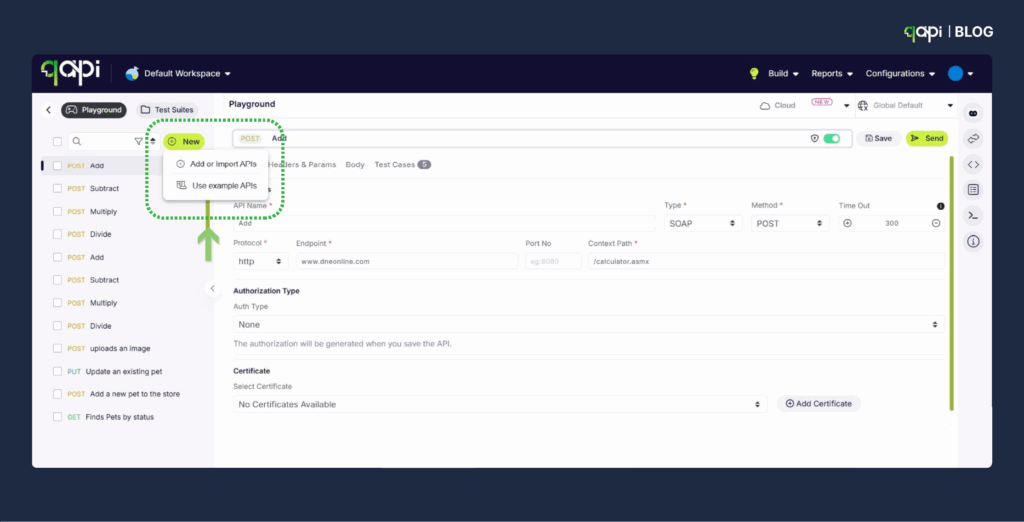
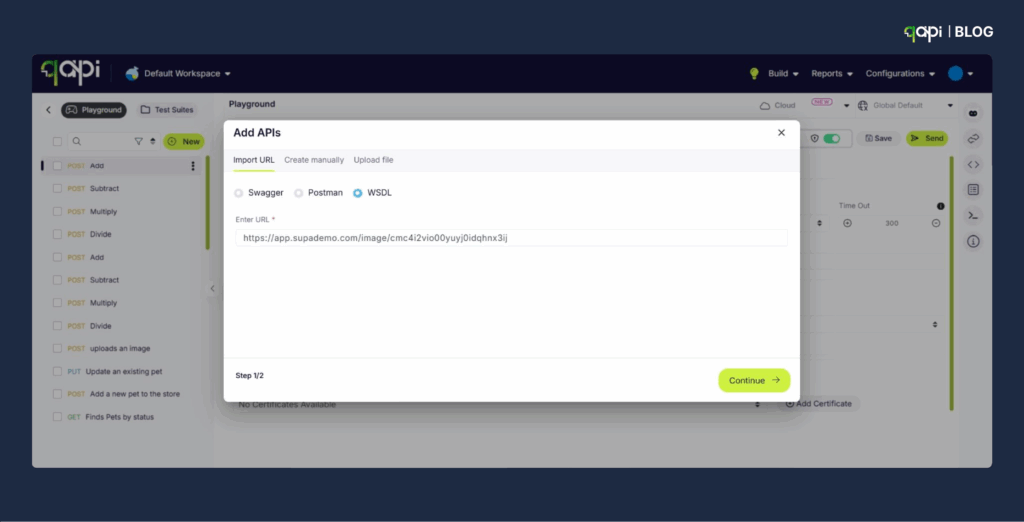
With qAPI, teams can import OpenAPI or Postman collections and immediately layer in schema validations and assertions without worrying about scripting. Instead of plain checks, every endpoint now has defined rules. For example: 

•  The 200 OK status code is not just a success—it must return a JSON response that matches the schema. 

•  The login endpoint must respond within 300ms or it’s flagged as a performance issue. 

•  The checkout flow must return a valid transaction ID every time, across all environments. 

Tokens, variables, and parameters make it easy to handle credentials and environments. That means you’re not just testing with hardcoded data—you’re validating real-world conditions

💡 Think of this step as drawing the map. Without it, your tests may run, but you’ll never know if you’re heading in the right direction. 

2) Tailor: Make Tests Match Reality 

The next step is to test your APIs the right way. 

Here’s the truth: APIs rarely fail in isolation.  

More than you realize, issues come from workflows—multi-step processes where one bad call creates bigger failures. A payment might succeed, but if the confirmation email isn’t received in within 5 minutes, you’ve lost the customer. 

That’s why the second loop stage is about tailoring tests to recreate real-world journeys

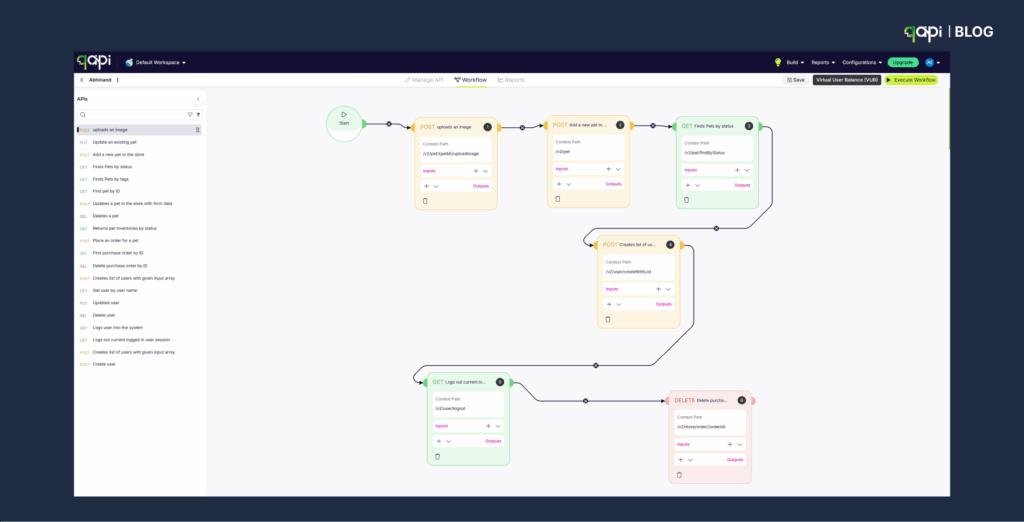
In qAPI, you can create customized process tests that lets you chain requests together to simulate how users actually interact with your product. You can validate: 

•  Business logic (e.g., a discount applies correctly at checkout). 

•  Dependency chains (e.g., user authentication before data retrieval). 

•  3rd-party services (e.g., shipping APIs, payment gateways). 

This gives you confidence not just in endpoints, but in entire flows. 

And here’s where AI steps in: qAPI’s Automap feature automatically discovers endpoints by mapping interactions, while it can also create workflows automatically expand your coverage without hours of manual work.  

Instead of writing rules line by line, qAPI suggests validation points based on actual traffic and expected behavior. The good thing here is that instead of making guesses about thousands of people, you can simulate users and understand how your APIs perform under different conditions. 

3) Simplify: Automate Across Your Pipeline 

You might be thinking, “I can just run some tests locally on different tools” use the setup as it is, but you can do a lot better now. 

A loop is only as strong as its motion. For API testing, that motion comes from automation—ensuring tests run continuously, not just when someone remembers to hit “run.” 

While most of you might be confused as you have been running automated tests but, AI automation will give you a lot than you ask. 

Too often, teams run tests locally, find issues late, and scramble before release. But the best teams integrate API testing directly into their CI/CD pipeline. 

With qAPI, you can: 

•  Run tests automatically in Jenkins, Azure DevOps

•  Run suites per branch, per environment, and per release stage. 

•  Block problematic merges with quality gates that stop regressions from moving ahead. 

This will not just reduce risk—it will build trust. Developers know their code won’t break critical APIs because the system won’t allow it. QA teams can shift from being gatekeepers to enablers, helping releases move faster while protecting quality. 

4) Evolve: Learn Faster with AI + Reporting 

The final stage of the loop—and arguably the most important—is learning

This means caring about how your business shows up in the market. Think about it from a consumer’s perspective: 

•  A traveler is trying to book a ticket. The airline API must confirm seat availability, validate payment, and issue an e-ticket—within seconds. 

•  A shopper is buying a sofa online. Multiple APIs come into play: product catalog, pricing, payment gateway, shipping provider, even inventory checks in real time. 

•  Even something as simple as logging in or resetting a password relies on authentication APIs working flawlessly. 

This is where AI shines. In qAPI, you don’t just see what passed or failed—you get AI-generated workflow summaries that explain what happened in plain language. That means: 

•  A developer new to the project can instantly understand a complex flow. 

•  A product manager can review test outcomes without diving into logs. 

•  A QA lead can spot gaps in assertions or flaky tests immediately. 

Beyond summaries, qAPI reports include runtime stats, detailed charts, and insights that feed directly back into the first loop stage. You’re not just closing tickets—you’re closing the loop by improving future tests. 

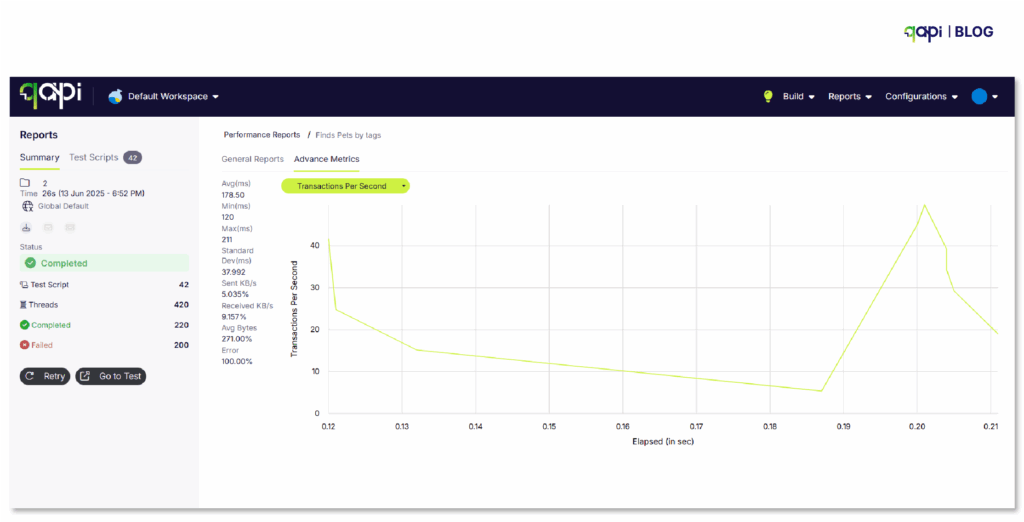
With qAPI’s reporting features, teams get a full picture of API performance and reliability: 

Detailed endpoint-level insights show you exactly which APIs are healthy, which are slow, and which are returning unexpected responses. 

Downloadable reports make it easy to share results across teams and stakeholders, so developers, testers, and product managers all see the same truth. 

AI-generated workflow summaries translate complex test outcomes into plain language, helping teams quickly spot gaps in coverage or areas of risk. 

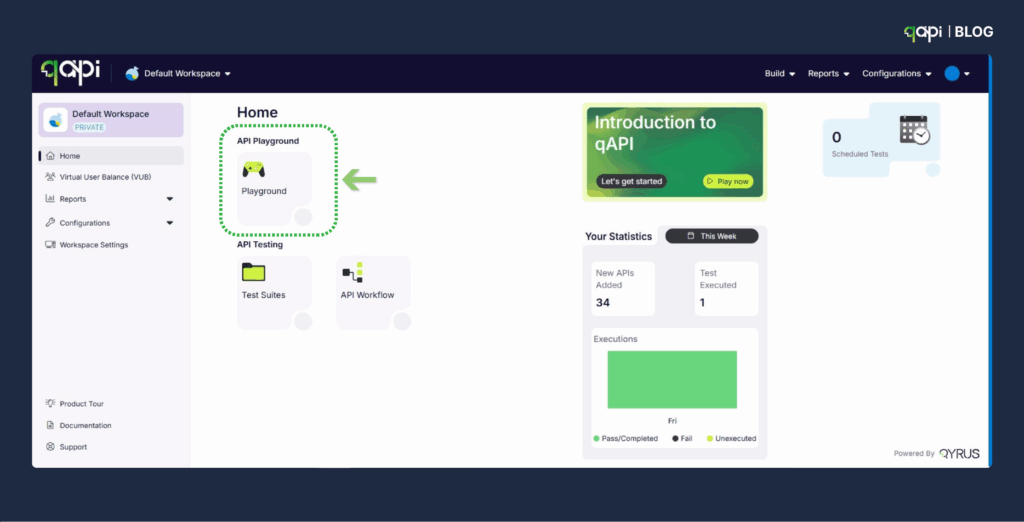
How to Connect qAPI (Quick Start) 

If you’re ready to try the API Testing Loop in your own team, here’s a simple path: 

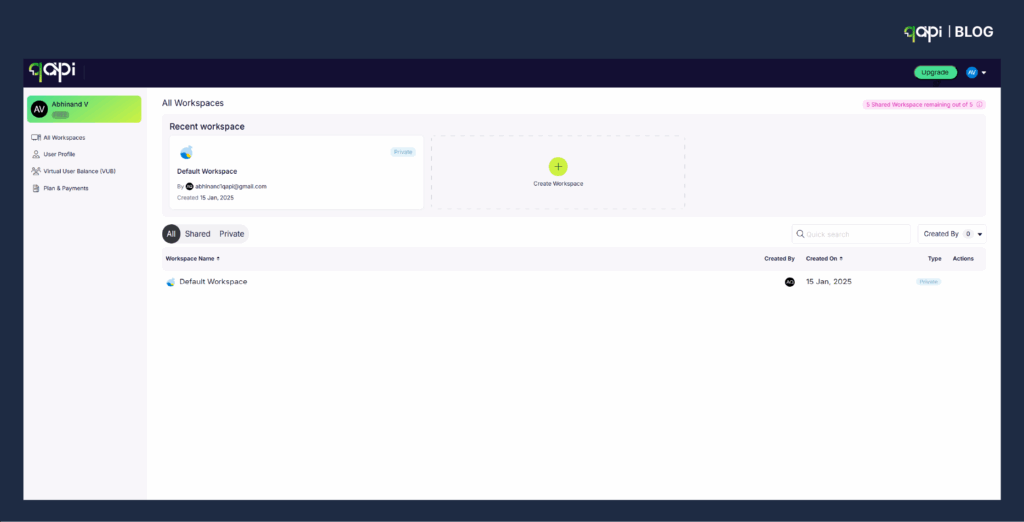
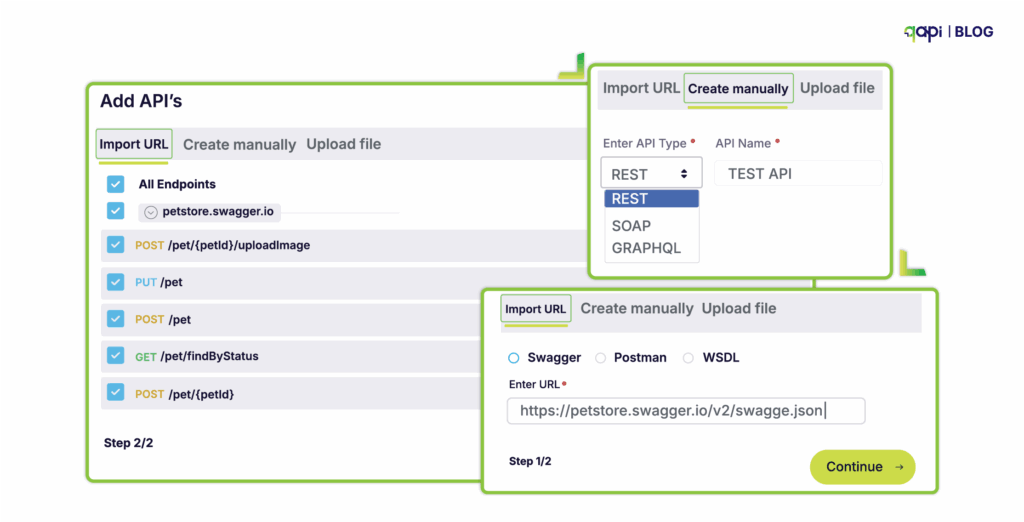
•  Create a workspace → Import APIs from OpenAPI, Postman, or WSDL. 

•  Set environments → Store variables, tokens, and secrets. 

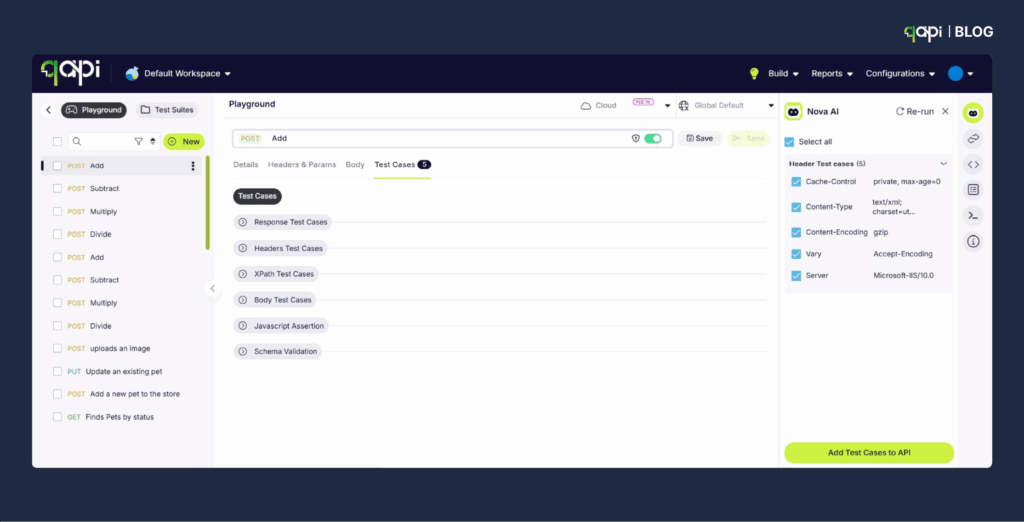
•  Build functional + process tests → Use schema/response assertions and AI-assisted discovery. 

•  Automate with CI/CD → Run tests via Jenkins, Azure, or TeamCity pipelines; block failing builds. 

•  Review, summarize, iterate → Use AI-powered summaries and reports to evolve tests with each cycle. 

Need a helping hand? Watch this video 

Why the API Testing Loop Will Work? 

The API Testing Loop isn’t just a methodology—it’s a mindset. We have seen it making things possible for our client’s. Here’s why it delivers results: 

•  Shared understanding – Explicit contracts and AI-generated summaries align developers, QA, and product teams. 

•  Real-world coverage – Process testing ensures you’re validating the workflows users experience. 

•  Consistency at speed – CI/CD integration guarantees that testing isn’t an afterthought—it’s built into every release. 

When these elements work together, testing stops being a bottleneck. Instead, it becomes a growth engine—powering faster shipping, better quality, and more resilient software. 

Closing Thought 

The future of API testing isn’t about running more tests—it’s about running smarter loops. By blending AI with automation, qAPI helps teams test in a way that’s continuous, contextual, and collaborative. 

The shift is already happening. Teams that embrace the loop are finding they can move faster, reduce risk, and build products users’ trust. Teams that don’t risk being left behind. 

So, the real question isn’t if you should adopt an API Testing Loop. It’s when. And the sooner you start, the sooner you’ll ship with confidence—on every commit. 

Ready to see how qAPI can power your loop? Get started here


The healthcare industry might look like it’s blooming, and advancements are on the rise since COVID-19 but conglomerates and small businesses are still yet to reach their full potential and scale at large. 

Why? 

APIs are fast and perfect for building scalable applications and helps fasten the communication process between two systems. Most people think APIs are just about building and deploying, but it’s way more than that. 

API testing is one of the most crucial aspects of using APIs, you need to set the rules, test the limits and ensure that your APIs are safe, scalable and efficient. 

Even better the numbers back it up. The API testing market is set to show an exponential growth from $1.07B to $4.73B (2022-2030).  

While the figures are promising, 64% of users still don’t check their APIs as thoroughly as they should. 

API testing isn’t just another trending topic. It’s your business’s credibility in line, so plan to build systems that helps save time and get more customers. 

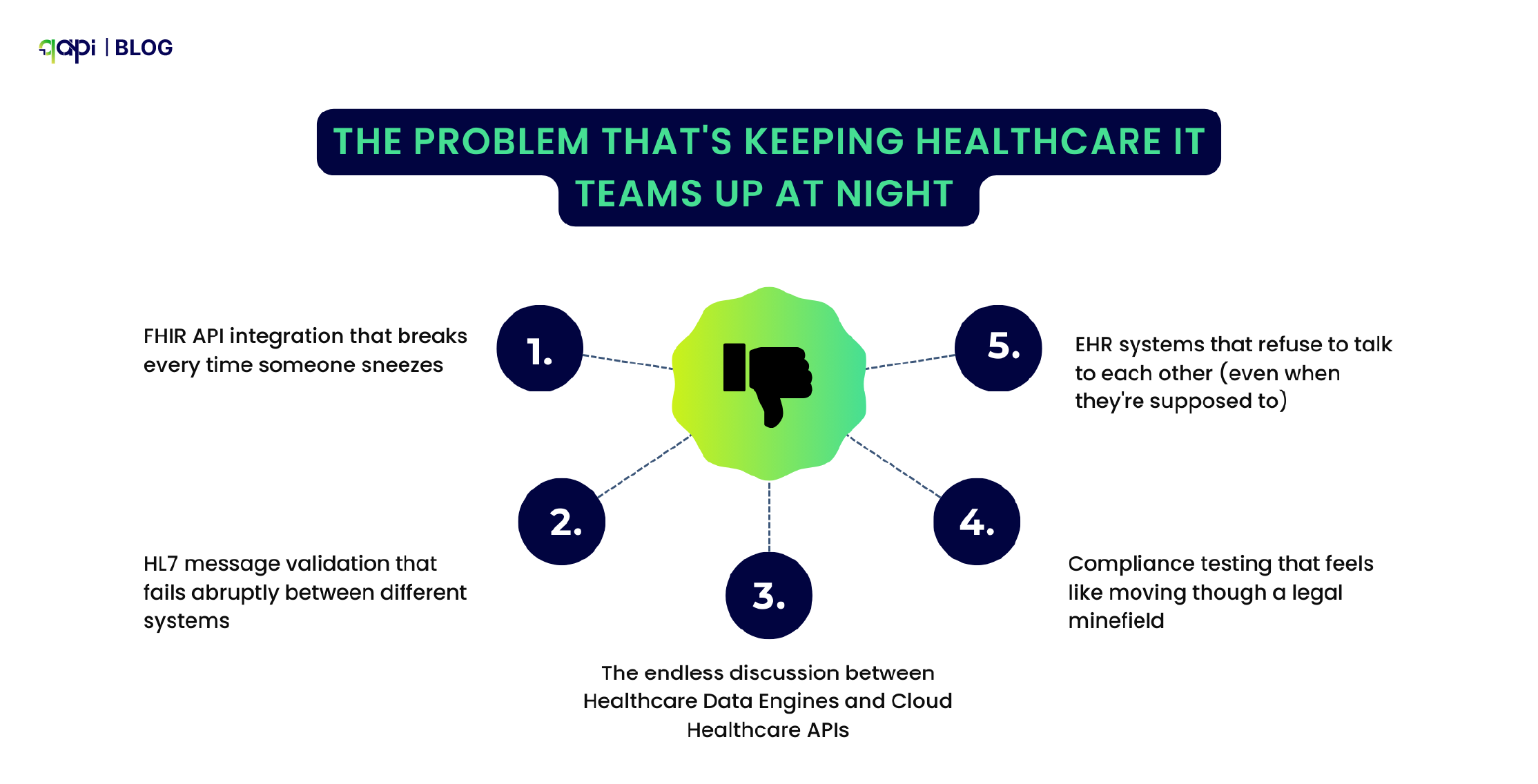
The Problem That’s Keeping Healthcare IT Teams Up at Night 

Let’s be honest – healthcare APIs are a nightmare to test. While everyone’s talking about digital transformation and connected care, the reality on the ground is far messier. 

Just scroll through Stack Overflow or Reddit, and you’ll find developers pulling their hair out over: 

•  FHIR API integration that breaks every time someone sneezes 

•  HL7 message validation that fails abruptly between different systems 

•  The endless discussion between Healthcare Data Engines and Cloud Healthcare APIs 

•  Compliance testing that feels like moving though a legal minefield 

•  EHR systems that refuse to talk to each other (even when they’re supposed to) 

And here’s the ice breaker – research shows that 37% of organizations consider security as their top API challenge, and API breaches leak 10 times more data than your average security incident.  

In healthcare, that’s not just embarrassing – it’s potentially life-threatening. 

When APIs Fail, People Get Hurt 

As simple as that. 

Let me tell you about a major hospital network. They were drowning in API integration problems, and it wasn’t just a technical headache – it was a patient safety crisis waiting to happen. 

Their daily routine looked like this: 

•  15% of patient records were showing incomplete data (imagine trying to treat someone when you can’t see their full medical history) 

•  Critical lab results were delayed by 3 hours on average (in emergency medicine, that’s an eternity) 

•  Staff were spending 40 hours per week manually fixing data that should have flowed seamlessly between systems 

•  They were having near-miss medication errors because APIs were passing along inconsistent patient allergy information 

Then came the breaking point. 

During what should have been a routine system upgrade, their API endpoints started returning inconsistent FHIR resource formats. Their QA team was doing their best with manual testing, but let’s face it – manually testing every possible combination of patient data scenarios is impossible. 

They missed edge cases in patient allergy data transmission. There was one patient with a severe penicillin allergy almost received exactly that medication because the API “forgot” to pass along that critical information between systems. 

That’s when they realized manual testing wasn’t just inefficient – it was dangerous. 

Here’s how it went down 

The Patient Allergy API: What Should Have Happened vs. What Actually Happened 

What Actually Should Have Happened 

Step 1: Doctor prescribes penicillin 

•  Prescription system calls: GET /api/patient/12345/allergies 

Step 2: Allergy API responds correctly 

  “patient_id”: “12345”, 

  “allergies”: [ 

    { 

      “allergen”: “penicillin”, 

      “severity”: “severe”, 

      “reaction”: “anaphylaxis” 

    } 

  ] 

Step 3: Prescription system processes response 

•  Checks prescribed medication against allergy list 

•  Finds penicillin match 

•  Triggers alert: “SEVERE ALLERGY WARNING” 

•  Blocks prescription until doctor acknowledges 

Step 4: Doctor gets immediate warning 

•  Prescription system shows red alert 

•  Doctor selects alternative  drug/medicine 

•  Patient receives safe medication 

What Actually Happened 

Step 1: Doctor prescribes penicillin 

•  Prescription system calls: GET /api/patient/12345/allergies 

Step 2: Allergy API returns faulty response 

  “patient_id”: “12345”, 

  “allergies”: null 

Instead of the expected allergy data 

Step 3: Prescription system misinterprets response 

•  Receives “allergies”: null 

•  Here the system references “no allergies” instead of “data unavailable” 

•  No allergy check performed 

•  No alerts were triggered 

Step 4: Dangerous prescription proceeds 

•  System shows “No known allergies” 

•  Doctor proceeds with penicillin prescription 

•  Patient nearly receives potentially fatal medication 

Why Focusing on API Testing Made a difference 

Here’s where things get interesting. Instead of throwing more people at the problem or buying another expensive tool that would gather dust, they decided to try something different: AI-powered API testing. 

Smart Test Generation That Actually Makes Sense AI analyzed their FHIR schemas and automatically generated comprehensive test cases covering every resource type and edge case they could think of (and plenty they couldn’t). No more manually writing test scripts for the 100th time. 

Predicting Problems Before They Become One qAPIs learning models, once trained on historic healthcare data patterns, started predicting potential integration failures. It’s like having a streetlight on an empty road – the system could spot trouble brewing before patients were affected. 

Compliance Testing Made Things Easier AI-driven validation started ensuring HIPAA, FDA, and interoperability standards compliance automatically. What used to take two weeks now takes two hours. 

24/7 Monitoring Continuous monitoring began identifying unusual API behavior patterns that could indicate data corruption. The staff was able to run tests round the clock to match the backlog and also analyse the tests with increased visibility. 

The Results That Actually Matter 

Six months later, here’s what changed: 

•  95% reduction in data integration errors (that’s not a typo) 

•  Real-time detection prevented multiple potential patient safety incidents

•  Compliance testing went from 2 weeks to 2 hours (giving QA teams their lives back) 

•  API reliability improved to 99.9% uptime (because when you’re dealing with health data, “good enough” isn’t good enough) 

What This Means for Your Healthcare Organization 

Look, every healthcare organization is dealing with some version of this problem. Whether you’re a small clinic trying to get your patient portal to talk to your EHR, or a major health system juggling dozens of different APIs, the challenges are real. 

The old approach of manual testing and hoping for the best isn’t just inefficient anymore – it’s becoming ethically questionable. When lives are on the line, can we really afford to test APIs the same way we did five years ago? 

The bottom line: AI-powered API testing isn’t just about making developers’ lives easier (though it does that too). In healthcare, it’s about making sure that when a doctor needs critical patient information, the APIs deliver it accurately, completely, and on time. 

Because at the end of the day, behind every API call is a human being who needs care. And they deserve better than crossed fingers and manual testing. 

qAPI is an end-to-end API testing tool that acts as a one stop solution for all your API testing needs. No more switching between tools, just simple, streamlined tests in minutes. 

What’s your biggest healthcare API testing challenge? Let’s talk reach out to us at marketingqapi@qyrus.com 

The misalignment between what you intend for your APIs and how they perform is sometimes bigger than you imagine. Have you ever witnessed that? Have you thought why is that way? 

Well, the gap starts to widen along the testing and shipping process. APIs that look fine in development often stumble in production—causing downtime, you lose appear fine in development often stumble in production—causing downtime, losing customers, and endless pressure on sales. For QA, it feels like chasing problems that could’ve been prevented. For developers, it’s the frustration of watching good code fail because testing came in too late. 

Performance testing is straightforward. It ensures that your APIs are scalable and can handle any amount of traffic and instability thrown towards them.  

However, manually testing APIs or generating test cases can be a time-consuming and inefficient process. You’d end up spending more time accessing breakdowns than you would generating them. 

That’s why it’s important to simulate users in your API testing process. It ensures your APIs are aligned to your product goals, you know before performance degrades and helps you plan infrastructure needs. 

In this blog, we will learn how to test API performance, latency, throughput, and error rates under load. And how you can set your APIs to build scalable and efficient applications. 

What is Performance Testing in APIs? 

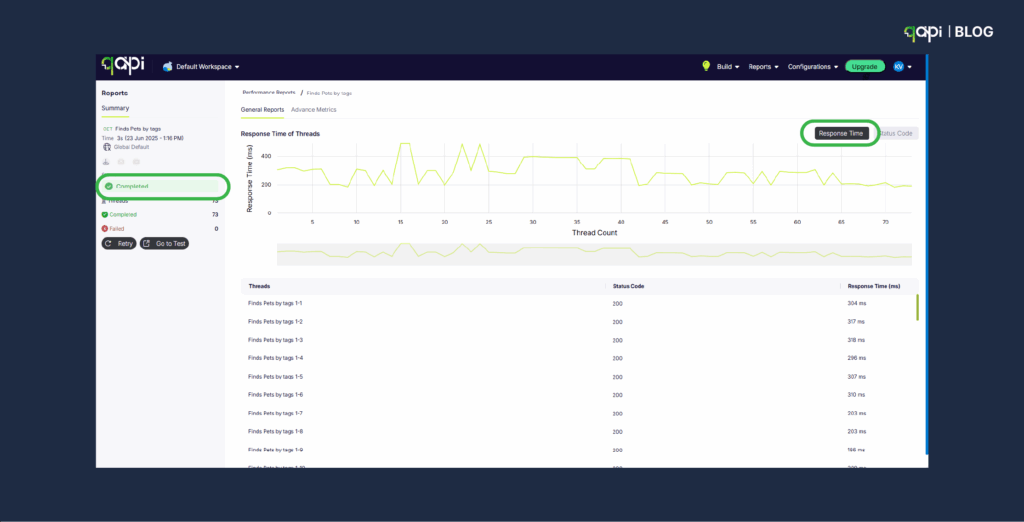
Performance testing for APIs is a process we use to understand how well your API handles load, stress, and various usage patterns. Unlike functional testing, performance testing measures how quickly and how much load your API can handle before it breaks. Such as: 

•  Response Time – How quickly the API responds to requests 

•  Throughput – How many requests per second the API can process 

•  Latency – Time delay between request and first byte of response 

•  Error Rate – Percentage of failed requests under load 

•  Resource Utilization – CPU, memory, and database usage during testing. 

The following factors help developers and SDETs understand how to build APIs that are more likely to fail. By ensuring the API account well on these aspects, you ensure that your APIs bring the trust you need. 

Types of API Performance Testing: 

•  Load Testing – Normal expected traffic levels 

•  Stress Testing – Beyond normal capacity to find breaking points 

•  Spike Testing – Sudden traffic increases (like flash sales) 

•  Volume Testing – Large amounts of data processing 

•  Endurance Testing – Sustained load over extended periods 

What is the role of Virtual Users in Performance Testing? 

Virtual users are simulated users that performance testing tools create to mimic/re-create real user behavior without needing actual people. 

How Virtual Users Work: 

•  Each virtual user executes a script that makes API calls 

•  They simulate realistic user patterns (login → browse → purchase → logout) 

•  Multiple virtual users run simultaneously to create a load 

•  They can simulate different user types, locations, and behaviors 

For example, instead of hiring 1,000 people to test your e-commerce API, you create 1,000 virtual users that: 

•  Log in with different credentials 

•  Browse products via API calls 

•  Add items to cart 

•  Process payments 

•  Each following realistic timing patterns 

Virtual User Benefits: 

•  Cost Effective – No need to recruit real users for testing 

•  Scalable – Can simulate thousands or millions of users 

•  Consistent – Same test patterns every time 

•  Controllable – Adjust user behavior, timing, and load patterns 

•  24/7 Testing – Run performance tests anytime 

Virtual User Simulation: Challenges Where Current Tools Fall Short 

Realistic User Behavior  

•  Static scripting limitations – Most tools use fixed scripts that don’t adapt to real user variations and decision-making patterns. All virtual users are designed to act identically but, real users change their minds, make mistakes, retry actions. 

•  Session complexity gaps – Real users browse, abandon carts, return later – current tools struggle with complex user journey modelling. Virtual users lose context between API calls, unlike real users who maintain browsing state 

Authentication and Session Management 

•  Token refresh complexity – Most tools struggle with realistic JWT token expiration and refresh cycles during long test runs 

•  Multi-factor authentication simulation – Current tools can’t properly simulate MFA flows that real users experience 

Data Management and Variability 

•  Synthetic data limitations – Test data doesn’t reflect real-world data distributions, edge cases, and anomalies 

•  Data correlation problems – Virtual users use random data instead of realistic data relationships (user preferences, purchase history) 

•  Geographic distribution gaps – Most tools don’t simulate realistic global user distribution and network conditions 

Technical Infrastructure Limitations 

•  Resource consumption explosion – Simulation of virtual users consumes significant memory and processing power, causing performance lapses or crashes. 

•  Network conditions– Tools don’t simulate realistic mobile networks, slow connections, or intermittent connectivity 

•  Parallel execution problems – Current tools hit hardware limits when simulating thousands of concurrent users 

•  Increasing cloud costs – Scaling virtual users in cloud environments becomes prohibitively expensive for realistic load testing 

These are just challenges that you often face but are avoidable. We’ll explore how smart tactics can put you steps ahead. However, let’s examine how automating API performance tests can simplify the process. 

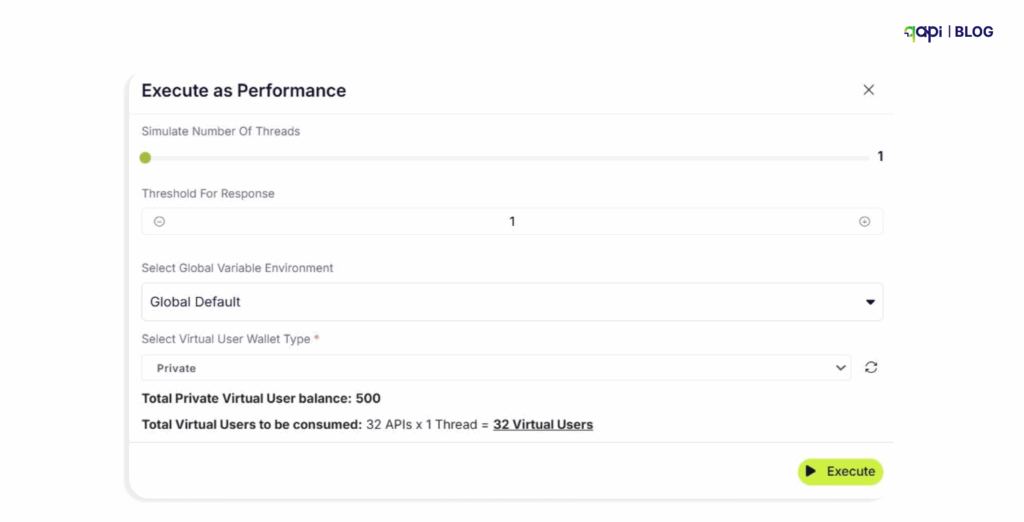
How do I set up virtual users for API performance testing?  

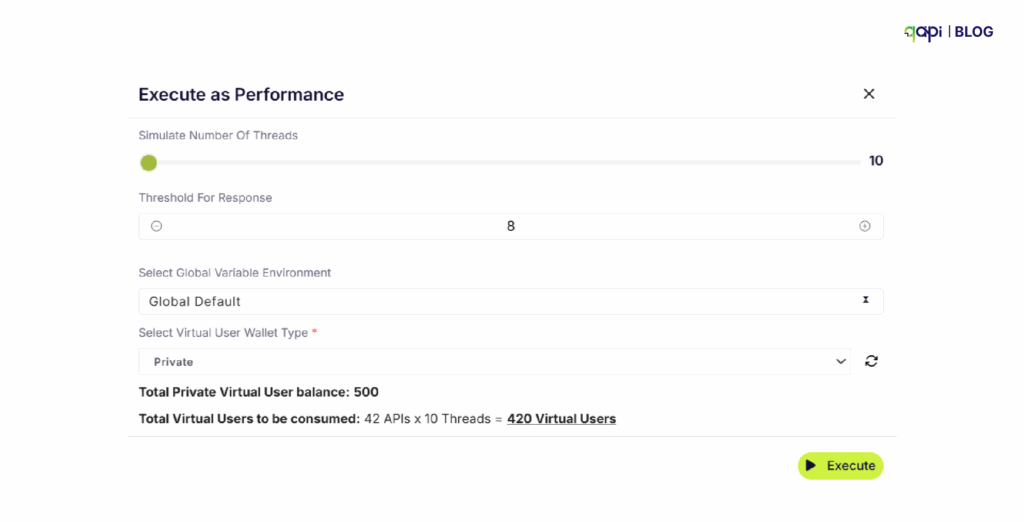
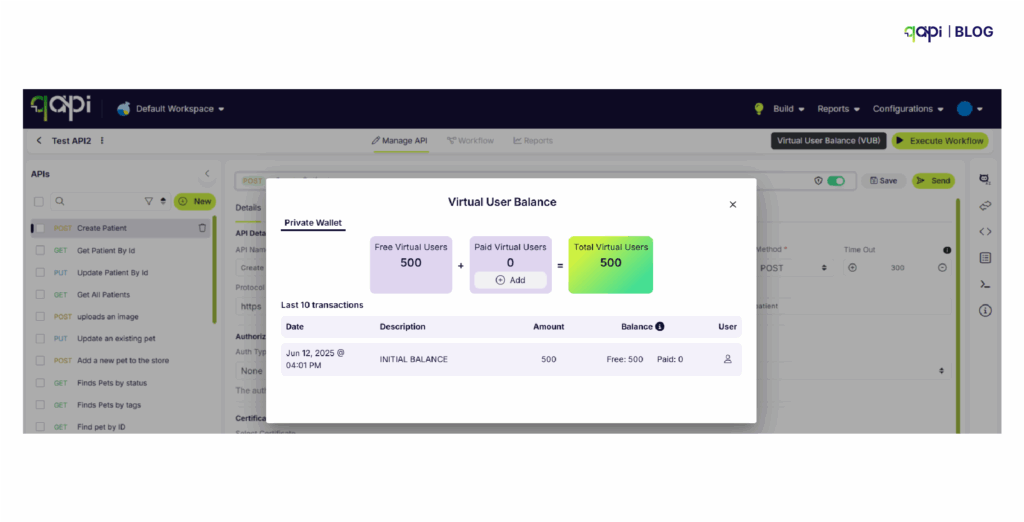
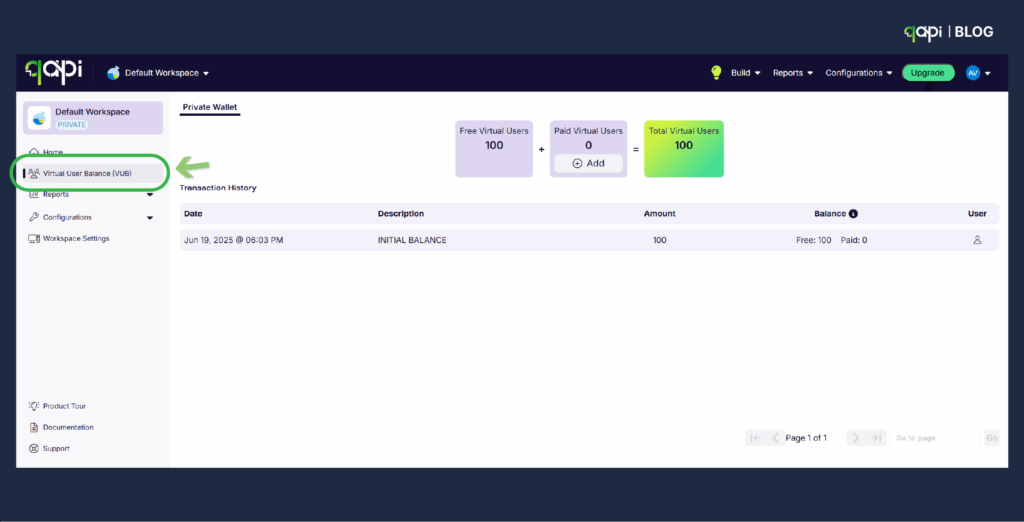
qAPI an end-to-end API testing tool offering free Virtual users each month so you can test your APIs for free. 

You can also add more virtual users if needed. 

Here’s how it works- 


Set Up Test Data 

•  Create varied and realistic test data: 

•  Use data files (CSV, JSON) for parameterization. Or directly import your API collection. 

  • Include details, edge cases and boundary values 
  • Add/define test cases 

•  Define data relationships between requests (if needed) 

Configure Monitoring 

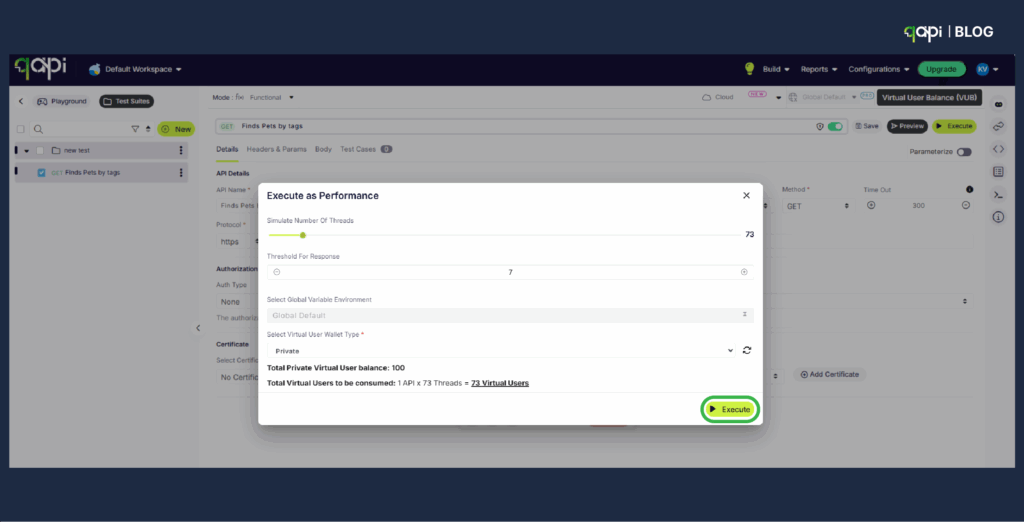
•  Number of virtual users: How many concurrent users to simulate 

•  Ramp-up period: How quickly to start all virtual users 

•  Loop count: How many times each virtual user should execute the script 

•  Time between iterations of the script 

Execute and Refine 

•  Monitor for errors or unexpected behavior 

•  Adjust configuration as needed 

•  Document any issues or anomalies. 

Best Practices for Performance Testing APIs with Virtual Users 

Before writing a single test script, establish what you’re trying to accomplish: 

•  Are you validating that your API can handle expected peak traffic? 

•  Are you looking to identify breaking points? 

•  Are you testing a specific endpoint or the entire API ecosystem? 

  1. Based on that, set the following parameters like: 

•  API must handle 1,000 concurrent users with <2s response time 

•  System should maintain 99.9% uptime under load 

•  Error rate must remain below 0.1% during peak load 

  1. Start Small and Scale Gradually

Build your test incrementally: 

1️⃣ Baseline test: Verify functionality with a single virtual user 

2️⃣ Smoke test: Run with a small number of users (10-50) to ensure basic stability 

3️⃣ Load test: Apply expected normal load (what you expect during regular usage) 

4️⃣ Stress test: Push beyond normal load to find breaking points 

  1. Test in Production-Like Environments

Your test environment should mirror production as closely as possible: 

• Match hardware specifications 

• Replicate network configurations 

• Use similar database sizes and configurations 

• Ensure monitoring and logging match production 

      4. Run Multiple Test Cycles

Performance testing isn’t a one-time activity: 

• Run tests at different times of day 

• Test after every major code deployment 

• Re-test after infrastructure changes 

• Create a performance baseline and track against it 

5. Consider Security Implications

When load testing APIs: 

• Use test credentials that have appropriate permissions 

• Avoid generating real user data 

• Ensure you’re not exposing sensitive information in test scripts 

• Consider rate limiting and how your API handles abuse scenarios 

These steps help ensure your API scales reliably without overcomplicating the process. 

Metrics to Monitor During API Performance Tests 

Focus on key metrics that reveal how your API performs under load. Monitor these in real-time: 

– Response Time: Measures how long the API takes to reply (aim for under 200-500ms for most cases). 

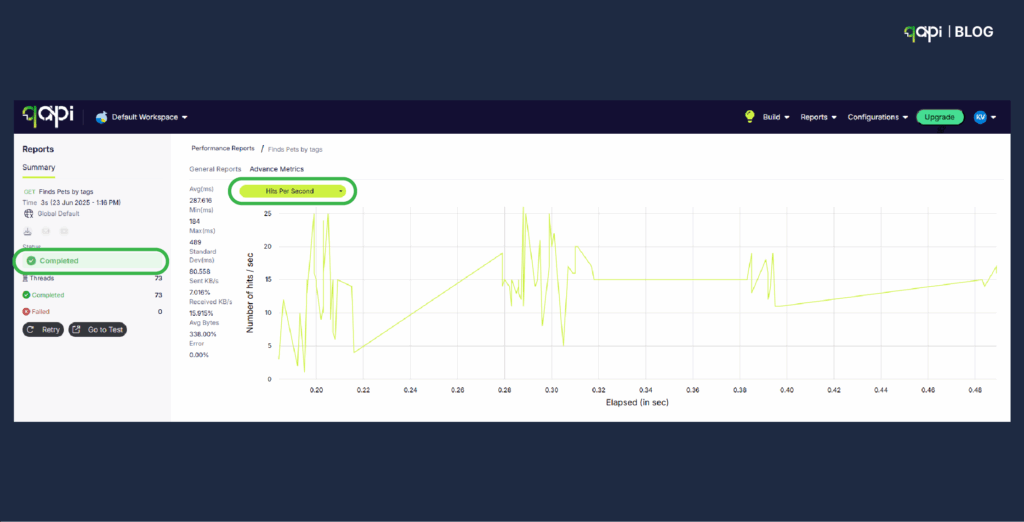
– Throughput/Requests Per Second (RPS): Tracks how many requests the API handles per unit of time. 

– Error Rate: Percentage of failed requests (e.g., 4xx/5xx errors); keep it below 1% for reliability. 

– CPU and Memory Usage: Monitors server resource consumption to spot overloads. 

– Latency: Time from request to first response byte; critical for user experience. 

How to Analyze the Results of API Performance Tests 

Follow these clear steps: 

Compare against benchmarks: Check if metrics like response time meet your predefined thresholds (e.g., avg < 300ms); flag deviations. 

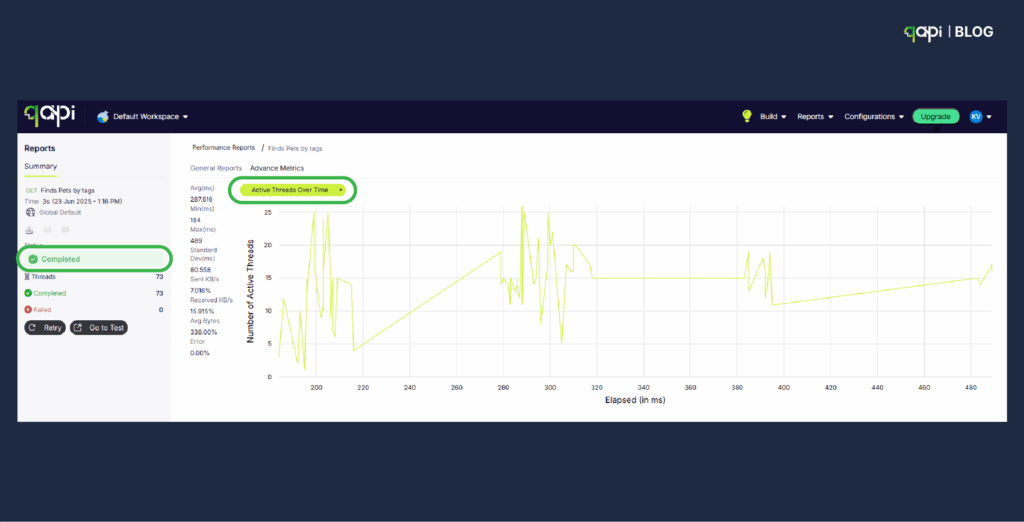
Review trends and graphs: Use visualizations to spot patterns, such as rising errors as the load increases, or percentiles (e.g., p90 for 90% of responses). 

Identify problems: Look for high CPU usage or slow queries causing delays; correlate metrics (e.g., high latency with error spikes). 

Iterate and optimize: Retest after fixes, focusing on improvements like reduced response times, to validate changes. 

How Performance testing ensures your APIs are scalable and dependable


By simulating VUs, you predict failures, optimize resources, and maintain 99.9% uptime—reducing outages by up to 50% in real cases. In 2025, with API security and performance trends surging (CAGR 32.8% for security testing), tools like qAPI can make this accessible, by cutting costs and boosting confidence. 

Conclusion: Level Up with qAPI 

Performance testing with VUs transforms APIs from fragile to fortress-like. qAPI’s codeless approach addresses traditional pain points, enabling faster and more realistic tests. Ready to optimize? Sign up for free VUs at qAPI and test today. See the difference for yourself. 

Test APIs faster and simpler with qAPI. 

At qAPI, we’re focused on one mission: simplifying API testing so that teams can move faster, debug smarter, and release more with confidence. This will in turn increase productivity when it comes to functional API testing.  

We’ve seen a clear pattern emerge across hundreds of engineering teams: writing API test cases takes too long and debugging them across multi-step workflows is even harder. It’s not just a developer frustration—it’s a managerial setback that’s affecting delivery timelines and system stability. 

In 2024, 74% of respondents are API-first, up from 66% in 2023, with an average application running between 26 and 50 APIs actively. This shift toward API-first development has created new testing challenges. 

Failing to complete digital transformation initiatives is costing organizations a minimum of $9.5 million annually, largely due to integration failures and inadequate API testing. And these numbers are small if we focus on the largely affected aspects, if we zoom out and look at the big picture, the number will be bigger. 

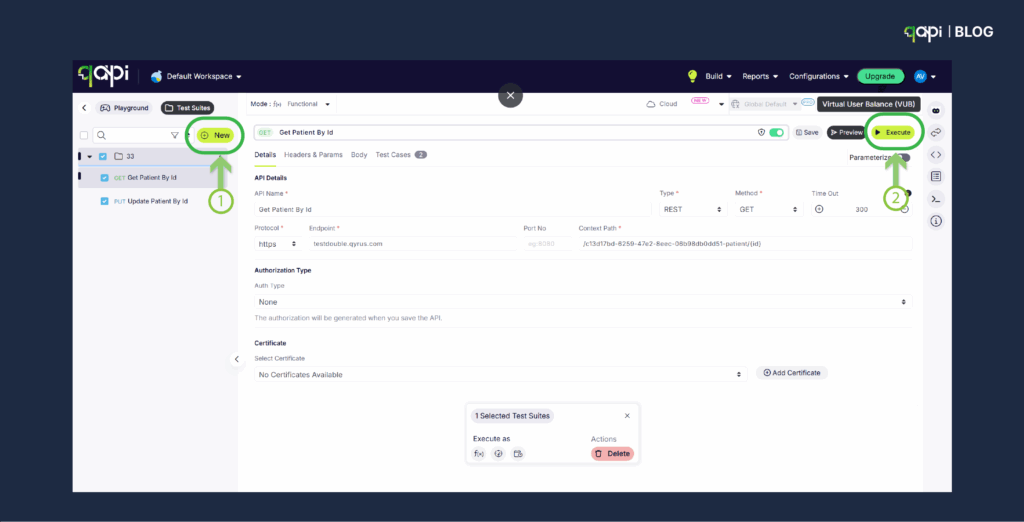
As part of this collective strategy, we have launched our functional API testing tool, which helps you create test cases with ease in the cloud. 

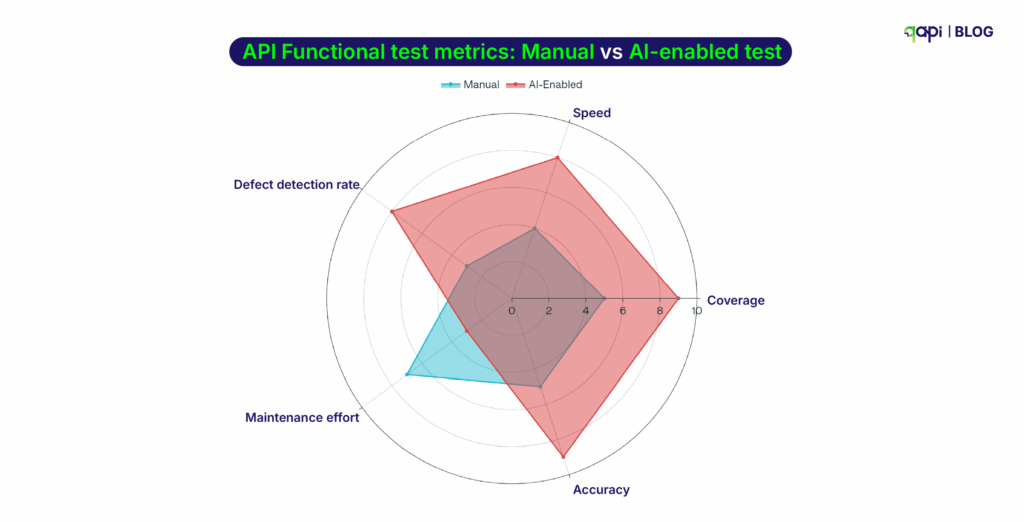
We understood the setbacks teams face with the current tools on the market and created a way to leverage AI to reduce the time wasted in running behind a manual testing process. 

Here, we’ll take a closer look at what qAPI’s API testing capabilities are, how they work, and how they’ll help teams save time and make the most out of their API testing needs. 

Let’s clear the basics first. 

What is Functional API Testing and Why is it Important? 

Functional API testing is the process of verifying that an API performs as per its defined functions correctly, meeting its specified requirements.  

It can be many things like sending requests to API endpoints and checking if the responses align with expected outcomes, including correct data, proper error handling, and follow specifications.  

Unlike performance or security testing, functional testing focuses on the API’s core functionality—making sure that it does what it’s supposed to do under any condition. 

Importance of Functional API Testing 

A single API failure, if not tested and identified early can lead to infamous issues, such as: 

•  Data Breaches: Improper handling of authentication or authorization, which exposes sensitive data. 

•  Service Disruptions: Faulty APIs will cause spiralling failures across dependent systems. 

•  Poor User Experience: Incorrect responses or slow performance will result in the loss of more customers and visitors. 

Functional API testing ensures reliability, security, and performance, which are important for maintaining user trust and application likeability.  

To create a good and scalable API testing framework, you and your team needs to identify the key areas of performance that will be used as a reference point to test APIs. 

The Market Gap 

Let’s just pick the trending markets — a typical e-commerce checkout process now involves 25-30 API calls across authentication, fraud detection, inventory management, payment processing, tax calculation, shipping logistics, and order confirmation.  

If each step is connected to the previous one, and any failure can affect the entire workflow. That’s why studies have shown that 68% of API failures occur in multi-step workflows rather than single endpoint calls. 

The problem? Most API testing tools are still designed to validate individual endpoints, rather than creating complex workflows

This is what qAPI solves. 

qAPI’s Functional API Testing capability is designed to solve these exact issues. Here’s how: 

•  Import any API collection (Postman, Swagger, etc.) and instantly generate workflow-based test cases 

•  Customize flow logic, with chaining, conditions, retries, and validations 

•  Run functional and performance tests together—one click, two test types 

•  Debug faster, with AI-driven test case generation and reporting insights get recommendations and solve issues faster. 

•  Automate API tests 24×7 

Use data-driven testing to cover multiple input scenarios. Validate both the structure and content of responses, and use assertions that account for expected variations in data.

Based on current growth trends and enterprise adoption rates, we project that by 2027, organizations will manage an average of 75-100 APIs per application, driven by increased adoption of microservices and third-party integrations. This shows a 50% increase from current levels. 

What challenges should I expect in functional API testing? 

Because when it comes to managing environments, there’s still a problem. 

APIs Change Fast. Tests Don’t Keep Up. 

APIs will change—new versions will come so will new endpoints, and changed fields. But with every change, your test suite needs to be updated too, which includes: test data, environment setup, and validation rules. 

Every API version you support requires additional effort to maintain: adjusting test data, assertions, and environments. A systematic review highlights ongoing struggles with “authentication-enabled API unit test generation,” showing major maintenance gaps 

Example: When your /user/profile endpoint changes to return an extra nickname field, old tests expecting only name may silently break or miss validation. Over time, many tests become outdated. 

And yet, most legacy testing tools—like Postman or Swagger-based setups—are still focused on one endpoint at a time. They weren’t built to test connected workflows or simulate production-like sequences. 

Most tools don’t handle this well. The result? Teams start ignoring broken tests—or worse, they stop writing them altogether. 

Also, There Are Multiple Slow Feedback Loops  

API tests that take 20 minutes to run don’t help developers. By the time you get results, you’ve moved on to other tasks. Fast feedback is crucial for modern development workflows.  Manual testing is a slow road. API tests should run automatically on every pull request or build. 

Tests Are Not Integrated Into CI/CD 

Only 30% of teams today automate Postman tests in their CI/CD pipelines. Many still run them post-deployment. That’s too late. 

In fast-moving development cycles, feedback loops need to be short. If your tests take 20 minutes, your developers have already moved on. 

This needs to change and to break this cycle, testing tools must follow these steps: 

Best Practices for Functional API Testing in 2025

benefits of functional testing

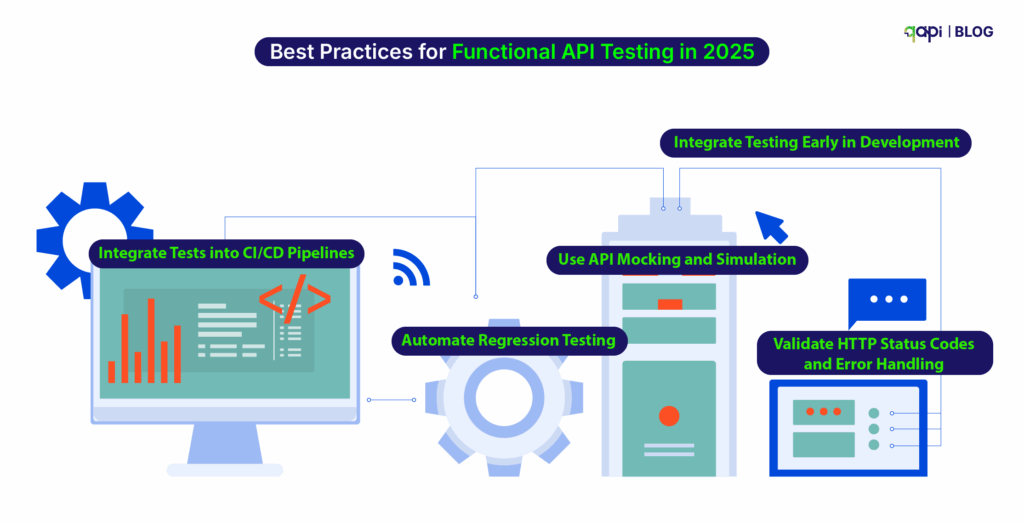
To ensure effective functional API testing in 2025, start doing these API testing best practices tailored to the latest technological advancements: 

1️⃣ Integrate Testing Early in Development Begin testing during the development phase to identify and fix issues before they escalate. Early testing reduces costs and ensures quality from the start. 

2️⃣ Use API Mocking and Simulation Tools like qAPI for virtual user simulation or Postman Mock Servers for testing without relying on real backend services, reducing dependencies and speeding up cycles. 

3️⃣ Automate Regression Testing Automate regression tests to ensure new changes don’t break existing functionality. This is crucial for maintaining consistency in fast-paced development environments. 

4️⃣ Validate HTTP Status Codes and Error Handling Verify that APIs return correct status codes (e.g., 200 OK, 401 Unauthorized) and handle errors gracefully to maintain application stability. 

5️⃣ Integrate Tests into CI/CD Pipelines Automate tests within CI/CD pipelines using tools like Jenkins or GitHub Actions to ensure every code change is tested. 

•  Add test triggers in your CI pipeline (e.g., GitHub Actions, Jenkins, GitLab). 

•  Run smoke tests on every PR, deeper tests nightly or before release. 

•  Generate test reports and alerts automatically. 

6️⃣ Leverage AI for Testing AI-driven tools can generate test cases, identify vulnerabilities, and predict failures based on historical data. By 2025, 40% of DevOps teams are expected to adopt AI-driven testing tools, enhancing efficiency and reducing errors.\ 

7️⃣ Choose Tools That Match Your Workflow 

Not every tool suits every team. Choosing based on popularity rather than fit often leads to rework and frustration. 

Choose tools that support your auth, CI/CD, and API types (REST, GraphQL, gRPC). 

Evaluate whether it can scale with test volume and handle async operations. 

Ensure your team can learn and maintain it quickly. 

Examples: 

Postman: Best for simple REST tests and manual workflows. 

REST Assured: Good for Java-based validation-heavy use cases. 

Karate: Great for BDD-style test writing and CI automation. 

qAPI: Cloud-native, AI-powered, adapts to any workflow, it’s built to automate both functional + performance testing workflows in one place. 

8️⃣ Start to Validate Error Handling 

•  Test invalid inputs, missing fields, bad tokens, and unsupported methods. 

•  Validate that error messages are clear and HTTP status codes are correct. 

•  Simulate failures in dependent services to test recovery logic. 

Gartner estimates that 31% of production API incidents are due to poor error handling—not code bugs. 

Best Practice  Description  Tools/Techniques 
Start Early  Test APIs during development, not after  qAPI with any other tool 
Mock APIs  Use simulators to avoid backend dependencies  Postman Mock Server, qAPI 
Automate Regression  Validate that updates don’t break old features  qAPI, CI pipelines 
Validate Status Codes  Ensure proper HTTP codes and responses  All major tools 
CI/CD Integration  Trigger tests on PRs, builds, or nightly runs  GitHub Actions, Jenkins, GitLab 
AI-Powered Testing  Generate, maintain, and debug tests with AI  qAPI
Choose the Right Tool  Align tools with your stack and workflows  qAPI
Test Error Handling  Simulate bad inputs, broken auth, failures  qAPI

How can I automate functional API tests effectively?  

Just bring your collection to qAPI

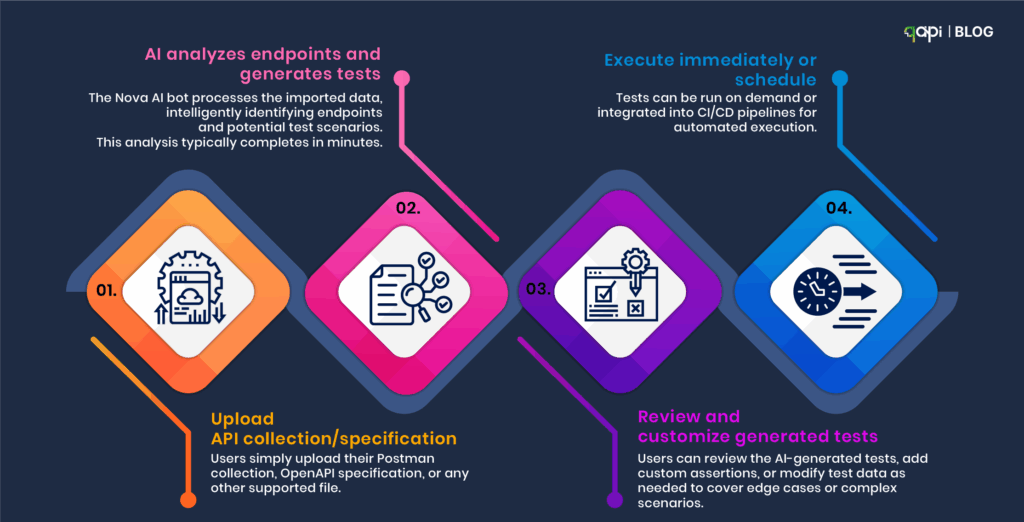
1️⃣ Import your Postman or Swagger files. 

2️⃣ Create a dedicated workspace. 

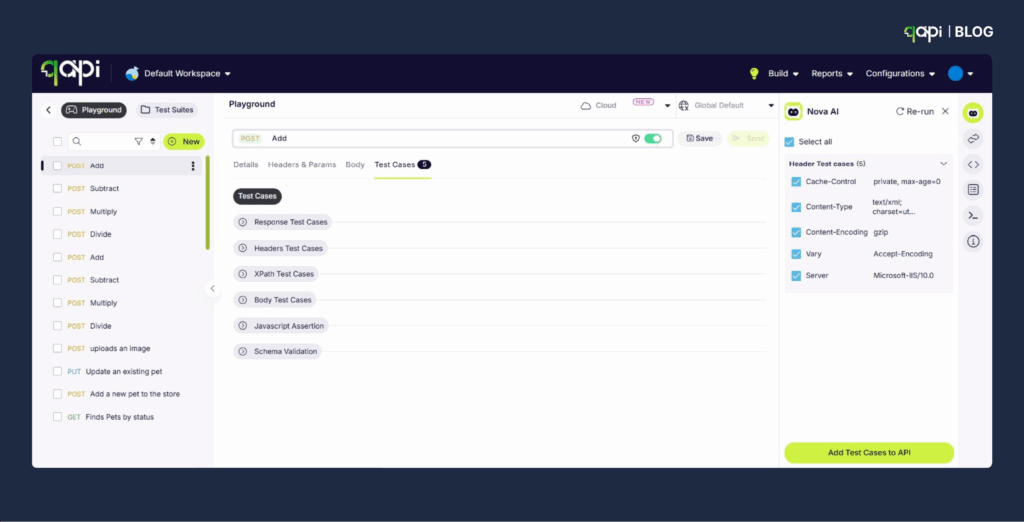
3️⃣ Let our AI generate intelligent test cases. 

4️⃣ Schedule or run tests immediately. 

5️⃣ Track, debug, and optimize—on the cloud. 

And that’s it. Here’s a video that takes you through it (Watch it here

Apart from API testing, Qyrus offers a single platform for automating a wide range of testing types, including: 

•  Cross-browser testing 

•  Mobile testing 

•  Web testing 

•  SAP Testing 

Qyrus is not just an API testing tool—it’s a comprehensive, AI-driven testing platform designed to streamline quality assurance across the board. It offers a wide range of testing solutions application. 

The Future of API Testing: What the Latest Data Tells Us 

The API economy is no longer emerging—it’s exploding. And the numbers confirm it. If you’re still testing APIs like it’s 2018, you’re already behind. 

Here’s what our most recent research reveals—and why it matters to your functional testing strategy: 

API Usage Is Increasing 

Treblle’s independent study of 1 billion API requests from 9,000 APIs found that APIs accounted for 83% of all internet traffic 

Microservices Are Multiplying Rapidly 

As per the CNCF 2024 Annual Survey, a typical enterprise runs 200–500 microservices, each exposing 2–3 APIs. 

That’s anywhere between 600 to 1,500 APIs per organization—and each API must be tested for version compatibility, functionality, and chained workflows. Manual or endpoint-level testing is simply not logical in this scenario. 

A recent forecast by IDC states that by 2027, 60% of enterprise development teams will rely on AI-assisted or fully autonomous testing tools

Similarly, Gartner predicts that 85% of customer interactions will occur via APIs—not front-end channels—by the same year. 

APIs now are the primary customer interface, and test coverage will need to evolve from manual scripting to AI-powered automation for teams to keep up. 

Put all this together, and the message is clear: 

•  API volume is rising fast 

•  Functional complexity is increasing 

•  Existing tools can’t scale to handle dynamic workflows 

•  Test gaps are costing real money 

•  AI will be the only sustainable way to manage testing velocity and coverage 

•  Workflow-centric validation 

•  Integrated performance + functional test execution 

And that’s exactly what qAPI is delivering. 

What’s your biggest API testing challenge? 

 Share your experiences with us, and let’s build a community of practitioners who can learn from each other’s successes and struggles. 

For more insights on API testing best practices, subscribe to our newsletter and get access to our comprehensive API testing checklist to ensure you’re covering all the essential aspects of functional API validation. 

FAQ

Use tools like Postman and qAPI to script end-to-end API calls. Next connect your requests by passing data from one response to the next and automate execution in your CI/CD pipeline for regular validation.

It is always a good practice to store test data separately from test scripts. Use environment variables for dynamic data and reset or clean up data before and after tests to ensure consistency and repeatability.

Automate token generation or use environment variables to store credentials securely. Then include the authentication steps in your test setup so that every test runs with valid access.

Use mocking tools like qAPI to simulate different responses, including errors and delays. This lets you test how your API handles failures without relying on real third-party services.

Top tools include Postman and qAPI. Choose based on your tech stack, scripting needs, and integration with your CI/CD workflow. It is also recommended to use both to save time and reduce code-based complexity.

Maintain test suites for all supported API versions and run them against each release. Communicate changes clearly and remove old versions slowly to avoid breaking existing clients.

Start by setting up tests and wait for callbacks, poll for results, or listen for webhook events. Use timeouts and retries to handle delays, and confirm the final state or response once the event is received.

Our teams regularly review and update tests to match their API changes. Utilize version control, clear documentation, and modular test design to simplify updates and minimize maintenance effort.

Send invalid, missing, or boundary data in your requests to trigger errors. Now, check if the API returns correct status codes and messages for each scenario.

Use data-driven testing to cover multiple input scenarios. Validate both the structure and content of responses, and use assertions that account for expected variations in data.

Sanity testing has come a long way from manual smoke tests. (Recent research by Ehsan et) reveals that sanity tests are now critical for catching RESTful API issues early—especially authentication and endpoint failures—before expensive test suites run. The study found that teams implementing proper sanity testing reduced their time-to-detection of critical API failures by up to 60%. 

But here’s where it gets interesting:  

Sanity testing is no longer just limited to checking if your API responds with a 200 status code. The testing tools on the market are now using Large Language Models to synthesize sanity test inputs for deep learning library APIs, reducing manual overhead while increasing accuracy.  

We’re witnessing the start of intelligent sanity testing. 

Wait, before you get ahead of yourself, let’s set some context first. 

What are sanity checks in API testing? 

The definition of sanity checks is: 

Sanity checks are used as a quick, focused, and shallow test (or a group of tests) performed after minor code changes, bug fixes, or enhancements to an API. 

The purpose of these sanity tests is to verify that the specific changes made to the API are working as required.  And that they haven’t affected any existing, closely related functionality. 

Think of it as a “reasonable” check. It’s not about exhaustive testing, but rather a quick validation. 

Main features of sanity tests in API testing: 

•  Narrow and Deep Focus: It concentrates on the specific API endpoints or functionalities that have been modified or are directly affected when a change is made.  

•  Post-Change Execution: In most cases it’s performed after a bug fix, a small new feature implementation, or a minor code refactor. 

•  Subset of Regression Testing: While regression testing aims to ensure all existing functionality remains intact, sanity testing focuses on the impact of recent changes on a limited set of functionalities. 

•  Often Unscripted/Exploratory: While automated sanity checks are valuable, they can also be performed in an ad-hoc or random manner by experienced testers, focusing on the immediate impact of changes. 

Let’s put it in a scenario: Example of a sanity test 

Imagine you have an API endpoint /user/{id} that retrieves user details. A bug is reported where the email address is not returned correctly for a specific user. 

•  Bug fix: The Developer deploys a fix. 

•  Sanity check: You would quickly call /users/{id} for that specific user (and maybe a few others to ensure no general breakage) to verify that the email address is now returned correctly.  

The goal here is not to re-test every single field or every other user scenario, but only the affected area. 

Why do we need them? 

Sanity checks are crucial for several reasons: 

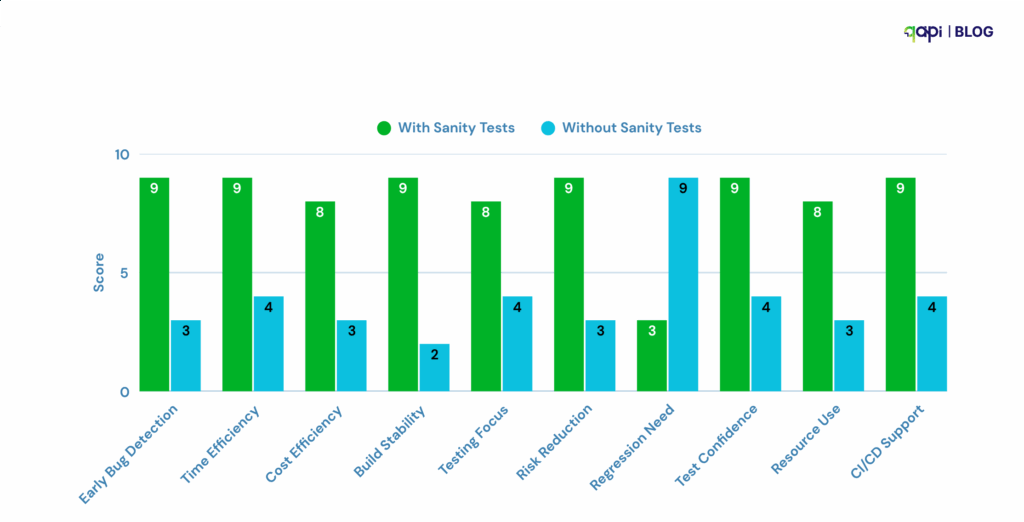
1️⃣ Early Detection of Critical Issues: They help catch glaring issues or regressions introduced by recent changes early in the development cycle. If a sanity check fails, it indicates that the build is not stable, and further testing would be a waste of time and resources 

2️⃣ Time and Cost Savings: By quickly identifying faulty builds, sanity checks prevent the QA team from wasting time and effort on more extensive testing (like complete regression testing) on an unstable build.  

3️⃣ Ensuring Stability for Further Testing: A successful sanity check acts as a gatekeeper, confirming that the API is in a reasonable state to undergo more comprehensive testing. 

4️⃣ Focused Validation: When changes are frequent, sanity checks provide a targeted way to ensure that the modifications are working as expected without causing immediate adverse effects on related functionality 

5️⃣ Risk Mitigation: They help mitigate the risk of deploying a broken API to production by catching critical defects introduced by small changes. 

6️⃣ Quick Feedback Loop: Developers receive quick feedback on their fixes or changes, allowing for rapid iteration and correction. 

Difference Between Sanity and Smoke Testing 

While both sanity and smoke testing are preliminary checks performed on new builds, they have distinct purposes and scopes:


Feature Sanity Testing Smoke Testing
Purpose  To verify that specific, recently changed or fixed functionalities are working as intended and haven't introduced immediate side effects.  To determine if the core, critical functionalities of the entire system are stable enough for further testing. 
Scope Narrow and Deep: Focuses on a limited number of functionalities, specifically those affected by recent changes.  Broad and Shallow: Covers the most critical "end-to-end" functionalities of the entire application. 
When used  After minor code changes, bug fixes, or enhancements.  After every new build or major integration, at the very beginning of the testing cycle. 
Build Stability  Performed on a relatively stable build (often after a smoke test has passed).  Performed on an initial, potentially unstable build. 
Goal  To verify the "rationality" or "reasonableness" of specific changes.  To verify the "stability" and basic functionality of the entire build. 
Documentation  Often unscripted or informal; sometimes based on a checklist.  Usually documented and scripted (though often a small set of high-priority tests). 
Subset Of  Often considered a subset of Regression Testing.  Often considered a subset of Acceptance Testing or Build Verification Testing (BVT). 
Q-tip  Checking if the specific new part you added to your car engine works and doesn't make any unexpected noises.  Checking if the car engine starts at all before you even think about driving it. 

In summary: 

•  You run a smoke test to see if the build “smokes” (i.e., if it has serious issues that prevent any further testing). If the smoke test passes, the build is considered stable enough for more detailed testing. 

•  You run a sanity test after a specific change to ensure that the change itself works and hasn’t introduced immediate, localized breakage. It’s a quick check on the “sanity” of the build after a modification. 

Both are essential steps in a good and effective API testing strategy, ensuring quality and efficiency throughout the development lifecycle. 

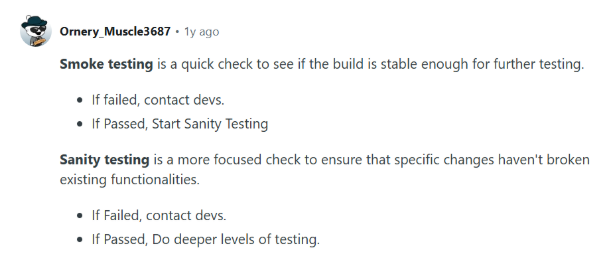
Reddit users are the best, here’s why: 

How do you perform sanity checks on APIs?

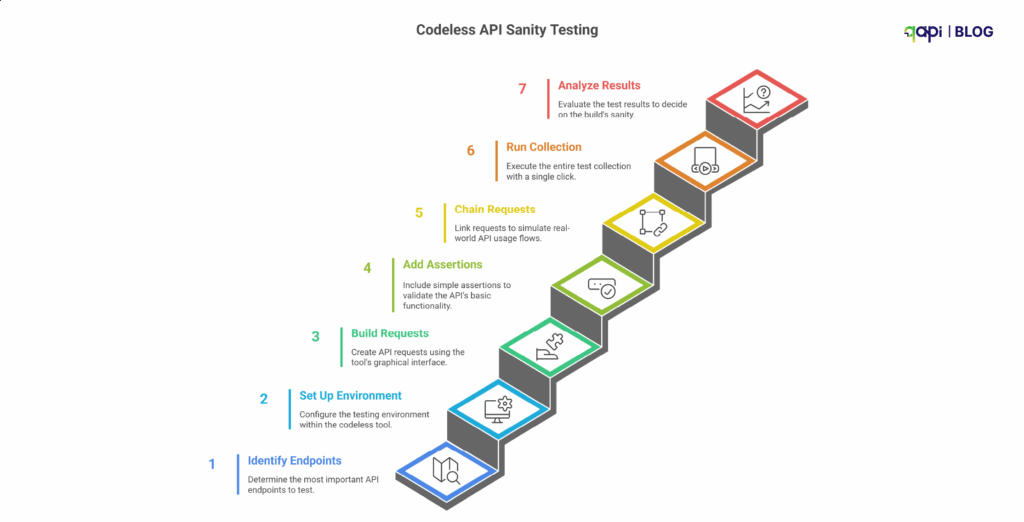
Here is a step-by-step, simple guide on using a codeless testing tool. 

Step 1: Start by Identifying the “Critical Path” Endpoints 

As mentioned earlier, you don’t have to test everything.  

You have to identify the handful of API endpoints that are responsible for the core functionality of your application. 

Ask yourself, you’re the team responsible: “If this one call fails, is the entire application basically useless?” 

Examples of critical path endpoints: 

Examples: 

•  POST /api/v1/login → Can users log in? 

•  GET /api/v1/users/me → Can users retrieve their profile? 

•  GET /api/v1/products → Can users see key data? 

•  POST /api/v1/cart → Can users complete a core action like adding items? 

•  Primary Data Retrieval: GET /api/v1/users/me or GET /api/v1/dashboard - Can a logged-in user retrieve their own essential data? 

•  Core List Retrieval: GET /api/v1/products or GET /api/v1/orders - Can the main list of data be displayed? 

•  Core Creation: POST /api/v1/cart - Can a user perform the single most important “create” action (e.g., add an item to their cart)? 

Your sanity suite should have maybe 5-10 API calls, not 50! 

Step 2: Set Up Your Environment in the Tool 

Codeless tools excel at managing environments. Before you build the tests, create environments for your different servers (e.g., Development, Staging, Production). 

•  Create an Environment: Name it for e.g. “Staging Sanity Check.” 

•  Use Variables: Instead of hard-coding the URL, create a variable like {{baseURL}} and set its value to 

e.g. https://staging-api.yourcompany.com.  

This will make your tests reusable across different environments. 

•  Store Credentials Securely: Store API keys or other sensitive tokens as environment variables (often marked as “secret” in the tool).

Step 3: Build the API Requests Using the GUI 

This is the “easy” part. You don’t have to write any code to make the HTTP request. 

  1. Create a “Collection” or “Test Suite”: Name it, for example, “API Sanity Tests.”

  2. Add Requests: For each critical endpoint we identified in Step 1, create a new request in your collection. 

  3. Configure each request using the UI

       • Select the HTTP Method (GET, POST, PUT, etc.). 

      •  Enter the URL using your variable: {{baseURL}}/api/v1/login. 

      •  Add Headers (e.g., Content-Type: application/json). 

      •  For POST or PUT requests, add the request body in the “Body” tab. 

You have now managed to create the “requests” part of your sanity suite 

Step 4: Add Simple, High-Value Assertions  

A request that runs isn’t a test. A test checks that the response is what you expect. Codeless tools have a GUI for this.  

For each request, add a few basic assertions: 

Add checks like: 

•  Status Code: Is it 200 or 201? 

•  Response Time: Is it under 800ms? 

•  Response Body: Does it include key data? (e.g., “token” after login) 

•  Content-Type: Is it application/json? 

qAPI does it all for you with a click! Without any special request. 

Keep assertions simple for sanity tests. You don’t need to validate the entire response schema, just confirm that the API is alive and returning the right kind of data. 

Step 5: Chain Requests to Simulate a Real Flow 

APIs rarely work in isolation. Users log in, then fetch their data. If one step breaks, the whole flow breaks. 

Classic Example: Login and then Fetch Data 

1. Request 1: POST /login 

• In the “Tests” or “Assertions” tab for this request, add a step to extract the authentication token from the response body and save it to an environment variable (e.g., {{authToken}}).  

Most tools have a simple UI for this (e.g., “JSON-based extraction”). 

2. Request 2: GET /users/me 

• In the “Authorization” or “Headers” tab for this request, use the variable you just saved.  

For example, set the Authorization header to Bearer {{authToken}}. 

Now you get a confirmation that the endpoints work in isolation, but also that the authentication part works too. 

Step 6: Run the Entire Collection with One Click 

You’ve built your small suite of critical tests. Now, use the qAPIs “Execute” feature. 

•  Select your “API Sanity Tests” collection. 

•  Select your “Staging” environment. 

•  Click “Run.” 

The output should be a clear, simple dashboard: All Pass or X Failed

Step 7: Analyze the Result and Make the “Go/No-Go” Decision 

This is the final output of the sanity test. 

•  If all tests pass (all green): The build is “good.” You can notify the QA team that they can begin full, detailed testing. 

•  If even one test fails (any red): The build is “bad.” Stop! Do not proceed with further testing. The build is rejected and sent back to the development team. This failure should be treated as a high-priority bug. 

The Payoff: Why Sanity Check Matters 

By following these steps, you create a fast, reliable “quality gate.” 

•  For Non-Technical Leaders: This process saves immense time and money. It prevents the entire team from wasting hours testing an application that was broken from the start. It gives you a clear “Go / No-Go” signal after every new build. 

•  For Technical Teams: This automates the most repetitive and crucial first step of testing. It provides immediate feedback to developers, catching critical bugs when they are cheapest and easiest to fix. 

For a more technical deep dive into the power of basic sanity validations, this GitHub repository offers a good example.  

While it focuses on machine learning datasets, the same philosophy applies to API testing: start with fast, lightweight checks that catch broken or invalid outputs before you run full-scale validations.  

It follows all the steps we discussed above, and with a sample in hand, things will be much easier for you and your team. 

Why are sanity checks important in API testing? 

Sanity checks are important in API testing because they quickly validate whether critical API functionality is working after code changes or bug fixes. They act as a fast, lightweight safety layer before we get into deeper testing. 

But setting them up manually across tools, environments, and auth flows is time-consuming. 

Source:(code intelligence, softwaretestinghelp.com, and more)

That’s where qAPI fits in. 

qAPI lets you design and automate sanity tests in minutes, without writing code. You can upload your API collection, define critical endpoints, and run a sanity check in one unified platform. 

Here’s how qAPI supports fast, reliable sanity testing: 

•  Codeless Test Creation: Add tests for your key API calls (like /login, /orders, /products) using a simple GUI—no scripts required. 

•  Chained Auth Flows: Easily test auth + protected calls together using token extraction and chaining. 

•  Environment Support: Use variables like {{baseURL}} to switch between staging and production instantly. 

•  Assertions Built-In: Set up high-value checks like response code, body content, and response time with clicks, not code. 

• One-Click Execution: Run your full sanity check and see exactly what passed or failed before any detailed testing begins. 

Whether you’re a solo tester, a QA lead, or just getting started with API automation, qAPI helps you implement sanity testing the right way—quickly, clearly, and repeatedly. 

Sanity checks are your first line of defense. qAPI makes setting them up as easy as running them. 

Run critical tests faster, catch breakages early, and stay ahead of release cycles—all in one tool. 

Hate writing code to test APIs? You’ll love our no-code approach 

We always judge a tool, product, or service by its capability to handle a load. 

Even a weightlifter is determined to be the strongest only by their capability to beat others by lifting the most weight successfully. 

The same outcome is expected from an API. 

Because an API that worked perfectly in the development environment can struggle under real-world traffic if we don’t know its limitations.  

It’s not a code issue—it’s a performance blind spot. Performance testing isn’t just a checkbox; it’s how you plan to protect and ensure reliability at scale. 

Studies show a 1-second delay can cut conversions by 7%. It’s not just an issue then it’s revenue loss. 

In this guide, we’ll walk you through how to integrate performance testing into your API development cycle—and why taking the easy route could cost you more than just downtime. 

What is API performance testing, and why is it important? 

Imagine if Slack’s public API handles millions of messages every hour. If it lagged for just a second, just imagine the payment defaults! 

In simple words, API performance testing is the process of simulating various loads on your APIs to determine how they behave under normal and extreme conditions. It helps answer: 

• How fast are your APIs? 

• How much load can they handle? 

• What are the problems affecting performance? 

Different types of performance tests help you understand your API’s limits. Here’s a breakdown: 


Testing Type Purpose
Load Testing API  Test normal traffic to check speed and errors. 
Stress Testing API  Pushes the API beyond its limits to find breaking points. 
Spike Testing API  Tests sudden traffic surges, such as those during a product launch. 
Soak Testing  Runs tests over hours or days to spot memory leaks or slowdowns. 
API Throughput Testing  Measures how many requests per second (RPS) the API can handle. 
API Response Time Testing  Checks how quickly the API responds under different loads. 

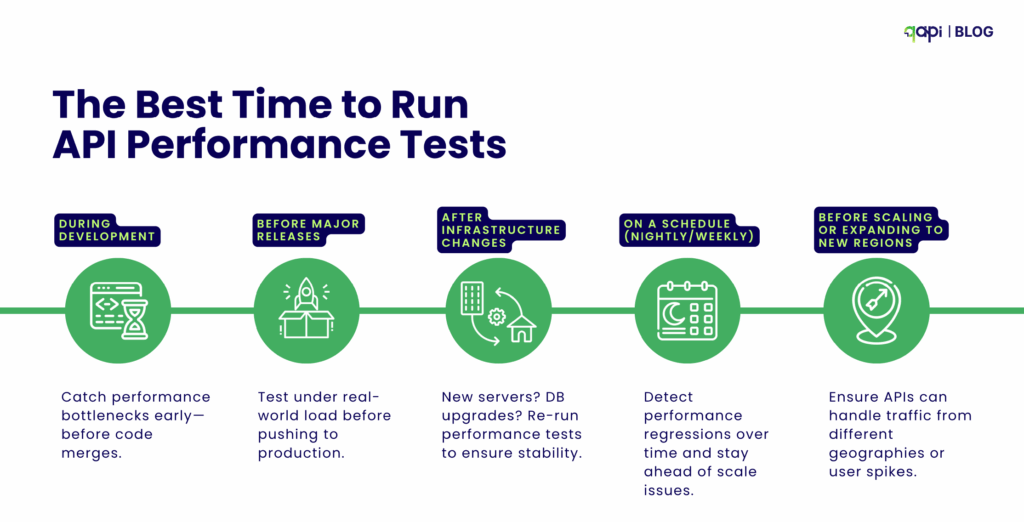
What’s the best time to run API performance testing? 

Performance testing should be part of your API development process, because as your application grows you are more likely to provide a poor user experience if issues are not addressed early. It is a good practice, and it is also recommended that you test at these stages: 

• Once it’s working but not yet perfect. 

• Before it hits the big stage (aka production). 

• Ahead of busy times, like a product drop. 

• Regularly, to keep it sharp and to monitor performance over time. 

The Best Time to Run API Performance Tests

Why Virtual User Simulation in matters API Testing 

Virtual user Balance (VUB) simulation is at the core need of performance testing. It involves creating and executing simulated users that interact with your API as real users would. 

Here’s why virtual user simulation is your next best friend: 

  1. Recreating Real-World Scenarios: Virtual users are designed to replicate the actions of human users, such as logging in, browsing, submitting forms, or making transactions. By simulating a large number of concurrent virtual users at once, you can accurately get an idea of real-world traffic patterns and test your API under real conditions. 

  2. Cost-Effectiveness: Hiring or coordinating a large number of human testers for performance testing is impractical and expensive. Virtual user simulation provides an economical way to generate high traffic and assess performance at a fraction of the cost. 

  3. Shift-Left Testing: Developers can shift left by using virtual APIs or mocked services to test their code for performance issues even before the entire backend system is fully developed, saving time and resources. 

Schema-Driven Performance Testing (OpenAPI/Swagger) 

One of the most talked about challenges in API performance testing is uncovered endpoints—those that are rarely tested due to lack of awareness, oversight, or incomplete test coverage.  This becomes critical as your API grows in complexity, and traditional manual scripting becomes hard, it’s usually the case when API collection grows. 

Schema-driven testing solves this issue by leveraging your OpenAPI/Swagger specification to automatically generate comprehensive test cases. These tests should describe every route, method, parameter, and expected behavior in your API, making them an ideal source for exhaustive performance coverage. 

Why should teams do it: 

• Saves Time and Reduces Human Error: Instead of manually identifying and scripting tests for each endpoint, automated tools can parse your schema and generate full performance test suites in minutes. 

• Ensures Full Coverage: Guarantees that every documented route and method is tested—including edge cases and optional parameters. 

• Adapts to Change Automatically: When your API schema evolves (new endpoints, fields, or methods), the generated test suite can be updated instantly, avoiding stale tests. 

According to GigaOm’s API Benchmark Report, schema-driven testing can reduce API testing effort by 60–70% while significantly improving endpoint coverage and consistency.

How do I conduct performance testing for my API? A Step-by-Step Process 

Step 1: Define Performance Criteria 

• What’s an acceptable response time? 

• What’s the expected number of users? 

Set clear goals, for example: 

Response time: Aim for under 500ms for 95% of requests. 

Throughput: Handle at least 1,000 requests per second (RPS). 

Error rate: Keep errors below 1% under load. 

Step 2: Choose Your Performance Testing Tool 

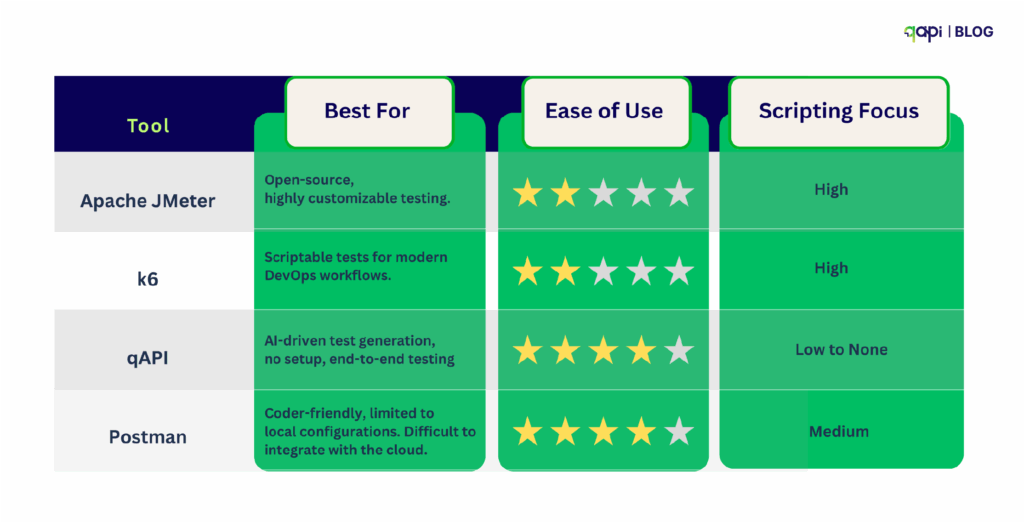
Select a tool that aligns with your team’s skills and needs. Here’s a comparison of popular options in 2025: 

qAPI stands out for its AI-powered test generation, which creates performance tests from imported API specifications in minutes, making it perfect for teams that want fast setup. 

Step 3: Simulate Load Scenarios 

With qAPI’s virtual user balance feature, you can automatically optimize concurrent user distribution based on your API’s real-time performance characteristics, ensuring more accurate load simulation. 

Let’s say for an e-commerce API, test 1,000 users browsing products, 500 checking out, and 50 retrying failed payments. 

APIs rarely deal with static, uniform data. In reality, they handle dynamic data with varying structures and sizes, making it essential to recreate these input conditions.  

To achieve this, randomized or variable data sets should be incorporated into tests. 

Practical techniques for simulating varying payload sizes include:   

1️⃣ Data Parameterization  Use dynamic test data (from CSV, JSON, etc.) instead of hardcoding values into your tests 

Why: 

• It prevents false results caused by server-side caching 

• Makes tests more realistic by simulating multiple users or products 

Example: Each API request uses a different user_id instead of the same one every

2️⃣ Dynamic Payload Construction  To automatically generate API request bodies with varying content, like longer strings, optional fields, or bigger arrays. 

Why : 

• Helps test how the API performs with different data shapes and sizes 

• Shows bottlenecks that affect large or edge-case payloads 

• Example: One request includes 10 items in an array,array; the next includes 100. 

3️⃣ Compression Testing  Send the exact requests with and without compression (like Gzip) enabled. 

Why : 

• Checks whether your API handles compressed payloads correctly 

• Reveals speed gains (or slowdowns) with compression 

• Helps validate behavior across your different client setups 

4️⃣ Pagination Testing

Test API endpoints that return lists, with and without pagination 

(like ?limit=20&page=2). 

Why : 

• Validates how well the API you created handles large datasets 

• Shows whether response size and latency are managed correctly 

• Useful for endpoints like /users, /orders, or /products 

Step 4: Run the Tests & Monitor 

Once you’ve decided your performance benchmarks and designed your load scenarios, it’s time to run the actual tests. 

Hitting “Start” —it’s where the real learning begins. 

Why Real-Time Monitoring Matters 

As your API tests run, what you need isn’t just a pass/fail status—you need live insight into what’s happening. 

That means you and your team must keep an eye on: 

• Response times: How quickly is the API responding? 

• Throughput: How many requests per second is it handling? 

• Errors: Are any endpoints failing or slowing down? 

Seeing this in real-time is crucial. It allows your team to: 

• Spot problems while they happen, not hours later 

• Quickly trace slowdowns to specific endpoints or systems 

• Avoid production surprises by catching unstable behavior early 

Monitoring Is More Than Just Watching 

Real-time monitoring isn’t just about watching numbers climb or fall. It creates a feedback loop that improves everything: 

• Did a spike in traffic slow down a key endpoint? Log it(qAPI logs it for you) 

• Did memory usage shoot up after a test run? Time to optimize. 

This data feeds your next round of testing, shapes future improvements, and builds a habit of continuous performance tuning

Running performance tests without real-time monitoring is like flying without a clear view. That’s what qAPI provides you with: 

• Faster issue detection 

• Smarter optimization 

• Stronger, more reliable APIs 

So don’t just run tests—observe, learn, and evolve. That’s how performance stays sharp, even as your APIs scale. 

Step 5: Optimize & Retest 

Performance issues often come from various sources, including server-side code, database queries, network latency, infrastructure limitations, and third-party dependencies. 

Once bottlenecks are identified, the best practice for API testing is to implement optimizations and then retest to validate their effectiveness. 

This involves refining various aspects of the API and its supporting infrastructure. Optimizations might include tuning specific endpoints, optimizing database calls, implementing efficient caching strategies, or adjusting infrastructure resources.    

As code changes, new features are added, and user loads evolve, new problems will emerge. This shows that performance testing must be a continuous practice rather than a single “fix-it-and-forget-it” approach.    

An API that consistently performs well, even under changing conditions, provides a superior user experience and builds customer trust. So always- 

• Tune endpoints, database calls, or caching 

• Rerun tests until stable 

API Testing Best Practices  

Take note of the following best practices in API testing that will help you save time and also build your tests faster like never before- 

Test in Production-Like Environments:  

Your performance testing environment should mirror production as closely as possible. 

Focus on Percentiles, Not Averages:  

Average response time can be misleading. A 100ms average might hide the fact that 5% of your users wait 5 seconds.  

Automate Performance Tests:  

Integrate automation into CI/CD pipelines to enable early detection. Automated tests provide rapid feedback, allowing issues to be addressed before they escalate.    

Define Clear Objectives & Benchmarks:  

Set clear performance goals and acceptance criteria upfront. Without these your testing efforts will be unfocused, and results difficult to interpret.    

Analyze Results Thoroughly:  

Do not just run tests; dig deep into the data to identify root causes of performance issues.  

Problems to Avoid when building an API performance testing framework: 

Not Testing All Possible Scenarios: Assuming a few tests cover everything can leave significant gaps in coverage, leading to undiscovered bugs and issues.    

Failing to Update Tests After API Changes: APIs are dynamic; neglecting to update tests after modifications can result in missed bugs or the introduction of new security vulnerabilities.    

Ignoring Third-Party Integrations: External services can introduce unpredictable performance issues and bottlenecks. These dependencies must be accounted for in testing. 

The best API Performance Testing Tool in 2025 

qAPI is new to the market, it’s completely free to use, does not require coding, and moreover, you get end-to-end test analysis to judge your APIs without having to worry about technical specifications. 

Why qAPI? It simplifies testing with AI, generating load and stress tests from Postman or Swagger collections in under 5 minutes, with built-in dashboards. 

Want to Automate All This? 

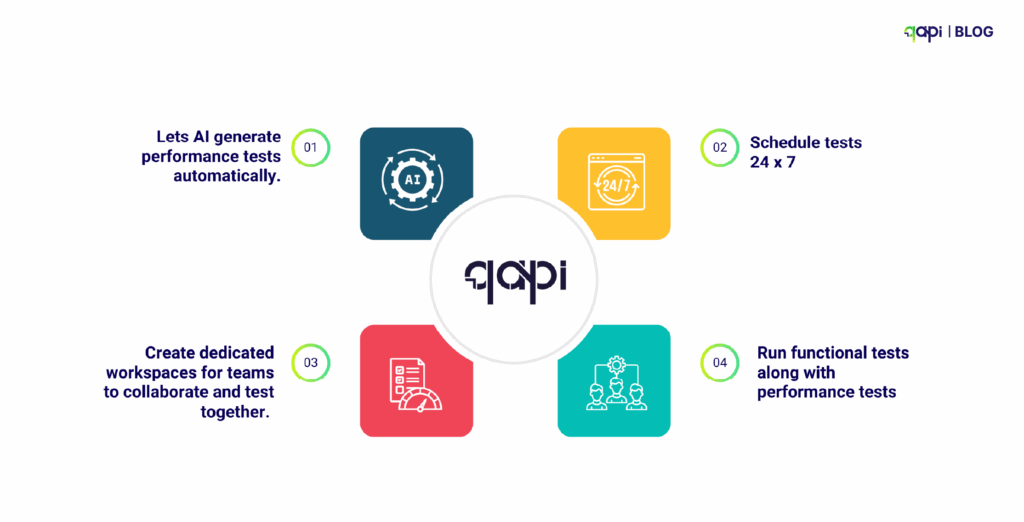
With qAPI, you can: 

• Let AI generate performance tests automatically. 

• Schedule tests 24 x 7 

• Create dedicated workspaces for teams to collaborate and test together. 

• Run functional tests along with performance tests 

At Last… 

In a world of rising microservices and multi-client environments, API speed and stability aren’t just keywords or fancy terms—they’re now basic expectations. API Performance testing lets you ship confidently, even at scale. 

API performance testing is essential for building apps that users love.  

Slow or unstable APIs can harm user experience, reduce retention, and incur costly fixes.  

By testing early, using the right tools, and tracking key metrics, you can build APIs that are fast, reliable, and ready for growth. 

In 2025, tools like qAPI, k6, and JMeter will make performance testing accessible and more powerful. Whether you’re handling a small app or a global platform, handling performance tests is easier and code-free with qAPI. 

Ready to start? Try integrating performance tests into your next release cycle—or use tools like qAPI to automate the process entirely. Start here 

FAQs

If you want a tool that does not need coding and can automate the test case generation process, then you should start using qAPI.

Performance testing for REST APIs focuses on evaluating RESTful endpoints under load. Key aspects include: Response time for GET, POST, PUT, DELETE. Latency and throughput under concurrent usage and Stateless behavior consistency. REST APIs are especially sensitive to payload size and HTTP method handling, making it essential to simulate real-world usage patterns during tests.

While Postman supports simple functional testing, it’s not ideal for high-scale performance testing. You can extend it using qAPI and scripts, but for better scalability and automated load testing.

Simulate real-world API load by using tools like qAPI, LoadRunner, or Jmeter to create virtual users and send concurrent requests.

There’s always a moment that changes everything. For our client, it was the 3 AM Crisis.  

Sarah’s phone buzzed at 3:14 AM—another production API failure. As the QA lead at a growing startup, she’d been here before—countless times. The payment processing API, which had worked perfectly in development, crashed under real-world load, leaving thousands of customers unable to complete transactions.  

The worst part? Their manual testing process, which they usually follow, had missed critical edge cases that automated API testing should have caught weeks earlier. 

This scenario plays out in development teams worldwide every single day.  

By the way, Sarah and her team now use qAPI to streamline their process and avoid such midnight fallouts. Please read the blog to know more about it. 

Our recent survey revealed that over 80% of developers spend more than 20% of their time dealing with API-related issues. In comparison, 73% of organizations report that API failures directly impact their bottom line.  

The problem isn’t just technical—it’s systematic. 

The Hidden Cost of not adapting the new API Testing metrics 

Most development teams find themselves trapped in what we call the “API Testing Paradox.” The more complex your application becomes, the more APIs and more scenarios you need to test.  

As the application grows, your testing approaches become increasingly time-consuming and more likely to cause errors. 

Let us consider the typical API testing workflow most teams follow: 

Step 1: Manual Endpoint Testing. A developer or QA engineer manually works API requests using tools like Postman or cURL. They test happy paths, document responses, and move on. This process might take 30-45 minutes per endpoint for basic testing. 

Step 2: Writing Automated Tests. For each API endpoint, someone needs to write test scripts. This requires in-depth programming knowledge, a solid understanding of testing frameworks, and a significant time investment. A good test suite for a single API endpoint can take 2-4 hours to develop properly. 

Step 3: Maintenance Nightmare. As APIs evolve, every test script needs updates when your API changes, which happens frequently in agile environments—your test suite becomes a maintenance burden rather than an asset. 

• According to Rainforest QA, teams using open-source frameworks like Selenium, Cypress, and Playwright spend at least 20 hours per week creating and maintaining automated tests. 

• 55% of teams spend at least 20 hours per week on test creation and maintenance, with maintenance alone consuming a significant portion of each sprint. 

• On average, about 21% of bugs slip through to production due to limitations in manual testing.  

• Cost per production API failure: The average cost of API downtime for large enterprises ranges from $5,600 to $11,600 per minute, which can add up to hundreds of thousands or even millions of dollars annually, depending on the frequency and duration of incidents. 

Why it’s not working for you now 

We see that the market has adopted various API testing tools, but most suffer from fundamental limitations: 

Code-Heavy Approaches: Tools like REST Assured, Karate, or custom scripts require heavy programming expertise. This creates bottlenecks where only senior developers can create and maintain tests. Increasing dependency 

Limited Collaboration: When testing requires coding, business analysts, product managers, and junior QA engineers are excluded from the process. This creates knowledge and communication gaps. 

Slow Feedback Loops: The testing approaches we currently use often mean waiting until the end of development cycles to identify issues. By then, fixing is expensive and, of course, time-consuming. 

Scalability Issues: As your API portfolio grows, code-based testing becomes increasingly complex to manage and scale across teams. (Nothing new here) 

The Codeless Revolution: A New Shift 

We’re creating a world where creating scalable API tests is as simple as filling out a form, where business analysts can validate API behavior without writing a single line of code.  

Where test maintenance takes minutes instead of hours. This isn’t a fantasy—it’s the capability of codeless API testing. 

The aim of qAPI, as a codeless API testing tool, is to provide a fundamental shift in how we approach testing.  

Instead of requiring specialized programming skills, we provide intuitive interfaces that help anyone to create, execute, and maintain test suites with ease. 

How can codeless API testing improve my development workflow? 

The Three Pillars of Effective Codeless API Testing 

Pillar 1: Visual Testing Interfaces 

The best codeless API testing platform should be able to transform complex testing scenarios into a straightforward visual testing interface. So that users can drag and drop components, configure parameters through forms, and see their tests take shape in real-time without the need for coding. 

How can codeless API testing improve my development workflow

Key Features to Look For: 

● Intuitive drag-and-drop interface 

● Pre-built test templates for common scenarios 

● Real-time test preview and validation 

● Detailed insights 

Pillar 2: Intelligent Test Data Management 

For an API test to be practical, it requires realistic test data. A testing platform should provide clear and effective data management capabilities without requiring knowledge of databases or scripting skills. 

qAPI takes care of that with a simplified data management utility and intelligent, AI-driven test case generation. Stay tuned for when qAPI launches the QyrusAI Echo feature – coming later this year. 

qAPI Capabilities: 

● It offers dynamic test data generation 

● Database integration without coding 

● Data parameterization and variable handling 

● Environment-specific data handling 

Pillar 3: Seamless Integration and Collaboration 

The API development process is effective when everyone on your team is aware of the developments made in real-time. Your API testing platform should enable seamless collaboration between developers, QA engineers, business analysts, and stakeholders. 

qAPI has launched shared workspaces for teams, saving time and resources. 

Seamless Integration and Collaboration

Collaboration Features: 

● Shared test repositories 

● Real-time collaboration tools 

● Stakeholder-friendly reporting 

● Integration with existing development workflows 

Building Your Codeless API Testing Strategy 

Here’s a strategy that will work for you. Regardless of which tool or API you use, follow these steps to eliminate coding and free up more time. 

Step 1: Import to qAPI  

– Log in to the qAPI dashboard  

– Next, click on “Add or Import APIs “   

– Upload your Postman/Swagger/WSDL, etc file   

Step 2: Generate Test cases.  

 - AI creates test cases automatically  

– Review suggested assertions and add test cases to the API.   

– Customize test data if needed  

– It executes tests immediately, so check for 200 OK   

– And you’re done!  

You can also access comprehensive, detailed reports for every test run—perfect for audits, debugging, and team collaboration. 

 Using AI-driven testing solutions within a codeless API testing platform is one of the most effective API testing best practices today. It not only accelerates test creation but also improves accuracy, coverage, and long-term maintainability. 

What are the benefits of using codeless API testing in development? 

The benefits of using a no-code API testing tool are evident in the statement itself; it eliminates coding, making a codeless automation framework more accessible to teams worldwide, including beginners. 

You save time 

● Writing API tests takes a lot of time: 4-6 hours per endpoint 

● Debugging the test cases: 2-3 hours weekly per developer(average time spent) 

● Maintaining test suites when APIs change again takes up an average of 20% of the sprint’s capacity 

You save costs 

Developer Time (Annual Cost for 5-person team): 

● Writing API tests: ~800 hours/year × $75/hour = $60,000 

● Maintaining test suites: ~400 hours/year × $75/hour = $30,000 

● Training new team members: ~120 hours/year × $75/hour = $9,000 

● Total: $99,000+ annually 

Infrastructure & Tooling: 

● Multiple testing framework licenses can cost up to: $15,000+ 

● CI/CD infrastructure for complex test suites: $12,000+ 

● Developer tooling and IDE plugins: $8,000+ 

Now let’s compare it with the Codeless Automation Framework 

Platform Cost: 

●  Enterprise codeless testing platform: $30,000-50,000/year 

P.S.- Individual plans on qAPI start at only $288/year 

Time Savings (5-person team): 

● 70% reduction in test creation time: $42,000 saved 

● 85% reduction in maintenance overhead: $25,500 saved 

● 60% faster team onboarding: $5,400 saved 

● Total Savings: $72,900/year 

ROI Breakdown 

Year 1 Net Savings: $22,900 – $72,900* (depending on platform choice)  

Payback Period: 6-8 months*  

3-Year ROI: 340-580%* 

And these are just conservative estimates that we have taken into consideration; actual savings can be much higher. 

What Codeless Testing Delivers: 

Speed: Test creation down from hours to minutes  

Maintainability: Visual updates vs. code refactoring  

Team effort: Everyone can contribute, not just senior developers. 

Reliability: Platform handles framework updates automatically  

Shifts Focus: More time building features, less time maintaining tests 

What Challenges might I Face When Implementing Codeless API Testing? 

Problem 1: Trying to Replicate Existing Code-Based Tests 

Teams often try to recreate their existing test suites exactly as they were written in code.  

Solution: Rethink your testing approach. Codeless platforms often enable better test organization and more comprehensive coverage. 

Problem 2: Neglecting Test Maintenance 

Even codeless tests require maintenance as APIs evolve.  

Solution: Establish regular review cycles and assign ownership for maintaining the test suite. 

Problem 3: Insufficient Training and Adoption 

Team members stick to familiar tools and processes.  

Solution: Invest in comprehensive training and create incentives for adoption. 

Problem 4: Ignoring Integration Requirements 

Codeless testing becomes isolated from existing development workflows.  

Solution: Ensure your chosen platform integrates with your CI/CD pipeline and existing tools. 

The Future of API Testing: Trends and Innovations Where do we see the market going 

In 2024, the API testing market is valued at $1.6 billion and is projected to reach $4.0 billion by 2030, with a compound annual growth rate (CAGR) of 16.4% annually. Here’s what’s driving the future of API testing. 

Key Trends in API Testing for 2025 

Codeless and Low-Code Tools for Accessibility 

Testing tools are becoming easier to use, even for non-technical team members. Codeless platforms, such as qAPI, allow testers to import API specifications and generate tests without coding.  

This trend is set to make API testing accessible to product managers and business analysts, improving team collaboration. 

AI and Machine Learning in Testing 

AI-powered solutions can automatically generate and optimize test cases, adapt to API changes, and expand test coverage, reducing manual effort and improving efficiency. 

Tools will use machine learning to analyze past test results, spot patterns, and suggest high-risk areas to test. For example, AI can predict which API endpoints might fail under heavy traffic.  

The qAPIs AI Test Case Generator already utilizes AI to generate test cases from imported API specifications, saving hours of manual work. 

Shift-Left Testing for Faster Feedback 

By running tests as soon as code is written, developers catch bugs before they reach production. This aligns with CI/CD pipelines, where automated tests run on every code change. Tools like qAPI, Postman, and Newman integrate easily with CI/CD systems, making this approach practical. 

Stronger Focus on API Security 

With APIs handling sensitive data, security is a top priority. In 2024, over 55% of organizations experienced API-related security issues, with some incidents resulting in costs exceeding $500,000.  

By 2033, the API security testing market is expected to grow from $0.76 billion in 2024 to $9.76 billion, driven by rising cyber threats. Standards like OAuth 2.0 and OpenID Connect are becoming increasingly common to protect data and meet regulations such as GDPR. 

Cloud-Based Testing for Scalability 

Cloud-based testing is gaining popularity for its flexibility and scalability. Tools like Postman and qAPI provide cloud platforms for running tests at scale, handling large API suites without the need for local hardware.  

This is important for teams and individual developers building cloud-native apps or microservices. 

Support for Modern Architectures 

APIs are central to microservices, event-driven systems, and real-time apps. Testing tools are adapting to support these architectures, including protocols like WebSocket and GraphQL. 

How to Choose the Right Codeless API Testing Platform? 

When evaluating platforms, consider these essential criteria: 

Technical Capabilities 

● Protocol Support: REST, GraphQL, SOAP, WebSocket compatibility 

● Authentication Methods: OAuth, JWT, API keys, custom headers 

● Data Formats: JSON, XML, form data handling 

● Integration Options: CI/CD, bug tracking, collaboration tools 

User Experience 

● Learning Curve: How quickly can team members become productive? 

● Interface Design: Is the platform intuitive and well-designed? 

● Documentation: Are there comprehensive guides and tutorials? 

● Support: What level of customer support is available? 

Business Considerations 

● Pricing Model: Does it scale with your team and usage? 

● Security: How does the platform handle sensitive data? 

● Compliance: Does it meet your industry requirements? 

Conclusion: Transform Your API Testing Future 

The shift to codeless API testing isn’t just about adopting new tools—it’s about transforming how your team approaches quality assurance. By removing the coding barrier, you enable broader participation, faster feedback loops, and more comprehensive testing coverage. 

The organizations that embrace this transformation will find themselves with a significant competitive advantage: faster time-to-market, higher quality products, and more collaborative development processes. 

“Sarah’s story, which began with a 3 AM crisis, has a different ending now. Her team adopted a codeless API testing platform six months ago. They’ve reduced their testing time by 70%, increased their API test coverage by 300%, and haven’t had a single production API failure in four months.” 

More importantly, her entire team—including business analysts and product managers—now actively participates in ensuring API quality. 

The future of API testing is codeless, collaborative, and accessible. The question isn’t whether you should make this transition, but how quickly you can implement it to transform your development workflow. 

Ready to start your codeless API testing journey? The tools, techniques, and strategies outlined in this guide provide your roadmap to success. The only thing left is to take the first step. 

CREATE YOUR FREE qAPI ACCOUNT TODAY! 

FAQ

Codeless API testing is a way to validate API functionality without writing traditional test scripts. Instead, users interact with visual testing interfaces or use no-code API testing tools that allow them to create, run, and manage test cases through a graphical UI. qAPI offers an AI-driven testing solution that helps auto-generate tests based on API specs or usage data, making it easier to test even complex workflows without requiring deep coding expertise.

Some major benefits of codeless testing include: Faster test creation using visual tools Easier collaboration across teams Reduced need for specialized coding skills Better integration with agile development cycles Increased test coverage through automation and reusability Access to AI-driven testing solutions that flag issues faster These benefits make it easier to transform development workflows and scale testing in fast-moving environments.

Yes —codeless testing for beginners is one of its most significant advantages. qAPI is a good example with user-friendly dashboards, drag-and-drop logic, and built-in validations, so even non-technical testers can: Build test cases from API documentation Run tests across environments View structured reports Collaborate with developers on failures It also reduces onboarding time for junior QA engineers, making it ideal for growing teams or organizations scaling their QA efforts.

Codeless testing focuses on speed, simplicity, and accessibility. In contrast, code-based testing offers more control and flexibility, but requires: Higher coding skills More setup and maintenance Greater onboarding time for new team members With low-code testing platforms, many teams now choose hybrid models—combining the strengths of both. But for API regression, smoke, or workflow testing, codeless solutions offer faster time-to-value and reduced overhead.

According to researchers the global test automation market capitalization is set to cross $55 Billion by 2030. 

Why do researchers say this with confidence? 

The shift from manual to automated API testing isn’t just a trend—it’s now necessary. More than 24% of companies have automated 50% or more of their test case generation, while 33% of companies aim to automate between 50% to 75% of their test cases.  

What is API test Automation? 

API test automation is a process that involves using scripts and tools to programmatically verify an API’s functionality, performance, and security without manual support.  

Automated API tests once done can seamlessly integrate into deployment pipelines, accelerating feedback and release cycles. Consistent test execution ensures dependable results across runs. 

The need for automation is purely driven by the capability for faster release cycles, improved software quality, and reduced operational costs. 

The benefits of API testing automation are outlined in the open. Teams can achieve faster feedback loops, eliminate human error, while making sure tests are consistent across multiple environments.  

Also, the ROI is significantly higher: automated testing can cover up to 95% of testing scenarios, dramatically reducing the time and resources required for comprehensive testing coverage. 

So it’s Better to Start by Choosing the Right API  Automation Testing Tool 

Before diving into the first tool you find, you should analyse on what you want and what you need. 

Step 1: Define Your Testing Needs 

Ask yourself and your teams this: 

Are you testing REST, GraphQL, gRPC, or SOAP APIs? 

Do you need functional, performance, or security testing—or all three? 

Are your APIs public, internal, or partner-facing? 

Will you integrate tests into CI/CD pipelines? 

Do you need support for mocking, assertions, or data-driven testing? 

See which tools offer all that you need, and get a trial demonstration. 

q-tip:  With the rise of API-first microservices, test environments are now more fragmented. Tools must support mocking, virtualization, and test data isolation. 

Step 2: Match Features to Use Cases 

Choose tools based on capability, not popularity. 

Feature Why It Matters
Codeless Test Creation  For non-technical testers or rapid setup
Support for All Protocols  REST, GraphQL, WebSockets, gRPC, etc.
CI/CD Integration  Seamless integration with Jenkins, GitHub Actions, GitLab, etc.
Mock Servers  Test early when APIs aren’t ready yet
Assertions & Validation   Verify schema, headers, payloads, and latency
Collaboration Support   Share tests with team, manage roles, comments
Version Control & History  Track test changes over API versions 
AI Assistance  Auto-generate test cases, predict gaps, create assertions 

Tools to Explore: 

qAPI stands out by offering a codeless approach to API testing, making it accessible to non-technical team members like product managers and QA leads. Its core strength lies in leveraging a purpose-built large AI model to generate accurate and structured test cases automatically, significantly reducing manual effort and setup time. This “shift-left” capability allows issues to be caught earlier in the development cycle.  

Technical aspects:  

✅ AI-powered Test Case Generation: Utilizes AI to intelligently create test scenarios, eliminating the need for manual scripting. 

✅ Codeless Automation: Users define tests through a user-friendly interface rather than writing code, simplifying the testing process. 

✅ CI/CD Integration: Designed for seamless integration into Continuous Integration/Continuous Delivery pipelines, enabling automated test execution upon code changes for continuous validation. 

✅ Unified Dashboards: Provides instant visibility into performance metrics, pass/fail trends, and failure logs for quick analysis and debugging. 

✅ Support for diverse API types: Integrates with various API types, including older software applications and different tech stacks. 

Virtual User Balance Simulate 1000s of concurrent users at a time to help analyse how your API simultaneously responds to multiple requests.

✅ Virtual User Balance: Simulate 1000s of concurrent users at a time to help analyse how your API simultaneously responds to multiple requests. 

The image below shows the Virtual User Balance feature on qAPI, where users can select the number of users they want for the testing process according to their needs. 

Step 3: Evaluate the Testing Workflow 

Try each tool on a real API, it’s important to go beyond features and actually run a workflow on your own API. Document what works for you here’s what your analysis should look like- 

Setup Time 

Most tools require plugin installs, manual auth configs, or CLI setup. 

With qAPI:  Just import your API collection (Postman, Swagger/OpenAPI, or curl commandand etc) — and you’re ready to go.  

No code, no configuration, no setup, no terminal commands. Setup takes under 5 minutes for most users. 

Learning Curve 

You shouldn’t need a scripting background to run meaningful API tests. 

With qAPI:  The interface is intuitive and easy to get around to, it does not need code. Everything from request editing to assertions can be done with a few clicks through the UI. And for advanced users, there’s support for custom headers, environment variables, and chained requests — without writing scripts. 

 Test Creation & Maintenance 

Maintenance often eats more time than writing the initial tests. 

With qAPI: 

You can auto-generate test cases using our built-in AI(Nova). 

Organize your tests in collections and reuse steps easily. 

Update tests with new inputs or endpoints without breaking your suite. 

This makes ongoing maintenance feel less like firefighting and more like fine-tuning. 

Reporting Output 

Reports should be more than just pass/fail—they should be actionable. 

With qAPI:  Every run includes detailed logs, error traces, response comparisons, and visual graphs. You’ll know exactly what failed and why. Shareable reports also make team handoffs easier. 

Parallel or Cloud Execution Support 

Running tests sequentially slows everything down. 

With qAPI:  Tests can be scheduled, triggered via webhook, or executed in parallel in the cloud — whether you’re testing one API or hundreds. The load is handled server-side so your local machine stays free. 

q-tip: Watch out for: 

Tools that slow down CI/CD due to long execution or setup. 

Complex scripting requirements for basic test cases. 

Step 4: Compare Cost vs. ROI 

Even free tools come at the cost of time. 

Criteria What to Consider
Free Trial Are key features locked behind paywalls, do you get to try the platform and are you able to navigate yourself after 1-2 test runs?
Team Pricing Is there per-user or per-workspace pricing?
Test Volume Are there limits on concurrent tests, environments, or API calls?
Support & Community Is there fast support or just docs/forums? Moreover, do you constantly need support?

q-tip:  Many dev teams are opting for free, AI-powered, and no-code platforms like qAPI to scale faster without complex pricing or setup. 

qAPI is letting users a completely free end-to-end testing trial where users can TRY, GAUGE AND ANALYZE the impact it can create. 

Step 5: Evaluate Collaboration & Access Control 

2025 teams work cross-functionally. Ensure the tool supports: 

Role-Based Access Control (RBAC) 

Shared and private workspaces 

Real-time commenting or test review flows 

API version-specific environments 

qAPI now allows users to collaborate in shared test environments, isolate variables, and manage access per user with just a few clicks.

Step 6: Review Reporting & Observability 

An API test that fails silently is worse than no test. 

Look for: 

Visual, actionable reports 

Response time graphs, error logs, coverage % 

Historical test trends & flakiness tracking 

q-Tip:  You’ll want reports your testers, developers, and PMs can all understand. Here’s a sample of qAPI report 

Virtual User Balance Image 3

Step 7: Plan for now and for years to come 

APIs evolve. Your testing strategy must too. 

Check if the tool supports: 

API contract testing (OpenAPI/Swagger validation)? 

Test reuse across API versions? 

AI-based updates to test cases when schema changes? 

Testing for edge cases, limits, and chaos scenarios? 

Tools that grow with your ecosystem will save months later. 

Final Checklist: What Makes the Right API Testing Tool in 2025?

The one that offers: 

No-code or low-code setup 

Built-in support for AI-generated test cases 

Works for both manual and automated pipelines 

Flexible pricing with generous free tier 

Collaboration-friendly 

Great reporting and integrations 

Can simulate real-world network and data conditions 

Ongoing support and clear roadmap 

  Analyzing Competitors 

Analyzing Competitors 

API Test Automation Best Practices: The only guide you need  

As someone who’s been working, building and testing APIs for years, we’ve seen what works and what doesn’t. Here are the practices that matter: 

Start Simple, But Think Big 

Don’t try to automate everything on day one. Pick your most critical API endpoints – the ones that would break your app if they failed. Start there. We’ve seen too many teams spend months building elaborate test frameworks while their core features remain untested. 

Begin with happy path tests – the normal user flows that work correctly. Once these are solid and running consistently, then add edge cases and error scenarios. 

Test Structure That Makes Sense 

The 3-Layer Approach 

Unit Tests (Fast & Focused) Test individual API functions in isolation. These should run in seconds and catch basic logic errors. 

Integration Tests (Real but Controlled) Test how your APIs work with databases, external services, and other components. Use test databases and mock external services. 

End-to-End Tests (Full Journey) Test complete user workflows from start to finish on qAPI. Keep these on priority as they will take most of your time. 

The 70-20-10 Rule: 70% unit tests, 20% integration tests, 10% end-to-end tests. This gives you speed and confidence without maintenance nightmares. 

What Actually Works 

Fresh Data Every Test Create and destroy test data for each test run. Yes, it’s slower, but it eliminates the “it worked on my machine” problems that waste hours of debugging. 

Realistic but Safe Data Use real data (real names, addresses, phone numbers) but isn’t actually real. Libraries like Faker.js or Java Faker are perfect for this. 

Separate Test Environments Never, ever test against production data. Have dedicated test databases that mirror production structure but contain only test data. 

Multiple Environments Strategy 

Local Development Every developer should be able to run API tests on their laptop without external dependencies. You can create separate environments in qAPI, local databases and share it with teams. 

Staging Environment Mirror production as closely as possible. This is where you catch environment-specific issues before they reach users. 

Production Monitoring Run basic health check tests in production continuously. Keep them lightweight – you’re monitoring, not testing new features. 

Authentication and Security Testing 

Don’t treat security as another checklist. Build it into your regular test suite. 

Essential Security Tests: 

Authentication Validation 

● Test with valid tokens 

● Test with expired tokens 

● Test with malformed tokens 

● Test without tokens 

Authorization Checks 

● Test user permissions (can regular users access admin endpoints?) 

● Test data isolation (can users see other users’ data?) 

Input Validation 

● Test with harmful inputs (SQL injection attempts, XSS payloads) 

● Test with oversized inputs 

● Test with missing required fields 

Performance Testing Reality 

Don’t wait until launch to test performance. Build basic performance checks into your regular test suite. 

Simple Performance Rules: 

Response Time Baselines Set acceptable response times for each endpoint and alert when they’re exceeded. Start with generous limits and tighten them over time. 

Load Testing Regularly test with realistic user loads. If you expect 100 concurrent users, test with 150. If you don’t know, start with 50 and work up. 

Database Query Monitoring Watch for N+1 queries and slow database calls. These are the #1 cause of API performance problems. 

CI/CD Integration That Actually Works 

Pipeline Integration Strategy: 

Fast Feedback Loop Run critical tests on every code commit. These should finish in under 5 minutes. 

Comprehensive Nightly Tests Run full test suite overnight when speed doesn’t matter. Include performance tests and longer-running scenarios. 

Pre-Deployment Validation Run smoke tests against staging before deploying to production. Basic functionality checks that take 2-3 minutes. 

Your APIs will fail – plan for it. 

Essential Error Scenarios: 

Network Issues 

● Timeouts 

● Connection failures 

● Partial responses 

Server Errors 

● 500 errors 

● Database connection failures 

● Third-party service outages 

Input Errors 

● Invalid data formats 

● Missing required fields 

● Data validation failures 

Monitoring That Matters: 

Real-Time Alerts Get notified immediately when core APIs fail. Use tools like PagerDuty or Slack notifications. 

Error Rate Tracking Monitor error rates over time. A spike usually indicates a problem even if individual requests still succeed. 

Response Time Trends Track response times over weeks and months. Gradual increases often indicate growing technical debt. 

Common Mistakes to Avoid 

The Big Ones: 

Over-Mocking Don’t mock everything. Test real integrations where possible. Mocks hide integration problems until production. 

Ignoring Test Maintenance Tests require ongoing care. Budget 20% of your testing time for maintaining existing tests. 
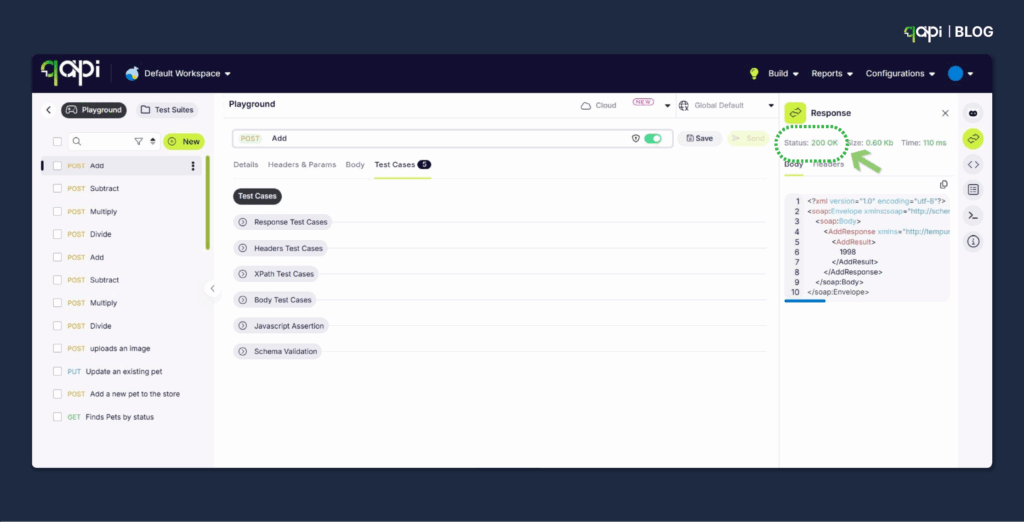
Testing Too Much UI Through APIs APIs should test business logic, not user interface behaviour. Use proper UI tests for interface validation. 

Hardcoded Test Data Avoid hardcoded IDs, dates, or other data that changes over time. Use data that can make a difference. 

qAPI doesn’t just solve the hardcoded data problem—it eliminates the entire category of “maintenance debt” that comes with traditional test automation. Your tests become self-healing and your QA team focuses on testing business logic rather than fixing broken test data. 

When dates change, products are discontinued, or business rules evolve, your tests adapt automatically instead of failing. 

Ignoring Test Order Tests should be independent. If Test B fails because Test A didn’t run, you have a problem. 

The Bottom Line 

A Good API test automation strategy isn’t about having the most sophisticated setup. It’s about having reliable tests that catch real problems before your users do. 

Start small, be consistent, and improve gradually. A simple test suite that runs reliably is infinitely better than a complex one that’s always broken. 

Focus on business value, not test coverage percentages. 80% coverage of critical functionality beats 95% coverage that includes testing trivial getters and setters. 

The best API test automation strategy is the one your team actually uses and trusts. Keep it simple, keep it working, and keep it focused on what matters most to your users. 

qAPI is a new, AI-powered API testing platform designed for teams that want to simplify, scale, and automate their API testing workflows—without writing code. Built to support shift-left testing, CI/CD integration, and cross-team collaboration, qAPI enables both developers and non-developers to create, run, and manage API tests through an intuitive, codeless interface. 

Don’t accept mediocre solutions and tools to validate the quality of your APIs. 

Whether you’re an SDET, QA engineer, or product-led team, qAPI helps you move faster with fewer bugs—while giving full visibility into API health and performance.  

Start by automating your API tests on qAPI, for free! 

“Will my API crash when 1000 users hit it simultaneously during peak hours?” 

“How do I know if my payment endpoint can handle the morning rush without spending thousands on load testing tools?” 

“Why did our API work perfectly in testing but fail easily in production?” 

“What will my Customer Experience (CX) be if 5000 users use my application at the same time?” 

If you’ve ever asked these questions as a developer, tester, SDET, or product manager, you’re not alone. After analyzing hundreds of forum discussions, Stack Overflow questions, and Sub-Reddit, we’ve found that API load testing is broken for most teams—and it’s not your fault. 

Research shows that “increased demand for speed of delivery is the #1 challenge teams face when delivering high quality APIs”, yet traditional load testing tools slow teams down with their complexity. 

APIs that pass your regular load tests often fail in production because: 

✅ Real users don’t make requests in straightforward, predictable patterns

✅ Mobile apps have network delays and retry logic

✅ Frontend applications usually batch requests differently than test scripts

✅ Geographic distribution affects latency and connection patterns

We have a solution

Load/Performance Testing Reimagined

We built Virtual User Balance to solve these exact problems—based on real feedback from developers, testers, and product managers who were frustrated with existing solutions.

Test Your APIs Like Real Users, Who Actually Use Them

Unlike other tools that create artificial load patterns, VUB simulates realistic user behavior

Simulate up to 5,000 concurrent users easily!

How VUB Works:

Individual User Wallets: Instead of sending same requests, VUB simulates a good user profile within your workspace. Each user instance operates with its own unique “wallet”: a dedicated allocation of credits.

Your Free Monthly Credits: A generous pool of credits is available to   each month. These can be allocated across projects or used with pre-defined templates on our platform.

– Paid (Private) wallet – Opportunity to buy more as needed, and its up to the user’s discretion to use them at all their workspaces. 

-Team wallet – procure Virtual Users for a team to use

-Easily transfer users between wallets

Test Scenarios, Not Just Stress: You define interesting and relevant test scenarios – “simulate 300 users browsing products and adding them to carts for 15 minutes,” “test transaction flow success under livestock updates,” etc.

Each workspace you create has a “wallet” where you can use its credits to cover costs and make things easier.

Distributed Smart Engine: Our backend runs a distributed engine optimized for handling thousands of concurrent wallet-based user sessions, ensuring realistic isolation and load ramping.

Balanced Visibility: Monitoring isn’t just about averaging; it provides granular metrics per transaction group, transaction success percentage, latency distributions, and resource breakdowns driven by the “wallet” concept.

How to use it?

Once your API collection is ready, create a test suite to test them together.

Next, select them and click on executing performance tests. 

As you can see in the image below, based on the number of threads you choose, you can see the number of users you consume. 

Once selected, click on execute. 

Get detailed analysis and breakdown for each user you selected 

For a better experience, check the number of users available in your wallet and use it as you please. 

To get started, all users get 100 free virtual users, and the best part. You can buy more Only if you need it. 

For Pro plan users, you get 500 per month 

VUB 2

Key Benefits of Our Virtual User Balance System: 

   ✅ Meaningful Metrics, Not Raw Counts: VUB provides intelligence. You gather data on transaction success rates, resource impact, and stability. You finally can ask, “Does my integrated rate-limiting handle this wave correctly?” or “Under sustained, realistic load, am I seeing frequent database connection failures?”

   ✅ Real User Simulation: Allow actual API calls (GET, POST, PATCH) using natural flows like user authentication, context-dependent data retrieval, and transaction processing chains.

You can track relevant metrics when users fail or get blocked, not just in specific conditions involving complex state interactions.

   ✅ One Test Machine for Thousands: Forget requiring dedicated hardware per user batch. Our distributed system intelligently routes and services thousands of virtual users from a single test machine.

Plus, the peace of mind knowing tests will run smoothly.

   ✅ Accessibility & Zero Upfront Costs: Start small. You’re given a free pool of monthly credits valued at several thousand interconnected requests – importantly, enough to conduct many locally meaningful tests without breaking your operational budget. Scale only when needed.

   ✅ Actionable Insights: If you test API functionality within complex workflows like order API transactions, user API onboarding, or policy APIs controls, the outcome is clear with detailed summary reports that pinpoint weaknesses.

Getting Started with Virtual User Balance

Ready to test your APIs like no other tools now possible?

Virtual User Balance is now available. Experience the future of API load testing—realistic, affordable, and designed for modern development teams.

Ready to stop guessing and start knowing how your APIs perform under real user load?

Start Your Free Trial →

Import API testing tools are software solutions that automatically generate test cases by importing existing API documentation, collections, or specifications. They convert formats like Postman collections, Swagger/OpenAPI specs, and cURL commands into running test suites, eliminating manual test creation. 

API testing is much more useful than you realize, close to 85% of professional developers now use API automation in their workflows. To ensure your software works correctly in complex distributed systems.  

After analyzing hundreds of enterprise implementations, a recent IJERT study found that teams leveraging AI-driven API automation achieved a 60% reduction in test maintenance effort compared to manual approaches. 

Where are we

As we are closing into 2025, there’s a new grown interest in import-based testing tools. In this advanced stage, tools must be capable to handle formal API specifications (such as OpenAPI) and existing API collections to automatically generate comprehensive test suites.  

This approach is fundamentally transforming efficiency; a 15% decrease in time spent on manual testing when automation is adopted.  

Key Advantages 

Speed and Efficiency 

    ✅ Instantly generate test suites from imported specs. 

    ✅  Skip manual endpoint configuration. 

    ✅ Create bulk tests for large APIs in seconds. 

Accuracy and Consistency 

    ✅ Avoid transcription errors from manual setup. 

    ✅ Ensure tests comply with API specifications. 

    ✅ Achieve complete endpoint coverage with minimal effort. 

Developer Productivity 

    ✅ Free developers to focus on test logic, not repetitive setup. 

    ✅ Integrate seamlessly with CI/CD pipelines and existing tools. 

    ✅ Lower the learning curve for new team members with automated workflows. 

Maintenance Benefits 

   ✅ Update tests easily when APIs evolve. 

   ✅ Sync automatically with version-controlled API specs. 

   ✅ Reduce maintenance overhead with AI-driven updates. 

In 2025, where speed and reliability are non-negotiable, import-based testing is essential for staying competitive. 

Which brings us to 

What are the best free import API testing tools in 2025? 


The API-first approach, where API design comes first before code development, this fundamentally changes how applications are built and delivered. These tools have the potential to meet the rapid development needs for the deployment cycles demanded by an API-first environment. 

qAPI (AI-powered, codeless) 

Postman (community edition),  

Newman (CLI tool),  

REST Assured (Java framework), and Insomnia (open-source version).  

Each offers different import capabilities for select target audiences. So lets look at them at a deeper level- 

qAPI – AI-Powered Codeless Testing (Free Tier) 


Overview: qAPI is a AI-driven solution engineered to simplify API testing, particularly for users who may not have extensive technical expertise. Its free tier capabilities is a good entry point to get a taste of what the application can handle. Thereby making advanced automation accessible to a broader audience. 

Import Capabilities: qAPI has a good support for a wide array of formats, ensuring compatibility across different types of APIs used in the development ecosystems.  

These include Postman Collections, Swagger/OpenAPI 2.0 & 3.0, cURL commands, Insomnia collections, HTTP request, and WSDL files.  

Key Features:  

✅  A core differentiator is qAPI’s leveraging of AI, specifically its “Nova AI bot,” to analyze imported APIs and automatically generate test cases, which significantly reduces manual effort.  

✅  The tool’s codeless interface ensures that you don’t have to spend time coding, making it an ideal solution for QA engineers, business analysts, and other non-technical team members to create and manage tests.  

✅  qAPI emphasizes rapid onboarding with a simple 5-minute setup process. Its AI capabilities are built to automate test maintenance, adapt to API changes, which has a significant benefit if you’re testing for long-term projects.  

✅  As a cloud-based solution, it offers flexibility and scalability without depending on local infrastructure. Furthermore, even within its Freemium plan, qAPI supports team collaboration, allowing up to 25 users to work together on test creation and execution.  

Postman  

Overview: Postman is arguably the most widely used API client and collaboration platform globally, serving over 35 million users. Its free Community Edition remains a popular choice for individual developers and small teams.    

Import Capabilities: The Community Edition provides robust import functionalities, including support for Swagger/OpenAPI specifications, cURL commands, WSDL files, GraphQL schemas, and raw HTTP requests.  

Limitations in Free Version: While powerful, the free version of Postman has certain constraints: 

✅ Limited Team Collaboration: It supports up to 3 collaborators.    

✅ Basic Reporting Features: The reporting capabilities are less comprehensive compared to its paid tiers. 

✅ No Advanced Monitoring: It lacks the advanced monitoring features available in paid plans. 

Postman’s widespread adoption makes its import capabilities a good standard for many, facilitating seamless transitions from development to testing workflows. Its free tier is an excellent starting point, but its limitations often force growing teams to consider paid plans for increased collaboration and scalability. 

Newman (Postman CLI Runner) 

Overview: Newman serves as the command-line collection runner for Postman, enabling users to execute Postman collections directly from the command line without the need for the Postman desktop application.    

✅ Import Capabilities: Newman basically imports Postman Collections, environment files, and global variables. It is specifically designed to execute existing Postman assets rather than importing raw API specifications for test generation.    

✅ Best For: CI/CD integration, command-line enthusiasts, automated pipelines, and batch execution of Postman test suites. It is particularly well-suited for integrating API tests into continuous integration workflows such as Jenkins or Travis CI.    

Newman extends Postman’s utility into automated build and deployment pipelines, making it useful for DevOps teams. Its command-line interface (CLI) focus means its primary purpose is programmatic execution rather than visual import. 

Insomnia (Free/Paid) 

Overview: Insomnia is an open-source, cross-platform API client developed by Kong. It is recognized for its clean user interface and robust support for various API protocols, including GraphQL.    

✅ Import Capabilities: Insomnia offers strong import capabilities, supporting Postman Collections, Swagger/OpenAPI specifications, cURL commands, and HAR files. It also includes support for importing WSDL files.    

✅ Best For: Developers who prefer open-source tools, GraphQL testing, and teams seeking a powerful API client with effective import and testing features. It supports local vault, cloud sync, and Git sync for storage, providing flexibility for sensitive projects.    

Insomnia is useful particularly to developers who value flexibility and community-driven development, with good support for modern API requirements like GraphQL. 

REST Assured (Free) 

Overview: REST Assured is a widely adopted open-source Java library specifically engineered for testing and validating REST APIs. It offers a domain-specific language (DSL) that simplifies the process of writing detailed tests with minimal code.    

✅ Import Capabilities: While fundamentally it is a code-based framework, REST Assured can integrate with OpenAPI specifications (often through plugins) and JSON schema files for contract testing and validation. Its use lies less in direct “import and generate” and more in “code and validate.” 

✅ Best For: Java developers, teams with existing Java test suites, and those who prefer writing API tests in code for maximum flexibility and seamless integration within the Java ecosystem. It integrates effectively with popular testing frameworks such as TestNG or JUnit.    

✅ REST Assured is useful to a more technical audience, providing deep programmatic control over API testing. Its “import” functionality is more about consuming specifications to build tests rather than offering a drag-and-drop experience. 

Free Tool Comparison Table:

Feature

qAPI Postman (Community) Newman Insomnia (Open Source) REST Assured
Codeless Testing
AI Test Generation
CI/CD Integration
Team Collaboration Limited (3 users) Limited
Learning Curve Low Medium High Medium High
Supported Import Formats Postman, OpenAPI, cURL, Insomnia, HTTP, WSDL, OpenAPI, cURL, WSDL, GraphQL, Raw HTTP Postman Collection, Environments Postman, Swagger/OpenAPI, cURL, HAR, WSDL OpenAPI (plugins), JSON Schema
Best For Non-technical teams, rapid prototyping Individual developers, small teams CI/CD, command-line automation Open-source preference, GraphQL testing Java developers, code-based testing

How to Import APIs – A Step-by-Step Guide

Using qAPI : 

Step 1: Import to qAPI 

– Login to qAPI dashboard 

Login - qAPI

– Next click on “Add or Import APIs ” 

– Upload your postman/swagger/WSDL or etc file 

Step 2: Generate Test cases. 

– AI creates test cases automatically 

– Review suggested assertions, and add test cases to API. 

-Customize test data if needed 

– It executes tests immediately, so check for 200 OK 

qAPI application- codeless API testing interface

– And you’re done! 

Need a detailed guide. Read here 

When using API testing tools, most teams focus on core features like request building, assertion capabilities, and reporting. However, one of the most critical—and often overlooked—aspects is how well these tools handle importing existing API specifications and collections. 

Nearly every modern API testing tool states that they support standard formats like OpenAPI 3.0, Swagger 2.0, and Postman Collections. 

But when you start importing this schema into different tools: 

 Postman’s collection runner handles basic chaining, but complex business logic often requires extensive scripting. Insomnia and REST Client frequently require complete reconstruction of dependency chains. 

The Codeless Advantage: qAPI has a visual workflow builder that can automatically detect and preserve these relationships during import, eliminating the need for manual scripting or complex configuration.  

Workflow Relationships Lost in Translation 

API specifications describe individual endpoints but rarely capture workflow relationships. A payment processing API might have separate endpoints for: 

✅ Tokenizing credit cards 

✅ Creating payment intents 

✅ Confirming transactions 

✅ Handling webhooks 

Traditional import tools treat these as isolated endpoints, losing business context. Teams then spend too much time manually reconstructing these relationships through custom scripts or complex test configurations.   

You can avoid them all for free. 

How To Troubleshoot API Import Problems 

Common Import Issues & Solutions 

Problem 1: “Invalid Collection Format” 

Symptoms: Import fails with format error  

Solutions: 

▪️Verify file format (JSON vs YAML) 

▪️Check for corrupted characters 

▪️Validate against schema 

▪️Try alternative export format 

Problem 2: “Authentication Not Working” 

Symptoms: Tests fail after import  

Solutions: 

▪️Check environment variables 

▪️Verify token formats 

▪️Update authentication headers 

▪️Test authentication separately 

Problem 3: “Missing Test Assertions” 

Symptoms: Tests run but don’t validate responses  

Solutions: 

▪️Add response validation rules 

▪️Include schema validation 

▪️Set up status code checks 

▪️Define custom assertions 

Prevention Strategies: 

▪️Always validate exports before importing 

▪️Use version control for collections 

▪️Document custom configurations 

▪️Test imports in staging environment 

FAQ - Import API Testing Tools

To import API tests from Postman: 1) Export your collection as JSON from Postman, 2) Choose an import tool qAPI , 3) Upload the JSON file, 4) Review auto-generated tests, 5) Configure environment variables, 6) Execute tests. Most tools complete this process in under 5 minutes.

Common API testing import formats include: Postman Collections (.json), OpenAPI/Swagger specifications (.yaml/.json), cURL commands (.txt), Insomnia collections (.json), HAR files (.har), and WSDL files (.wsdl). Most modern tools support multiple formats for maximum flexibility.

Yes, free import API testing tools like qAPI, are reliable for most use cases. They offer core import functionality, basic test execution, and CI/CD integration.

Import and setup time varies by tool complexity: qAPI takes under 5 minutes with AI assistance, Postman requires 15-30 minutes for manual configuration, while code-based tools like REST Assured may take 1-2 hours including environment setup and test customization.

Importing API tests automatically generates test cases from existing documentation or collections, taking minutes and reducing errors. Manual creation requires writing each test individually, taking hours or days but offering more customization.

Conclusion: Getting Started with Import API Testing 

Key Takeaways: 

1️⃣ Import-based testing reduces setup time by 68% 

2️⃣ Free tools like qAPI offer enterprise-level features 

3️⃣ Multiple import formats ensure compatibility 

4️⃣ AI assistance eliminates manual configuration 

Next Steps: 

1️⃣ Identify your current API documentation format 

2️⃣ Choose a tool based on your team’s technical level 

3️⃣ Start with a small collection to test the workflow 

4️⃣ Scale up to full test suite automation 

Final Recommendation: 

Start with qAPI’s free tier for the fastest, most user-friendly experience. Its AI-powered test generation makes it a top choice for beginners and pros alike.  

Ready to streamline your API testing? Try qAPI today