
Do you know that more than 55% of the global internet traffic comes from mobiles, and the market share of applications developed as mobile-first is 35% higher than any other segment.
The datapoints clearly show, and the change in user behaviour shows that people today prefer using apps. There’s a reasonable probability that you’re reading this on your mobile device.
Why? Because it has the highest engagement, 88% of mobile time is spent in apps. Testing the performance of your mobile application is the only way to ensure that your product has a space in the market.
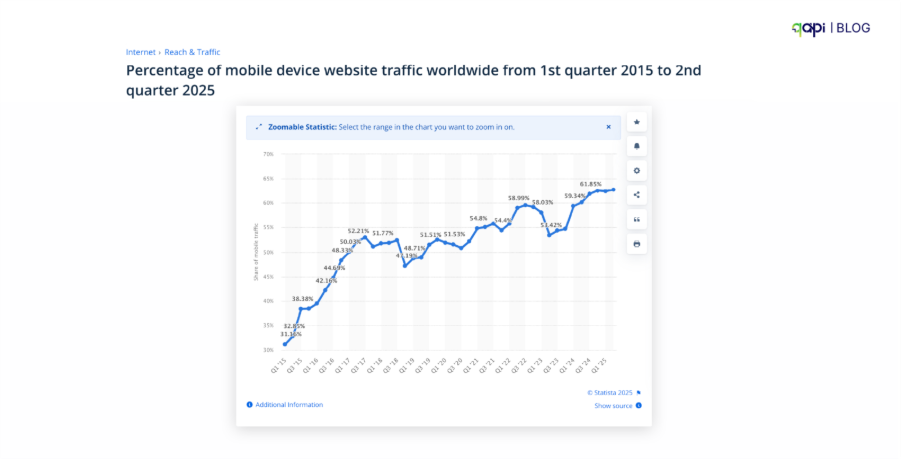
Global mobile traffic 2025| Statista
Your mobile app might have a beautiful UI, do what it’s built for, and be live in the app store. But you get a review that a user is abandoning the app within a few days.
Not ideal feedback, right?
We’re in a competitive market where users abandon an app if it takes more than 3 seconds to load. Performance testing for mobile apps is not just another item on your checklist; it’s the safeguard measure for your user experience and product life.
But testing mobile performance is tricky. It’s not just about how fast your server responds. It’s a complex interplay of the user’s device, their network connection, and your backend services.
This guide will help you understand why performance testing tools for mobile apps are important, and we’ll break down:
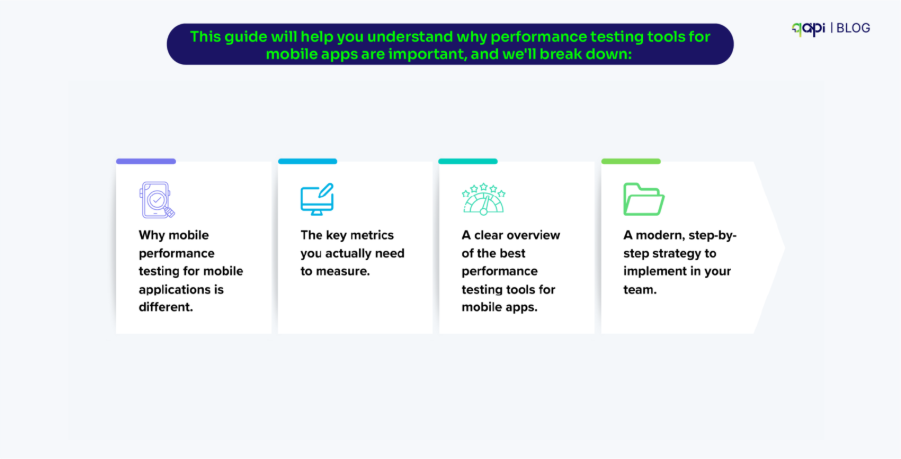
• Why mobile performance testing for mobile applications is different.
• The key metrics you actually need to measure.
• A clear overview of the best performance testing tools for mobile apps.
• A modern, step-by-step strategy to implement in your team.
Let’s dive in.
Why Mobile Performance Testing is Different (And More Important Than Ever)
Mobile devices come in thousands of shapes and sizes, which makes consistent testing almost impossible. This fragmentation is especially true for Android, which has more than 24,000 device models in 2025 and holds around 70–72% of the global market. iOS is more controlled with 28–29%, but both platforms update and behave differently. Because new models keep appearing every year, most QA teams end up testing only 10–20% of real devices, unless they use large cloud device farms—leaving many untested phones vulnerable to crashes.
Different OS versions make things even harder. Android users run many versions at the same time—some even 10+ years old—while iOS is more consistent, with over 81% of users on iOS 17 or newer. Still, each OS handles rendering, animations, and memory differently, so versions need to be tested separately.
Phones also slow down due to heat and battery limits. When devices get hot or run low on power, they automatically reduce CPU speed—sometimes cutting performance by 50%. Older devices (about 25% of the market in 2025) struggle even more. Testing on real devices matters because throttling and battery issues often occur 40% more often on phones than in desktop simulators.
The Network: 3G, 4G, 5G, Wi-Fi, Latency, and Packet Loss
If devices are unpredictable, networks are even more chaotic. Real users jump between weak 3G spots (still 20% of rural traffic), busy 4G towers, and fast but inconsistent 5G networks (now 63% adoption in cities). Public Wi-Fi can slow down apps with 200ms delays, and even good 5G often delivers 20–50ms latency instead of the promised 10ms.
Latency and packet loss quietly break apps without anyone noticing why. Even modern 5G networks can see 5–10% packet loss during busy hours. Travelers face even worse conditions, with roaming causing up to 15% loss as their signal shifts between carriers.
This is why mobile performance testing must simulate real network conditions—slow 3G, unstable Wi-Fi, high latency—because these environments reveal more problems than a stable office connection.
The Backend: Throughput, Concurrency, and Traffic Spikes
Mobile apps rely heavily on backend APIs, and these APIs need to handle large amounts of traffic smoothly. Slow or poorly optimized endpoints can cause response times to jump from 200ms to several seconds, which frustrates users—most will leave an app if it takes more than 3 seconds to respond.
When many users are active at once, concurrency causes even more issues. A single mobile app may trigger 10 or more API calls at the same time, and underpowered servers can start failing at just 1,000+ users, causing 20–30% of requests to break.
Traffic spikes—like a flash sale or viral post—are even more dangerous.
A sudden 10x increase in users can overload servers, causing timeouts and major slowdowns. For e-commerce apps, this can cost over $100K per hour* in lost sales. This is why backend teams use load-testing capability from qAPI to simulate high traffic and uncover weak points before real users experience them.
Let’s say you’re testing a web app on a desktop with a stable Wi-Fi connection is one thing. Testing a mobile app is another beast entirely. You are battling what we call the “Triangle of Unpredictability”: the device, the network, and the backend.
Diagram: A Venn diagram showing three overlapping circles labeled “Client-Side (Device),” “Network,” and “Server-Side (API).” The middle center is labeled “User Experience.”
1. The Client-Side (The Device): Is your user on the latest iPhone or a 3-year-old Android with limited memory? A slow app on a high-end device is a performance bug. A fast app that drains the battery is also a performance bug.
2. The Network: Your user could be on a stable 5G connection one minute and a spotty 3G network in a subway the next. Your app must be resilient to high latency and packet loss.
3. The Server-Side (The APIs): These are the workhorses. If your APIs are slow to deliver data, your app will feel sluggish, no matter how optimized the client-side code is.
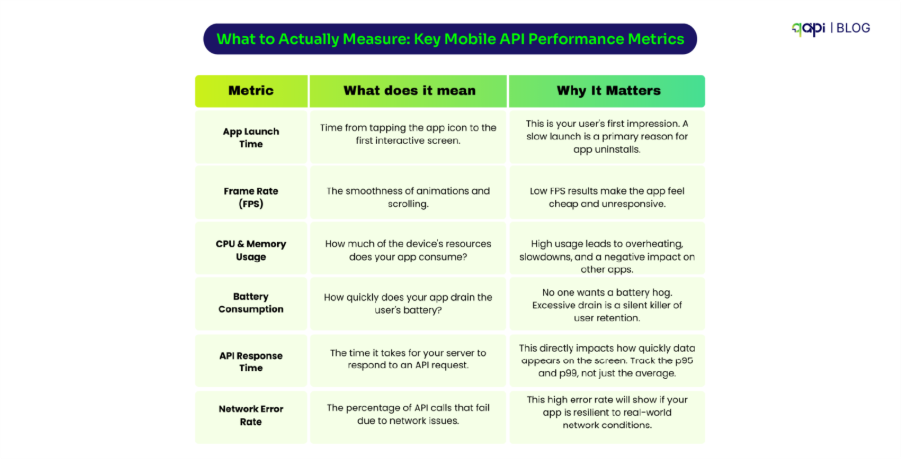
What to Actually Measure: Key Mobile API Performance Metrics
“Make the app faster” is just a blind comment a team can make. You need to measure specific, actionable metrics. Here are the ones that matter most:
5 Mobile Performance API Tests Every Team Should Run
Different tests uncover different problems—slow backend APIs, crashes on older devices, long-term memory leaks, or failures during traffic bursts. Below is a deep yet easy-to-understand breakdown of the five-core performance API test types every mobile team should run in 2025 and 2026.
1️⃣ Load Testing
Load testing shows how your app and APIs behave under expected real-world usage, while 90% of the teams run these tests but they run it at the basic. For example:
• 1,000 concurrent users checking out
• A small chunk of 500 users logging in at the same time to check results
• A typical day’s traffic pattern replicated strategically
It will help answer:
• Will the app stay responsive during normal work hours?
• Are the APIs fast enough for real-world traffic?
• Do any endpoints slow down at even at medium volume?
Mobile apps generate more API calls per user session than web apps. Example, let’s say:
• Home screen loads about 6–12 API calls
• Your feed loads about 4–8 API calls on average.
Because even normal traffic can stress the backend more than teams expect. So, you need to test it.
How qAPI Supports Load Testing
• Reuse real functional user journeys as load scenarios (no need to write the test scripts).
• Run load tests that simulate hundreds to thousands of virtual users hitting the same workflows.
• Measure API latency, throughput, and error rates at scale.
• Auto-correlate slow APIs to specific steps in the mobile journey.
• Visualize p95, p99, and failure trends in real time.
2️⃣ Stress Testing (Pushing the System Beyond Limits)
We recommend the team to go deeper into their stress testing so we can intentionally break the system to find:
• The maximum capacity
• The failure point (when APIs start timing out)
• How gracefully the system recovers
As mobile apps experience unpredictable bursts:
• Holiday traffic
• Viral features
• Unplanned push-notification spikes
What we have seen is APIs fail under stress, the mobile UI becomes slow or unresponsive, even if the app itself is fine.
How qAPI Supports Stress Testing
• Ramp users far beyond normal load until APIs begin to degrade.
• Automatically detect when throughput drops, latency spikes, or failures increase.
• Provide clean reports showing exactly where and why breakpoints occur.
• Highlight the endpoints that fail first which will help teams prioritize fixes.
3️⃣ Spike Testing (The only way to check traffic surges)
Spike testing applies sudden, unpredictable traffic movements that mimic real-world scenarios that happens on:
• Flash sales
• Live event ticket drops
• Notifications to millions of users
• Viral content surges
• App relaunch after downtime
Most mobile outages happen not during “high traffic,” but during those traffic spikes.
Mobile users tap repeatedly, reload pages, retry logins, or refresh feeds—all multiplied by thousands of people at the same moment spread across different time-zones.
How qAPI Supports Spike Testing
• Pay as you go model, choose how many users you want to test(e.g., 100 → 5,000 VUs in seconds).
• Compare system behavior before, during, and after the spike.
• Capture failure bursts that only appear under sudden pressure.
• Visual dashboards for spike-induced: by timeouts, queuing delays, memory saturation or cascading failures
4️⃣ Endurance Testing (Long Duration / Soak Tests)
Endurance testing runs the app or API under moderate traffic for hours (sometimes days) so that it can find out:
• Memory leaks
• Resource exhaustion
• CPU performance
• Slow degradation that isn’t visible in short tests
It will help us answer questions like:
• To check if performance degrades after 2 hours?
• Does memory usage increase slowly over time?
• Do APIs remain stable overnight?
As mobile device issues emerge only under long-term use:
• Apps that leak memory keep crashing.
• Background processes consume CPU.
• APIs start slowing down with persistent sessions.
These problems are invisible in a typical 10-minute test, which teams tend to trust.
This is where qAPI Supports Endurance Testing
You can run API workflows for hours without manual setup.
• Monitor long-term metrics and track:
• memory growth
• latency creep
• 401/403 token expiry issues
• connection resets
• Automatically track trend lines across the entire test window.
• Compare beginning vs. end-of-test performance.
5️⃣ Scalability Testing (How Well the System Grows)
Scalability testing checks whether your backend and infrastructure can scale up or down gracefully when traffic changes.
Key questions that you need to answer:
• If traffic doubles, does latency double—or stay stable?
• Does autoscaling kick in fast enough?
• Does the system scale horizontally or vertically?
• What are the cost implications of scaling?
Mobile users can spike in unpredictable ways, without us even guessing it by:
• Location-specific traffic during events
• Seasonal activity changes
• Social-media-driven boosts
• Regional behavior shifts
How qAPI Supports Scalability Testing
• Generate traffic patterns that increase gradually over time.
• Show how latency and error rates shift as load grows.
• Compare performance at 1x, 2x, 5x, and 10x load.
• Produce visual insights into scaling thresholds and cost trade-offs.
• Integrate into CI/CD for ongoing scalability checks.
A Modern Strategy for Mobile App Performance Testing
Here is a practical, step-by-step plan you can implement with your team.
Step 1: Define Your Performance Budget Before you test, set clear, measurable goals. For example:
• Client-Side: App launch time must be under 2 seconds.
• Server-Side: The p95 response time for the /login API must be under 400ms.
Step 2: Start with API Performance (Shift-Left) Don’t wait for a UI. As soon as your API contract is defined, use a tool to load test your critical endpoints. A slow API will always result in a slow app. Find and fix these backend bottlenecks first.
Step 3: Integrate Client-Side Profiling During Development Encourage your mobile developers to use Xcode Instruments and Android Profiler as part of their regular workflow to catch major CPU or memory issues before they’re even merged.
Step 4: Run Automated End-to-End Performance Tests This is where a unified platform shines. Set up a CI/CD job that runs a key user journey (e.g., login → browse → add to cart) on a few representative real devices while simultaneously simulating backend load with virtual users. This is the most realistic test you can run.
Step 5: Monitor in Production No test environment can perfectly replicate the real world. Use APM (e.g., Datadog, New Relic) and mobile-specific monitoring tools to track the performance your actual users are experiencing. Feed this data back into your testing strategy.
Conclusion: Adapt and Improve
Building a high-performance mobile app is a complex challenge, but it is achievable. It requires moving beyond siloed tools and adopting a unified strategy that considers the device, the network, and the backend together.
By focusing on the right metrics, choosing modern mobile application performance testing tools, and implementing a holistic testing strategy, you can stop guessing and start engineering a fast, reliable, and delightful user experience.
qAPI is your trusted API performance testing tool, try now.
FAQs
Q: What is the best free tool for mobile performance testing? A: For client-side profiling, the built-in Xcode Instruments and Android Profiler are the best free options. For backend load testing, JMeter is a powerful open-source choice, though it has a steep learning curve.
Q: How do you test for battery drain? A: Both Xcode Instruments and Android Profiler have built-in “Energy Log” or “Energy Profiler” tools that allow you to measure your app’s impact on the battery over a period of time.
Q: JMeter vs. qAPI for mobile API load testing? A: JMeter is a powerful, flexible open-source tool but requires significant technical expertise to script and maintain complex tests. qAPI is a unified, no-code platform that allows you to build both functional and performance tests much faster and provides correlated client-side metrics that JMeter cannot.