

Give yourself a break before you read this blog. Let’s take a walk a few years back, to a time when you would struggle to get answers to your specific research. Didn’t you wish you had a way to find all the answers you need within a click, all in one place?
In 2026, mobile applications don’t just “search” anymore; they solve.
Whether it’s generating the perfect recipe based on the three ingredients left in your fridge, syncing health metrics across a dozen wearable devices, or providing real-time AI-driven answers to complex queries, mobile apps have become the essential “operating system” for daily life.
However, powering every one of these seamless interactions is the API—the backend engine that drives the data flow.
API testing for mobile applications is no longer just a “check-the-box” activity; it is the process that ensures these critical services perform reliably under messy, unpredictable, real-world conditions. Without robust testing, the “magic” of 2026 quickly turns into a frustrating user experience.
How Do I Pick the Right Mobile App Performance Testing Tool?
Let’s answer the real question: Why do you and your teammates spend so much time testing APIs, only to see a drop in user engagement? That shouldn’t be the case.
You are doing what you know best: monitoring latency, tracking error rates, and simulating loads. Yet performance still falls short during peak usage, users complain about lag, and retention suffers. –
The short answer? Your tools and the metrics you’re prioritizing might be holding you back.
The Five Roadblocks to Performance
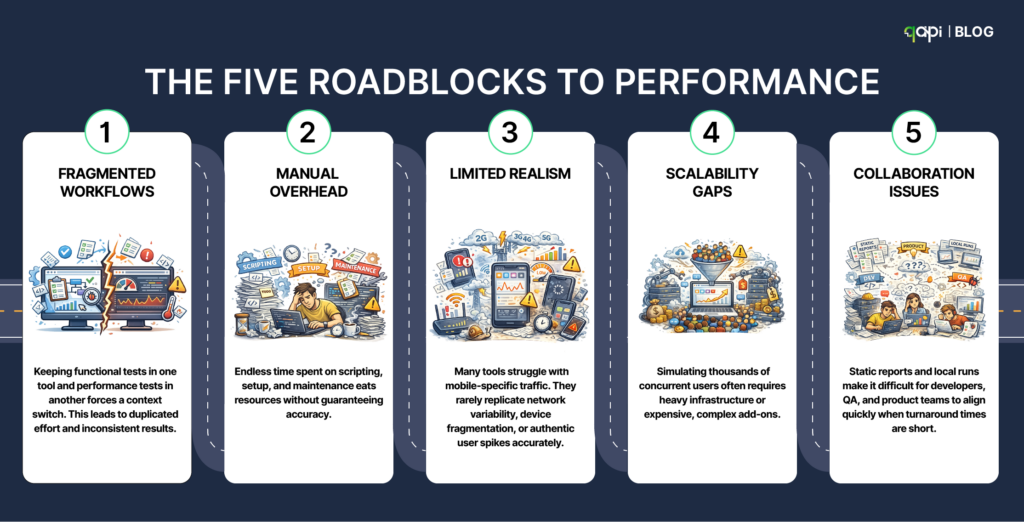
- Fragmented Workflows: Keeping functional tests in one tool and performance tests in another forces a context switch. This leads to duplicated effort and inconsistent results.
- Manual Overhead: Endless time spent on scripting, setup, and maintenance eats resources without guaranteeing accuracy.
- Limited Realism: Many tools struggle with mobile-specific traffic. They rarely replicate network variability, device fragmentation, or authentic user spikes accurately.
- Scalability Gaps: Simulating thousands of concurrent users often requires heavy infrastructure or expensive, complex add-ons.
- Collaboration issues: Static reports and local runs make it difficult for developers, QA, and product teams to align quickly when turnaround times are short.
The result?
Poor API performance drives massive user loss. In fact, 53% of mobile users abandon apps that take longer than 3 seconds to load, making latency, throughput, reliability, and scalability critical for survival.
The Questions You Aren’t Asking (But Should Be)
Most teams focus on obvious features like load capacity or scripting languages. To truly scale, you need to dig deeper:
- Does it unify functional and performance testing? Can one tool handle both seamlessly so you don’t have to maintain separate suites?
- How much manual work is truly eliminated? Does the tool have the ability to reduce some burden or are you still handwriting scripts?
- Can it simulate real mobile chaos effortlessly? Can it mimic variable networks, device differences, and sudden spikes without requiring custom coding?
- Is scaling simple and cost-effective? Can you instantly scale virtual users, or do you have to provision and manage servers yourself?
- Does it improve team collaboration? Does it improve the way teams interact and improve their turnaround time?
- Will it grow with you? Can it handle the transition from a small startup to an enterprise-level ecosystem without forcing a tool migration later?
Curious to know which tool checks all these boxes? Teams using qAPI report 60% faster testing cycles and dramatically better mobile app performance.
Why API Testing Is Essential for Mobile App Success
Your mobile app is only as strong as its APIs. A slow or unreliable backend will turn your polished UI into a frustrating experience.
The problem is that many teams test only what they can see. They polish animations, tune layouts, and squash UI bugs. But the “heartbeat” of a mobile app—and its most common point of failure—lies in:
- Multiple API calls
- Authentication tokens
- Network reliability
- Backend performance
When these APIs misbehave, the UI is the least of your problems.
Let’s look at the specific dimensions API testing brings to the development process.
- Latency Breaks Flows
In the mobile world, latency isn’t just a number on a dashboard; it’s the difference between a completed checkout and an abandoned cart.
If a user taps “Pay” and a slow API call blocks the entire screen, the app feels frozen. Users don’t see “latency”—they see a broken app. Most teams miss this because they test for success responses (status 200) but ignore response times under real-world pressure. In production, those extra milliseconds add up quickly, especially across chained APIs.
Google’s research continues to show that even micro-delays have a massive impact on user abandonment (source).
- Mobile Networks Expose API Assumptions
APIs are usually built and tested in “perfect” conditions: stable office Wi-Fi and low-latency environments. But your users live in the real world:
- They switch from Wi-Fi to 5G.
- They lose signal in elevators.
- Packets drop, and requests need to retry.
If APIs aren’t tested for retries, idempotency, and partial failures, you get duplicate transactions, corrupted data, and the “dreaded” endless loading screen.
According to the Ericsson Mobility Report, network variability contributes to a significant portion of failed mobile sessions (Ericsson). Users rarely blame the network—they blame the app.
- API Payloads Quietly Drain Performance
A heavy API response does more than just slow down the app; it actively degrades the device’s health:
- Data Usage: Expensive for users on limited plans.
- Battery Drain: Constant radio activity for large downloads kills battery life.
- Thermal Throttling: Large payloads force the CPU to work harder, triggering OS-level slowing.
Older devices feel this pain first.
Yet most teams never test payload size, over-fetching, or response efficiency. They validate correctness — not cost.
GSMA research shows inefficient mobile data usage directly impacts engagement and retention.
If your API returns more than the screen needs, your users pay the price.
- Authentication APIs Fail in the Edges
Authentication flows usually work fine during the “happy path” of logging in. The real failures happen at the edges:
- Tokens expire in the middle of a session.
- Refresh calls fail under heavy load.
- Chained APIs reject requests inconsistently due to sync issues.
The result is random logouts that feel like “bugs” to the user. The Verizon Data Breach Investigations Report consistently highlights authentication issues as a top API risk. Testing auth once at login isn’t enough; you must validate the entire token lifecycle under stress.
- Scale Reveals Problems Too Late
Data is the purest form of proof. Most APIs behave perfectly with ten test users or a small beta group. But growth changes the rules. When traffic spikes during a launch, queues back up and dependencies fail.
- App Annie reports that the majority of high-impact app failures occur during growth events, not during development (Business of Apps).
If your APIs aren’t load-tested independently of the UI, you’re essentially waiting for your users to tell you when you’ve reached your limit.
- Offline & Sync Issues Destroy Trust
Imagine you and a teammate working on the same test case. You add new fields, update endpoints, and refine the dataset.
Later, you realize their changes overwrote yours entirely. You’ve got no alerts, no warning, but still you lost your entire progress.
Users might see missing updates, overwritten changes, or corrupted data across devices, as in note-taking apps where offline edits don’t sync properly.
This destroys trust instantly. A study by the Mobile Ecosystem Forum (2025) found that 40% of mobile app complaints involve sync issues. Offline support is one of the hardest problems in mobile development. Without rigorous API testing:
- Data overwrites itself silently.
- Conflicts are never resolved.
- Sync failures go undetected until the user reopens the app to find their data gone.
Once trust is lost, it is rarely regained.
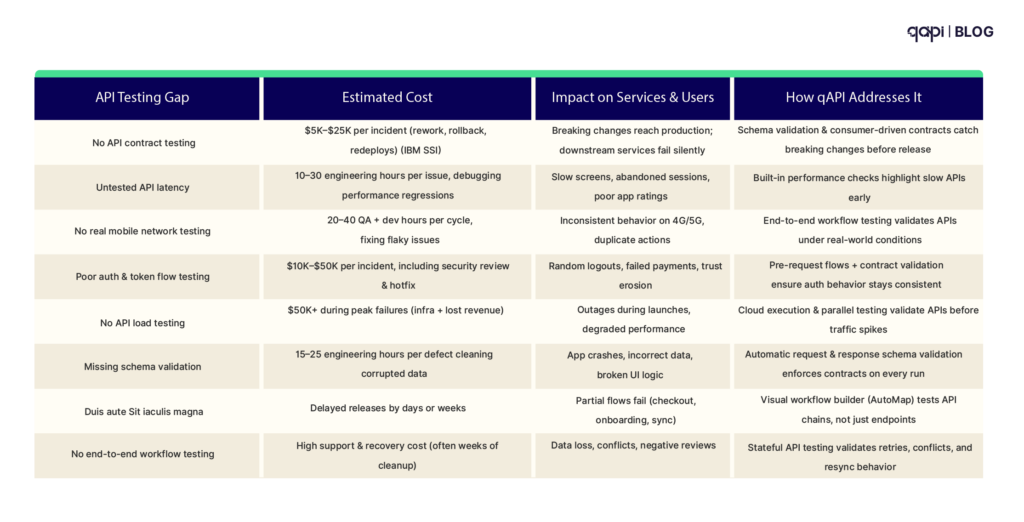
The Real Cost of Ignoring API Testing
Every row in the table below represents an avoidable cost. In 2026, mobile performance is no longer decided by UI polish; it is decided at the API layer.
Why This Matters to Your Team
Every screen load, tap, and background sync depends on APIs behaving predictably under real-world conditions—scale, network instability, and evolving contracts. When APIs fail, no amount of frontend optimization can save the user experience.
The Takeaway
Mobile users don’t care about your architecture. They care about whether the app works — every single time.
Avoid These Failures with qAPI
Most teams don’t struggle because they lack tools. They struggle because their tools don’t reflect how mobile systems actually behave.
Relying only on mobile app performance testing tools open source or basic mobile application performance testing tools open source can help at an early stage—but these tools often focus on isolated performance checks, not real API-driven workflows.
They rarely catch issues like schema drift, chained API failures, or data inconsistency across sessions.
Similarly, many performance testing tools for Android apps and performance testing tools for Android mobile applications measure screen-level behavior. They miss what’s happening underneath: API latency, contract breaks, and sync issues.
This is where qAPI changes the approach.
qAPI helps teams:
- Test complete workflows: Move beyond testing endpoints in isolation to testing the entire user journey.
- Validate contracts continuously: Ensure that a change by the backend team doesn’t break the mobile experience.
- Detect regressions early: Identify performance dips before they reach a single user.
- Scale effortlessly: Run massive tests without heavy scripting or complex infrastructure management.
By shifting testing to the API layer—and making it part of every run—teams stop reacting to production issues and start preventing them.
The result? Faster releases, fewer incidents, and mobile apps that feel consistently fast and reliable—no matter the device, network, or scale.