
If you are in finance, healthcare, or tech, then you’ve already been fed enough on the use cases of APIs and how they’re changing the space you’ve been working in.
We’re now in a race to ship/build/use AI-powered features.
Engineering teams have quietly embraced a new checklist, one that feels uncomfortably familiar to anyone who has watched a production outage unfold in real time.
In recent months, as applications have grown into smaller meshes of microservices, third-party integrations, and AI agents talking to other AI agents, the humble API endpoint has become the thing that holds everything together — or doesn’t.
For developers, this is more like a debate than a daily frustration. Because by the time a bug shows up in the UI, it has usually been quietly hiding in an API for weeks — a missing field, an undocumented error, an edge case that only breaks when two services talk to each other at exactly the wrong moment.
The testing setups that once felt good enough — a Postman collection, a handful of curl commands, some manual spot-checks before release are now starting to show their cracks when your system has dozens of endpoints changing every sprint.
This is a serious problem, and this has to change.
In 2026, shipping without a real API testing practice is like skipping code review: plenty of teams do it, nobody brags about it, and everyone pays for it eventually.
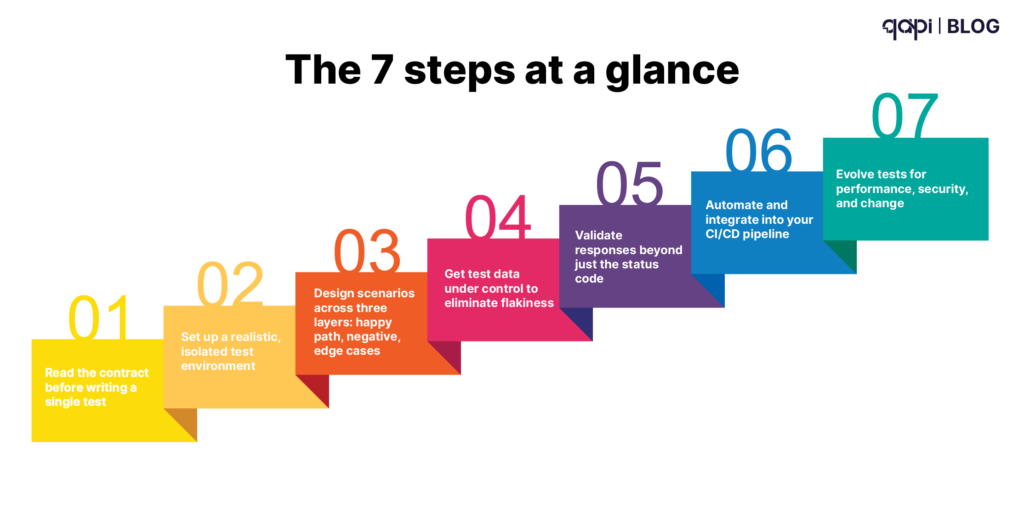
The 7 steps at a glance:
- Read the contract before writing a single test
- Set up a realistic, isolated test environment
- Design scenarios across three layers: happy path, negative, edge cases
- Get test data under control to eliminate flakiness
- Validate responses beyond just the status code
- Automate and integrate into your CI/CD pipeline
- Evolve tests for performance, security, and change
This guide gives you a practical 7-step framework for testing API endpoints that fits how modern teams actually build and ship software.
Along the way, you’ll see where traditional tools are enough, and where intelligent platforms like qAPI start to matter — especially when you’re tired of brittle scripts and constant maintenance overhead.
Step 1: Start With the API Contract, Not the UI
The first step in API endpoint testing is understanding what the endpoint claims to do — before you open Postman or write a single assertion.
For each endpoint, we need to document three things:
1. The basics
• URL, HTTP method, and purpose — for example, POST /users creates a new user account
2. Request requirements
• Which fields are required vs. optional?
• What types and formats are expected? (Email strings, ISO 8601 dates, enum values, UUIDs)
3. Response models
• Success codes: 200, 201, 204
• Error codes: 400, 401, 403, 404, 409, 500
• Response body schema for both success and failure paths — not just the happy path
For qAPI users, this is where things get interesting: qAPI can directly read your OpenAPI spec and traffic to infer what endpoints exist and how they behave.
Then suggest a starting set of tests. You’re no longer staring at a blank page trying to write up test cases from scratch. QAPI helps you automate this process entirely.
Step 2: Set Up a Realistic Test Environment
Good tests in the wrong environment is a misleading step and delays delivery. A test suite that passes against a toy mock but fails in staging isn’t protecting you from anything. So to beat this you need to start with a:
A non-production environment Staging, QA, or a dedicated sandbox that mirrors production in configuration. Testing directly on production is asking for data leaks, accidental side effects, or real customer impact.
Proper authentication for every role API keys, OAuth tokens, or JWTs for each access level — admin, standard user, read-only service account. Keep test credentials completely separate from real customer accounts.
A clear plan for external dependencies Decide upfront: when do you call real third-party APIs (payment sandboxes, SMS providers), and when do you mock or stub to avoid rate limits and flakiness?
Logging and observability Access to request logs, error logs, and ideally correlation IDs or trace IDs so you can follow a failing request through microservices. Without this, debugging test failures becomes more like a lucky draw.
Step 3: Design Test Scenarios Across Three Layers
Most teams stop at “does a valid payload return a 200 with the right JSON?” That’s just increasing your risk appetite — not a test strategy.
For every endpoint, you need to think in three layers.
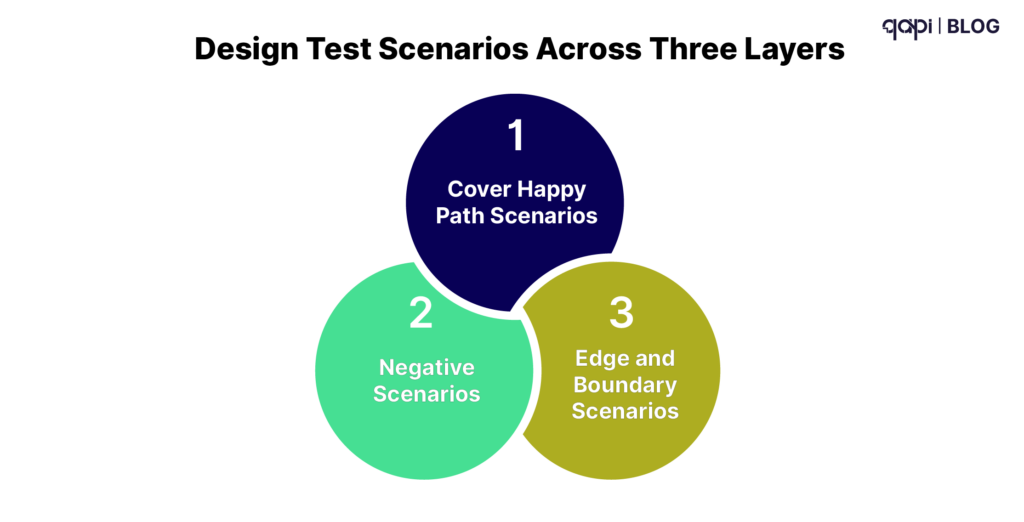
Layer 1: Cover Happy Path Scenarios
The intended use cases — what the endpoint was built for:
• Valid input → correct success status code
• Response body matches the expected schema and field values
• Side effects happen correctly (database records created, downstream events fired)
Example for POST /users: send a valid email and password, assert you get 201 Created, a Location header, and a user object in the body.
Layer 2: Negative Scenarios
These prove your API fails safely and that the errors are handled intentionally, not accidentally:
• Missing required fields → 400 with a clear error message
• Invalid formats (malformed email, string where integer expected) → 422
• Wrong HTTP method (PUT where only POST is accepted) → 405
• Invalid, expired, or missing auth tokens → 401
• Business rule violations (duplicate email, conflicting resource state) → 409
Each scenario should return the correct error code with a proper error message — not a stack trace, not a 500 that swallows the real problem. Each detail should help us understand the issue, no matter which team handles it.
Layer 3: Edge and Boundary Scenarios
This is where production bugs hide and where all the major efforts should be diverted:
• Minimum and maximum field lengths (what happens at exactly 255 characters?)
• Very large payloads (does your API handle a 10MB JSON body gracefully?)
• Special characters and unexpected encodings
• Values at the exact boundary of a business rule — balance exactly $0.00, age exactly 18
• Rate limit behavior: what happens on request 101 when the limit is 100/minute?
A useful exercise we recommend for teams is to ask: “What’s the weirdest legitimate value someone could send here — and what’s the most dangerous malicious one?” Generate test cases for those first.
Step 4: Get Test Data Under Control
Flaky tests are almost always a test data problem. If your test data is shared, stale, or environment-dependent, your test results are unreliable — and an unreliable test suite is worse than no suite at all, because it trains your team to ignore failures.
You want data that is representative of real usage, isolated so tests don’t interfere with each other, and repeatable so the same test produces the same result every time.
Four practical rules:
- Use fixtures for common scenarios. Store representative JSON payloads in version control alongside your tests. Fixtures are the ground truth for what “valid input” means.
- Parameterize everything environment-specific. Base URLs, auth tokens, and resource IDs come from configuration — never hard-coded into test files.
- Avoid shared state. Each test should create its own data and clean up after itself. If you must share state across tests, build explicit setup and teardown routines and document them.
- Have a reset strategy. Cron jobs or scripts that restore your test database to a known state. Idempotent operations wherever possible.
qAPI can discover realistic test data from your existing API traffic and logs, then reuse it in tests. That means you aren’t inventing synthetic payloads that don’t reflect how your API is actually called in the wild.
Step 5: Validate Responses — Well Beyond “200 OK”
Sending the request is the easy part. The value is in what you assert.
Validate at four levels for every scenario
- Status codeIs the code intentional, or just the frameworkdefault? A 200 that should be a 201 is a bug. A 500 that should be a 400 is a worse bug.
- HeadersContent-Type: application/json, security headers, CORS headers, cache-control directives. Headers are easy to neglect andfrequently break clients in subtle ways.
- Response body
• Schema: required fields present, types correct, no unexpected nulls •Business logic: totals add up, statuses are valid, relationships are consistent •Data hygiene: no internal IDs, secrets, or PII leaking into the response
- Response timeEven a basic assertion — “this core read endpoint must respond in under 500ms” — catches regressions before they reach users. Youdon’t need a full load testing suite to do this.
A concrete POST /users happy-path checklist:
• Status is 201
• Body contains id, email, createdAt
• email field exactly matches the submitted value
• Follow-up GET /users/{id} confirms the user actually exists in the system
Step 6: Automate and Wire Tests Into Your CI/CD Pipeline
Manual API testing is fine for local exploration. It’s not a quality strategy.
The moment a test lives only in someone’s Postman collection on their laptop, it stops being a safety net and starts being a liability.
Structure your test suite into three tiers:
• Smoke tests — A small, fast set that runs on every single commit. High signal, low cost. If smoke fails, the PR doesn’t merge.
• Regression suite — Broader coverage that runs nightly or on release branches. Catches subtler regressions that aren’t worth running on every commit.
• Extended / performance — Full coverage plus timing assertions. Runs pre-release or on a schedule.
Wire tests into your pipeline:
| Trigger | Suite |
|---|---|
| Every pull request | Smoke tests |
| Merge to main | Smoke + partial regression |
| Nightly build | Full regression + performance baseline |
| Pre-release tag | Full suite + extended security checks |
Make failures visible and actionable:
• Test reports with clear pass/fail status, logs, and the exact request/response that failed
• Slack or Teams alerts when critical suites fail — not just a red CI badge that people learn to ignore
• Defined ownership: someone specific gets paged when an API test breaks
qAPI is built to plug into this pipeline layer. Because it’s change-aware, it tells you not just that a test failed, but which endpoints changed and which tests are now affected — so you’re triaging the right thing, not chasing false alarms.
Step 7: Evolve Your Tests for Performance, Security, and Change
API testing isn’t a project with a finish line. APIs change, risks change, and your tests need to keep pace — or they decay into expensive noise.
Add performance awareness
• Track p50/p95 response times for critical endpoints over time — not just point-in-time snapshots
• Define simple SLAs: “GET /orders/{id} must respond in under 300ms in staging”
• Alert on timing regressions after deploys or infrastructure changes
Full load testing (k6, JMeter, Gatling) belongs in a separate suite, but even basic timing assertions embedded in your functional tests catch expensive regressions early.
Add security basics
You don’t need a dedicated security engineer to cover the fundamentals:
• Missing or invalid auth tokens return 401 — not 200, not 500
• Users cannot access each other’s data (test this explicitly across roles — don’t assume authorization works)
• Simple injection payloads or malformed JSON return safe error messages, not stack traces or database errors
Use past incidents and findings from your security team as seeds for new negative test cases. Every bug that hit production should become a regression test.
Stay change-aware
New fields, new status codes, new flows — all of them require:
• Updating your endpoint profiles from Step 1
• Adjusting test data and scenario assumptions
• Adding tests for new failure modes
The real challenge is that no team has time to manually audit every endpoint after every change. This is where automated contract monitoring earns its keep. qAPI watches for changes in API behavior and contracts, highlights unexpected drift, and helps you update tests without starting from scratch.
The Complete Framework: At a Glance
| Step | What you do | What you prevent |
|---|---|---|
| Contract | Profile each endpoint's inputs, outputs, and status codes | Testing against wrong assumptions |
| Environment | Isolated staging with real auth and observability | False confidence from toy mocks |
| Scenarios | Happy path, negative cases, and boundary conditions | Bugs that only surface under unusual conditions |
| Test data | Fixtures, isolation, and a reset strategy | Flaky tests from shared or stale state |
| Validation | Status code, headers, body schema, response time | Bugs hiding behind a 200 OK |
| CI/CD | Automated suites triggered on every change | Manual testing gaps and late-stage catches |
| Evolution | Performance baselines, security checks, contract monitoring | Test suites that rot as the API grows |
If your current workflow is “a handful of Postman collections, some CI jobs, and a lot of manual cleanup,” this framework is your roadmap out of that.
And if you want to see what it looks like when a platform handles the hardest parts — maintenance, change detection, and intelligent test generation — that’s when it’s worth seeing qAPI in action on your own endpoints.
FAQs
Begin by understanding the contract for that endpoint: note its URL and HTTP method, which fields are mandatory or optional, the expected request and response formats, and the success and error status codes described in your API spec or documentation.
Prioritize endpoints that are missioncritical (payments, login, core user actions), customerfacing, or tied to recent bugs and outages, then gradually extend coverage to less risky or internal endpoints.
In addition to the status code, check key headers (such as Content-Type), the response body structure and required fields, data types and ranges, business logic (like totals and states), and whether the response time stays within acceptable limits.
Keep tests independent, use predictable test data and configuration, mock or stub unstable third-party services, rely on condition-based checks instead of fixed waits, and regularly clean up or rewrite tests that fail intermittently.
Run a fast smoke set of crucial endpoint tests on every pull request, a larger regression suite on main or prerelease builds, and full or heavier checks (including performance or security tests) on scheduled runs in a staging environment, all automated through your pipeline.