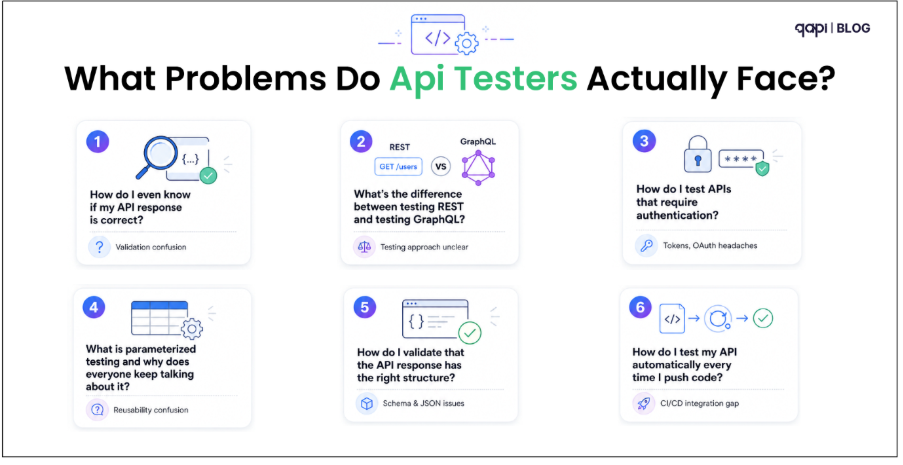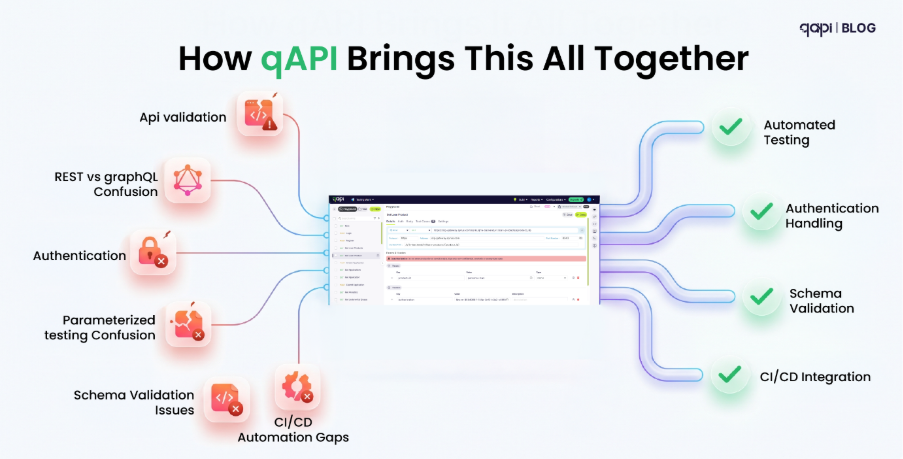
The Context 

Passing individual API tests doesn’t mean your workflows work. This post covers 5 practical ways to get the most out of API workflow testing — from chaining calls correctly to making your tests survive real-world change Discover how qAPI streamlines these complex processes, making execution significantly less painful. 

Ask any QA engineer to name their primary frustration, and you’ll likely hear a variation of the same answer:  

“My tests pass in isolation but the workflow breaks in staging.”  

It shows up constantly across communities like r/QualityAssurance and r/softwaretesting.  

An engineer runs their suite, the dashboard stays green, and confidence is high—until the push to staging. Suddenly, a critical multi-step flow collapses. 

The problem is almost never a broken endpoint; It’s always a broken sequence. The order of calls is incorrect. A token from step one wasn’t passed to step three. Or a status change in one service wasn’t reflected in another quickly enough to satisfy a dependency. Individual endpoint tests are just that — individual. They tell you each piece works in isolation. They say almost nothing about whether those pieces work together, in the right order, under realistic conditions. 

That’s what API workflow testing is for. And most teams either aren’t doing it, or they’re doing it in a way that breaks the moment the API changes. 

Here are 5 ways to actually get it right — and how qAPI helps you get there without rewriting everything from scratch every sprint. 

  1. Stop Testing Endpoints. Start Testing Journeys.

The most common mistake in API testing isn’t technical — it’s conceptual. Teams build a test for each endpoint and call it done. POST /users passes. GET /orders passes. POST /payments passes. Ticket closed. 

But real user flows don’t work like that. A user registers, gets a verification email, confirms their account, logs in, browses products, adds to cart, and checks out. Each one of those actions is an API call. Each one depends on the output of the one before it. The ID returned by POST /users becomes the input to GET /users/{id}. The order ID from POST /orders has to be passed to POST /payments. Break the chain at any link and the whole workflow silently fails. 

The fix: Map your user journeys before you write a single test. For every critical business flow in your product — signup, purchase, booking, whatever your core workflows are — draw out the sequence of API calls involved. Then write tests for the sequence, not just the endpoints. 

In qAPI, you can build these workflow chains visually, linking calls together and passing response values from one step to the next automatically. You define the journey once. qAPI handles the data threading — extracting IDs, tokens, and values from each response and injecting them into the next call without manual scripting. For teams that have spent hours debugging “why is step 4 failing with a 404,” this alone removes a huge class of problems. 

2. Chain Your Calls — And Actually Validate What Passes Between Them

Chaining API calls is step one. Validating what moves between them is step two — and most teams skip it entirely. 

Here’s a common scenario: POST /orders returns a 201 with an order ID. That ID gets passed to PATCH /orders/{id}/confirm. The confirm call returns a 200. Test passes. But nobody checked whether the order ID that came back from step one was actually valid, or whether the status in the database actually changed, or whether the confirmation response contained the right fields to trigger the next downstream action. 

You’re asserting “it didn’t crash.” You’re not asserting “it did the right thing.” 

What to validate at each step in a chain: 

  • The response status is the right status — not just any 2xx 
  • The values being extracted and passed forward actually exist in the response (don’t assume the field name or structure is stable) 
  • The state of the system changed the way it should — sometimes this means a follow-up GET call to verify, not just trusting the response 
  • Error responses in the middle of a chain are caught and handled — not silently swallowed 

This is where most hand-rolled test scripts fall down. Developers wire up the happy path, it works, the test stays green, and six months later someone adds a new field to the response schema, the extraction breaks, and suddenly POST /payments is receiving a null order ID and nobody knows why. 

qAPI handles this with response mapping and inline assertions at each chain step. You can define exactly what fields to extract, validate that they meet expected conditions, and only pass them forward when they do. If an intermediate step returns something unexpected, the workflow fails immediately at that step — with the exact request, response, and assertion that broke — rather than three calls later with a confusing error. 

You should test what’s actually happening in your system, not just whether your API is alive. 

  1. Use Realistic Data — Not the Same Three Test Fixtures

There’s a quiet epidemic in API testing: everyone uses the same test data. The same email address. The same user ID. The same product SKU. It works for the first test. It works for the second. By the time you have thirty tests all creating a user with test@example.com, they’re stepping on each other, failing intermittently, and you’re spending more time debugging test data conflicts than actual bugs. 

Flaky tests — tests that randomly pass and fail without any code change — are the number one complaint in QA threads on Reddit and Quora. The root cause, more often than not, is shared or static test data. 

Practical rules for workflow test data: 

Each workflow run needs its own data. Generate unique values dynamically — timestamps, UUIDs, randomised strings. Don’t hard-code an email address that five parallel test runs will all try to register simultaneously. 

Test realistic edge cases, not just clean inputs. Real users send special characters in name fields. They send very long strings. They upload files in unexpected formats. Workflows that handle “John Smith” flawlessly can silently choke on “François Müller” or a name with an apostrophe. If your workflow processes financial data, test the boundary — what happens at exactly $0.00, at the credit limit, at an amount with a long decimal? 

Mirror what production actually looks like. The best test data comes from anonymised production traffic, not from what seemed reasonable when you wrote the test at 4pm on a Thursday. 

qAPI can generate and inject dynamic test data at the workflow level — randomising values per run, parameterising inputs by environment, and pulling from data sets that reflect real-world usage patterns. This means parallel test runs don’t collide, and your edge case coverage reflects what real users actually do. 

  1. This is How You BuildWorkflows That Survive API Changes 

APIs change. Fields get renamed. New required parameters appear. Response schemas get updated. Status codes shift. In a growing product, this happens constantly — and it’s the single biggest reason test suites decay. 

Most teams deal with this reactively. The CI build goes red, someone investigates, finds that user_id is now userId, updates the test, marks it fixed. Multiply that across twenty endpoints and three sprints and you have a team that spends more time maintaining tests than writing new ones. 

The smarter approach is to build your workflow tests so they’re as resilient as possible from the start — and to know immediately when something structurally changes, rather than finding out when a test breaks in the middle of a release. 

How to build change-resilient workflow tests: 

Use contract-based assertions rather than hardcoded values. Instead of asserting that the status field equals “active”, assert that the status field exists, is a string, and is one of the valid enum values. This survives a value change without breaking. Reserve exact-value assertions for things that should never change — like a specific error code for a specific violation. 

Don’t assert on every field in the response. Assert on the fields that matter for the next step in the workflow. Asserting on everything means every schema addition becomes a test failure. Be specific about what you care about. 

Separate workflow logic from environment config. Base URLs, auth tokens, and environment-specific IDs live in configuration, not in test files. When you deploy to a new environment, you change the config — not twenty tests. 

qAPI is built around this exact problem. It monitors API contracts and flags when endpoint behaviour changes — new fields, renamed parameters, shifted status codes — so you know about the change before your tests fail. When a change does break a test, qAPI shows you exactly what changed, which tests are affected, and what needs updating. Instead of finding through a red CI build, you’re looking at a clear difference. 

Key outcome you’d get from qAPI: Your workflow tests stay useful as your product evolves, instead of becoming the thing everyone dreads touching. 

  1. Run Workflow Tests in CI — But Run theRightTests at the Right Time 

Wiring API tests into CI is table stakes in 2026. But most teams get the structure of this wrong — and end up with either a pipeline that takes 20 minutes to run on every commit, or a pipeline so thin it misses everything that matters. 

The real question isn’t “should workflow tests be in CI?” It’s “which workflow tests, triggered by what, and how quickly do they need to fail?” 

The three-tier structure that works: 

Tier 1 — Smoke suite (runs on every commit, under 3 minutes): 4–6 critical workflow tests covering your most important business paths. Registration → login. Create → fetch. The absolute must-not-be-broken flows. If these fail, the PR doesn’t merge, period. 

Tier 2 — Regression suite (runs on merge to main, 10–15 minutes): Full workflow coverage across all major user journeys. This is where you catch the subtler integration failures — the ones that don’t break core flows but do break edge cases. Runs nightly at minimum, on every merge to main ideally. 

Tier 3 — Full suite including performance and security (nightly or pre-release): End-to-end workflow tests plus response time assertions, rate limit testing, and auth boundary checks. Takes longer, runs less frequently, but gives you the confidence to ship a release. 

The other half of this is making failures actionable. A red CI build that produces a wall of log output is barely better than no CI. When a workflow test fails, the output needs to tell you: which step in the workflow failed, what the request looked like, what the response was, and what assertion didn’t hold. Everything else is noise. 

qAPI integrates directly into GitHub Actions, GitLab CI, Jenkins, and similar pipelines. Tests run as part of your existing deployment workflow — no separate tool to log into, no separate dashboard to check. Failures surface in-line with the information you actually need to fix them: the exact step, the exact response, the exact assertion. 

Our Framework in One View 

Best Practice The Problem It Solves How qAPI Helps
Test journeys, not endpoints Integration failures that only appear in staging Visual workflow builder with chained calls
Validate what passes between steps Silent failures from bad data threading Response mapping and inline assertions
Use realistic, dynamic data Flaky tests from shared or static fixtures Dynamic data generation and parameterisation
Build for API change Test suites that decay every sprint Contract monitoring and change-aware alerts
Structure CI tiers correctly Slow pipelines or gaps in regression coverage Native CI/CD integration with actionable failure output

Frequently Asked Questions

API workflow testing is the practice of testing a sequence of API calls — as they actually occur in a business process — rather than testing each endpoint in isolation. It verifies that data passes correctly between calls, that the system's state changes the right way, and that the end-to-end flow works as expected.

End-to-end testing usually means testing through a UI — simulating a user clicking through the browser. API workflow testing tests the same journeys but at the API layer directly, without the browser. Many teams use both: API workflow tests for fast, reliable regression coverage, and UI E2E tests for final validation before release.

Focus on your most critical business flows first: the paths that, if broken, would immediately impact users or revenue. For most products that's 5–10 core journeys. Within each journey, you need at minimum a happy path, one or two failure scenarios (what happens when auth fails mid-flow, or a resource doesn't exist), and any known edge cases from past production incidents.

Extract them from the response at each step and inject them into the next call — don't hard-code them. Most testing tools support response variable extraction. In qAPI, this is built into the workflow builder: you point at the field in the response, give it a variable name, and reference it in subsequent steps.

Write schema-based assertions rather than exact-value assertions wherever possible. Assert that a field exists and has the right type, rather than that it equals a specific value. Keep environment-specific config (URLs, tokens, IDs) out of test files entirely. And set up contract monitoring — know about API changes as they happen, before they break your suite.

Yes. qAPI is built for both technical and non-technical testers. The workflow builder uses a visual, codeless interface — you add steps, connect them, map response values forward, and set assertions without writing code. For teams that want code-level control, qAPI supports that too.

Microservices and APIs are now everywhere, along with CI/CD, “automation” driven dashboards. These terms sound great —they feel like the logical next step—; there is a good chance your team is already planning or launching them. In fact, your team has likely made some ambitious plans to integrate and scale the existing development systems. 

Poetically by using these terms and strategies your teams should be shipping confidently, but in reality, releases are still delayed, oncall rotations are messy, and production incidents keep slipping through.   Something is definitely wrong here, and you are not able to locate it, and what’s worse than not knowing what the problem is with your APIs. So, if your API development cycles looks confusing, it’s important to understand how it works in practice and how to simplify and make it work. 

 Recent industry reports highlight a growing gap between intent and execution: 

•  Flaky automated tests are on the rise as suites and pipelines grow more complex.  

•  99% of organizations reported at least one API security issue in the past 12 months  

•  API incidents are now the leading root cause of major outages across industries. 

So, the problem isn’t “we don’t test APIs.” The problem is that most teams are: 

•  Maintaining scripts that are effortless and that can’t keep up with change. 

•  Testing the wrong things (lack of clarity of API functionality and purpose). 

•  Doing far too much manually in a world that moves too fast. 

To fix it, you have to start by naming what’s actually going wrong. 

The Challenges That Quietly Break API Testing 

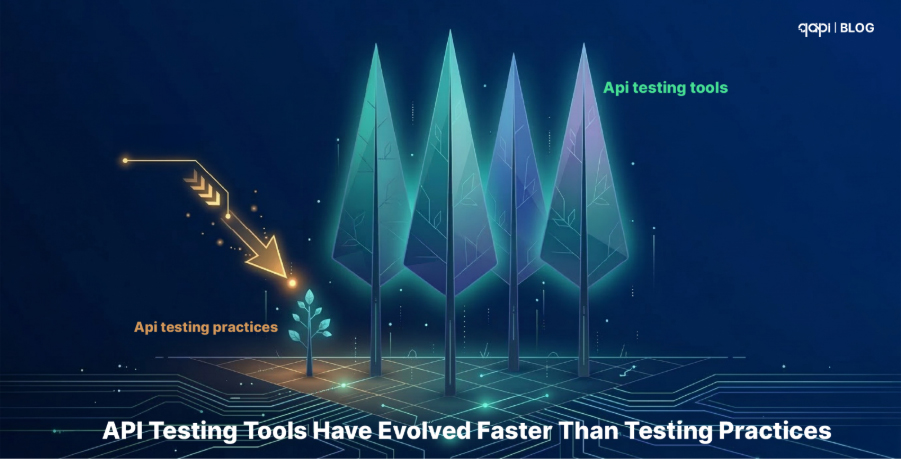
API Testing Tools Have Evolved Faster Than Testing Practices 

API Testing Evolves Faster

Here is a pattern that we’re seeing repeats across nearly every mid-to-large engineering organization: 

Once the team upgrades their API testing tool. The new version ships self-healing tests, built-in security scanning, automated contract validation, and real-time schema drift detection. The changelog is impressive. 

 And then the team uses it… exactly the way they used their legacy tools. 

Same manually written collections. Same hardcoded tokens and URLs. Same “happy-path-only” assertions. Same nightly batch runs instead of per-commit feedback. The tools have evolved, but the underlying practices haven’t matched the pace. 

This gap manifests in three specific, measurable ways: 

•  Test Maintenance Overload: In teams with brittle, heavily scripted suites, maintenance still consumes 40–60% of total automation time. Modern tooling offers contract-driven test generation that can slash this number—but only if teams restructure their suites to actually support it. 

•  Shallow CI/CD Integration: Many teams still run Postman collections locally before a deploy or rely on a single nightly run. While modern tools support deep, per-commit pipeline integration, the internal workflows often remain stuck in a manual mindset. 

•  Wasted Self-Healing Capabilities: When a response schema changes—a renamed property or a shifted data type—modern tools can auto-apply updates. However, teams that still hardcode every assertion by hand never trigger these capabilities, forcing them to fix every break manually. 

Eventually, coverage stops growing. This isn’t because the team lacks ambition; it’s because every engineering resource is exhausted just keeping existing tests alive. To protect pipeline velocity, teams start disabling “noisy” tests. Coverage quietly erodes in the most critical areas: error handling, authentication, and performance. 

Meanwhile, the few teams that have modernized their practices alongside their tools report faster releases, fewer regressions, and significantly less time spent on test maintenance. 

The gap isn’t about which tool you pick. It’s about whether your testing practice has caught up to what the tool can actually do. 

 Test Maintenance Overload 

Every contract change—new field, new auth scheme, slightly different response—can break dozens or hundreds of tests if they’re heavily scripted and hardcoded. Studies of automation practices note that maintenance can consume 40–60% of test automation time in large suites when design is brittle.  

That leads to two predictable outcomes: 

•  Coverage stops growing because teams are just keeping old tests alive. 

•  People start disabling “noisy” tests to protect the pipeline, shrinking coverage quietly. 

AI is in the Workflow—But Teams Aren’t Ready 

This is the widest gap in API testing right now — and it is growing fast. 

In 2026, AI-assisted test generation, anomaly detection, and MCP-powered local model integrations aren’t experimental but strategic. They ship inside tools. They power workflows at companies that are moving faster, catching deeper issues, and releasing with a fraction of the manual overhead that legacy teams still carry.  

But most teams haven’t absorbed this shift. Here is what that looks like in practice: 

•  Test creation is still entirely manual. A developer or QA engineer reads the spec (if it exists), writes assertions by hand, and updates them by hand when something changes. Every. Single. Time. 

•  Flaky test diagnosis is still a human guessing game. Instead of ML-based classification that identifies patterns in test instability — timing dependencies, shared state, environment drift — teams assign someone to “look into it” during a sprint where nobody has slack. 

•  Coverage gaps stay invisible. Without AI analyzing traffic patterns, schema evolution, or historical incident data, teams have no systematic way to know what they’re not testing.  

The dangerous gaps — around error handling, authorization edge cases, timeout behavior — stay hidden until they show up in production. 

Research into ML-based flaky test classification shows promising results in identifying problematic tests automatically. But in practice, most teams don’t benefit from this intelligence yet — not because it doesn’t exist, but because their tooling and workflows haven’t been updated to use it. 

Teams that still rely entirely on manual test design are not just slower. They are structurally unable to keep pace with API-first competitors who use AI to auto-generate edge-case coverage, self-heal broken tests after contract changes, and surface risk patterns humans would miss. 

Distributed Microservices: Failure Points Everywhere 

This is the one problem that architects understand in theory but testing teams experience in pain. 

Microservices delivered on their core promise: teams can develop, deploy, and scale services independently. But that autonomy added a category of failure that traditional testing frameworks were never designed to catch.  

Most failures in distributed API systems don’t happen inside a service. They happen at the boundaries where services interact. 

Let’s see what this means: 

The Boundary Problem 

Consider a simple example. Service A changes a response field — maybe a field name, maybe a format. 

The change seems harmless. Service A’s tests pass. Service B’s tests also pass because nothing in its local environment changed. 

But in actual practice, when Service B consumes the updated response, the system breaks. This is contract drift

Both teams did their testing correctly — but no one tested the interaction. 

Failures Don’t Stay Local Anymore, why? 

Distributed systems also fail in chains. Leading to failures appearing across multiple services. This happens because no single team sees the full picture. No single test suite reproduces the issue. 

This is what makes cascading failures so difficult to catch before production. 

Scale Makes Testing Fragmented 

Large organizations now operate hundreds or thousands of APIs across many teams. 

Without any strong governance, testing becomes fragmented because: 

•  Teams invent their own testing practices• Duplicate APIs and duplicate tests emerge• Breaking changes ripple across services without clear ownership 

Over time, the system becomes harder to reason about and harder to test reliably. 

The hardest problems appear when testing real workflows. Business processes like: 

•  Loan origination• Claims processing • Order fulfillment 

Rarely involve a single API. 

Instead, they spread in multiple services interacting in sequence. 

Testing these flows requires: 

•  Orchestrating chains of API calls• Maintaining state between steps • Coordinating with external systems 

These stateful, multi-service workflows remain one of the hardest areas of API testing. 

Endpoint Coverage Is Still Misleading Metric 

Many teams still measure success by endpoint coverage. If every API endpoint has tests, the system should be stable — in theory. 

But in 2026 failures don’t happen inside endpoints. They happen between services. 

Testing APIs in isolation may improve coverage metrics, but it does quite little to guarantee system reliability in production. 

Test Data Complexity Amplifies the Problem 

Even well-designed tests become unreliable when test data is poorly managed. Shared databases, reused identifiers, and hidden dependencies between tests often lead to the classic scenario: 

A test passes when run alone but fails when the entire suite runs. 

What we feel is that API testing isn’t failing because teams aren’t writing tests. 

It feels broken because new architectures are distributed, while many testing approaches were designed for monolithic systems. 

Testing individual APIs is easy. Testing how hundreds of APIs behave together — under real conditions — is where the real challenge begins. 

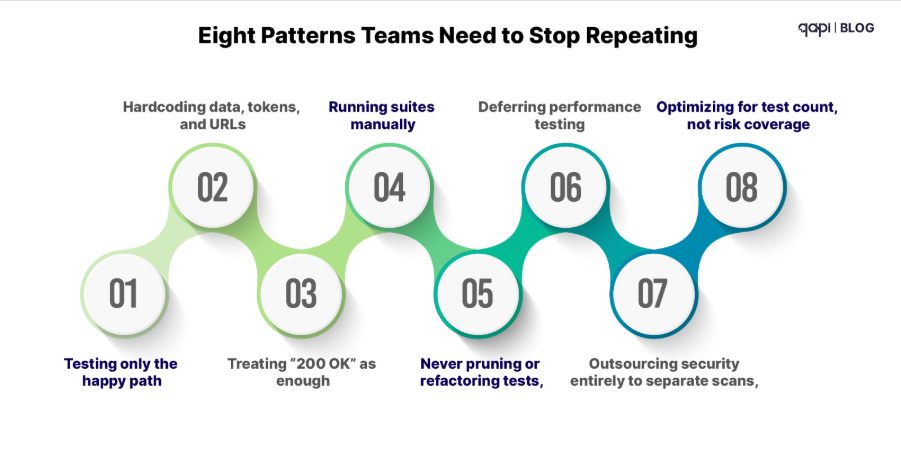
Eight Patterns Teams Need to Stop Repeating 

structural challenges

On top of those structural challenges, certain habits make everything worse: 

  1. Testing only the happy path while most incidents come from edge cases and failures.  
  2. Hardcoding data, tokens, and URLs so suites are brittle and environment specific.  
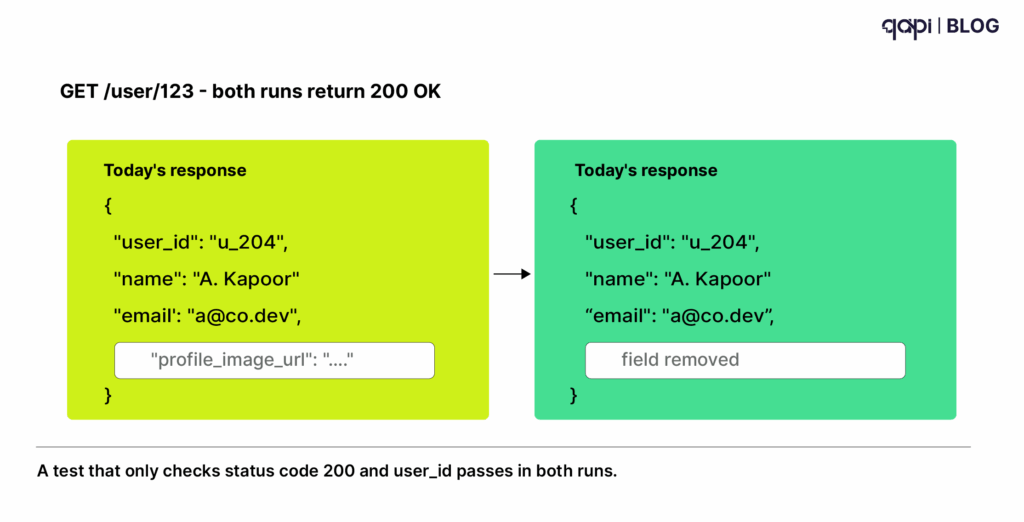
  3. Treating “200 OK” as enough, instead of validating schemas, business rules, and error behavior.  
  4. Running suites manually instead of integrating them as first class citizens in CI/CD.  
  5. Never pruning or refactoring tests, letting suites rot into noisy, low signal collections. 
  6. Deferring performance testing until right before launch—or never.  
  7. Outsourcing security entirely to separate scans, instead of embedding negative and abuse case tests into normal design.  
  8. Optimizing for test count, not risk coverage, chasing big numbers instead of meaningful protection. 

Recognize any of those? Most teams do. 

The Questions High Performing Teams Have Started Asking 

The pivot from “more tests” to “better testing” often starts with new questions: 

•  Which 10 APIs, if they fail, hurt us the most? 

•  For those APIs, are we testing error handling, security, and performance—or just “does the happy path return 200”? 

•  What percentage of our test failures in the last month were flaky vs. real issues?  

•  How many of our external APIs have at least basic auth and input validation tests, given that almost all organizations have experienced API security incidents?  

•  How much time did we spend maintaining tests last quarter versus expanding coverage? 

•  Do our tests adapt when contracts change, or are we rewriting scripts by hand each time? 

If you don’t like your answers today, you’re not alone. But that’s also where a new approach becomes compelling. 

What “Good” Looks Like—and Where qAPI Fits 

A modern API testing practice isn’t about perfection. It’s about: 

•  Change aware tests driven by contracts (OpenAPI, consumer driven contracts) that flag breaking changes early. 

•  Risk-aligned coverage, where business-critical APIs and failure modes (security, performance, correctness) get disproportionate attention. 

•  CI/CD native automation, with fast, reliable feedback on every meaningful change. 

•  Built in functional, process and performance testing not just as separate, but all in one. 

•  Intelligent, agentic behavior that reduces maintenance and flakiness instead of amplifying them. 

This is exactly the gap qAPI is designed to fill. 

Instead of another brittle, script heavy framework, qAPI uses an agentic, AI infused approach to: 

•  Detect API changes and highlight what tests are now at risk. 

•  Reduce manual maintenance through reusing test cases where possible. 

•  Help teams focus on meaningful coverage—especially around orchestrated flows, security, and performance—rather than chasing raw test counts. 

•  Integrate deeply with modern pipelines so API tests become a reliable, fast feedback mechanism, not a lastminute hurdle. 

If your current reality looks like constant flakiness, endless maintenance, and a growing sense that “we’re still blind in the riskiest places,” it’s a strong signal that your API testing strategy needs to evolve. 

Want to See What Agentic API Testing Looks Like? 

If you recognized yourself in more than a handful of the challenges or mistakes above, you’re exactly the kind of team qAPI was built for. 

Here are three low friction next steps: 

  1. Run a quick API testing health check Take one of your most critical APIs, list the top 5 failure modes that would hurt you, and check how many you actually test today. 
  2. Shortlist one or two painful workflows Think of a flaky, business critical flow—like payments, onboarding, or loan approval—and imagine what it would mean to have tests that adapt as that workflow evolves. 
  3. See qAPI in action on your own APIs Instead of reading another generic best practices guide, bring one real use case and see how an agentic, change aware approach can cut flakiness, shrink maintenance, and expand meaningful coverage—without throwing more people at the problem. 

You don’t have to boil the ocean to fix API testing. But you do need tools and practices that match the complexity you’re actually operating in. 

If you’re ready to move beyond fragile scripts and slow feedback into intelligent, agentic API testing, qAPI is a good place to start. 

“Payment API down.”

“Users can’t log in.”

“Checkout flow broken.”

This is not a good notification to have once you’ve built it as a developer or once you’ve invested in the software as a business owner. So where do things go wrong in API testing, and what are the specific mistakes that teams fall into and make product and technology miserable? 

We’ve created this blog to help you understand the mistakes you make and how to avoid them in the long run when dealing with complex API ecosystems and API testing scenarios. 

Because we’ve been interacting with multiple developers. And after hundreds of conversations with engineering teams over the past five years, we’ve discovered something surprising: we’re all making the same seven mistakes

Mistake #1: Testing Endpoints in Isolation (Instead of Testing Workflows) 

You’ve got Postman for manual testing, a custom script for CI/CD, and maybe Swagger for documentation. Each tool tests individual endpoints beautifully. Every test passes. Ship it, right? 

The problem that we tend to miss here is: Real users don’t call one endpoint at a time. They create workflows: 

  1. Create account → 2. Verify email (background job + webhook) → 3. Set up profile → 4. Upload avatar → 5. Add payment method 

Somewhere between step 2 and 3, there’s a race condition. Step 4 has a file size limit that only appears with real images. Step 5 fails when certain payment methods are used together. 

Your isolated endpoint tests caught none of this because they weren’t designed to test workflows—they test components

The real problem: Tool fragmentation makes this worse 

Most teams we talk to have this setup: 

•  Postman for manual API testing 

•  JMeter or k6 for load testing 

•  Custom scripts for CI/CD automation 

•  Swagger/OpenAPI for documentation 

•  cURL commands in runbooks 

•  Separate security scanning tool 

Each tool knows about one piece of your API. None of them understand your complete user workflows. 

The fix that we suggest and works best: 

Test complete workflows as one complete unit. This means finding a tool or approach that can: 

•  Chain multiple API calls in sequence 

•  Validate state changes across steps 

•  Handle async operations (webhooks, background jobs) 

•  Test with realistic timing between steps 

•  Verify the complete journey, not just individual stops 

This is where tools designed for workflow testing make a difference. Instead of manually chaining requests in Postman or writing complex scripts, platforms like qAPI let you define complete workflows with proper assertions at each step—including waiting for webhooks and validating state transitions. 

Mistake #2: Using Admin Tokens for Everything  

You set up one test token with full admin access. Your Postman collections use it. Your automated tests use it. Your load testing scripts use it. Coverage looks great. Everything works. 

Why it fails in production: 

Real users have constrained permissions: 

•  Basic users can only access their own data 

•  Support agents can view but not modify 

•  Premium users have additional endpoints 

•  Expired trial users lose access mid-session 

Your tests with god-mode tokens never validated any of this. 

We’ve seen this exact scenario play out: A team ships a feature that works perfectly for admins. Regular users get 403 Forbidden errors on every request. The feature was completely unusable for 95% of the user base. Tests? All green. 

The tool spread problem: 

Here’s how this typically breaks down: 

•  Manual testing in Postman uses your personal admin account 

•  Automated CI/CD tests use a service account (also admin) 

•  Load testing scripts use a single test user (you guessed it—admin) 

•  Security scans run as anonymous or admin 

•  Nobody actually tests as a regular user with real constraints 

Each tool operates independently, and they all default to the path of least resistance: admin access. 

The fix: 

Create a permission matrix and test systematically across all user roles: 

Roles to test: 

•  Anonymous (no token) 

•  Basic authenticated user 

•  Premium/paid user 

•  Support agent (read-only) 

•  Admin user 

•  Expired trial user 

•  Suspended user 

What to validate: 

•  Can users access only their own data? 

•  Do premium features properly gate access? 

•  Can support agents view but not modify? 

•  Do expired users get proper error messages? 

•  Are admin-only endpoints actually protected? 

Verify that basic users truly can’t access other users’ data, premium features are properly gated, support agents can’t modify records, and admin-only endpoints are actually protected. 

The challenge is maintaining different authentication tokens across different test scenarios. qAPI handles this by letting you define user roles once and automatically apply the right permissions across all test cases—no manual token management in every test. 

Mistake #3: Not Testing With Real Data 

If your test data is clean. Simple. ASCII characters. Perfectly formed. Whether it’s in your Postman examples, your test scripts, or your documentation—everything is sanitized and ideal. Then you are closer to breakdown than you realize. 

Real users bring new: 

•  Unicode characters (Chinese names, Arabic text, emoji in bios) 

•  SQL injection attempts (malicious or accidental) 

•  Null values where you expected strings 

•  Strings where you expected numbers 

•  Empty strings, excessive whitespace, special characters 

•  Edge cases you never imagined 

Here’s what we mean: 

•  Email: josé.garcía@empresa.mx (special characters) 

•  Name: O’Brien (apostrophe breaks queries) 

•  Age: -5 (negative number) 

•  Bio: Robert’); DROP TABLE users;– (SQL injection) 

•  Phone: +1 (555) 123-4567 ext. 890 (formatting chaos) 

The tool nightmare: 

Here’s where multiple tools make this problem exponentially worse: 

In Postman: You manually create 5-10 example requests with clean data In your CI/CD scripts: You hardcode a few test users In your load testing: You generate random data that’s still too perfect In your documentation: You show idealized examples 

Nobody is systematically testing the messy, real-world data that actually breaks things. 

And when you have test data scattered across multiple tools, updating it becomes impossible. Found a new edge case? Now you need to: 

  1. Add it to your Postman collection 
  2. Update your automated test fixtures 
  3. Modify your load testing data generators 
  4. Remember to update documentation examples 

Most teams give up after step 1. 

Here’s what we suggest 

Adopt a data-driven testing with comprehensive scenarios: 

Instead of writing 100 individual test cases with hardcoded data, start by defining your test logic once and feed it different data scenarios. One test validates user creation; a CSV file contains 100 different user data scenarios. 

This is exactly what data-driven testing in qAPI enables—write the test once, provide a data file, and automatically run all scenarios. Adding a new edge case means adding one line to your data file, not rewriting tests. 

Mistake #4: Ignoring Load Behavior  

If your API responds in 150ms during testing. And you ship confidently. You might have even run some load tests with JMeter or k6. 

What we predict will happen in most times 

At 100 concurrent real users: 

•  Database connection pool exhausts 

•  Memory usage spikes 

•  Response times jump to 8 seconds 

•  Cascading failures begin 

•  Everything crashes 

Your load tests completely missed this because they simulated robots, not humans. 

Most teams have separate tools for different types of testing: 

Functional testing: Postman or custom scripts (tests correctness) Load testing: JMeter, k6, Gatling (tests performance) Monitoring: Datadog, New Relic (tracks production) 

The problem? Load testing tools don’t understand how real users behave

How traditional load testing fails: 

JMeter/k6 simulation: 

•  1,000 virtual users 

•  Each sends requests every 2 seconds 

•  Constant, uniform load 

•  Runs for 10 minutes 

This simulates a DDoS attack, not actual user behavior. 

Real user behavior: 

•  Browse product page (30 seconds, no requests) 

•  Click “Add to Cart” (1 request) 

•  Read reviews (2 minutes, 3-4 lazy-loaded requests) 

•  Hesitate at checkout (1 minute, no requests) 

•  Complete purchase (burst of 5-7 requests) 

•  Abandon site (zero requests for hours) 

The critical difference: Real users are idle 70-80% of the time, then create bursts of activity. This “bursty” behavior creates entirely different bottlenecks than constant load. 

What happens with realistic load: 

When you test with realistic user behavior patterns, you discover: 

•  Connection pool exhaustion during bursts (not constant usage) 

•  Memory leaks that only surface during idle periods (garbage collection issues) 

•  Race conditions when users resume activity (state synchronization) 

•  Cache stampede during simultaneous requests (everyone hits checkout at once) 

•  Database query performance under realistic patterns (not just sustained load) 

The tool consolidation problem: 

When load testing is a completely separate tool from functional testing: 

•  Load tests can’t validate business logic (just HTTP status codes) 

•  You’re testing different workflows in different tools 

•  Bugs found in load tests require reproduction in functional tests 

•  No unified view of what’s actually breaking under load 

The solution: 

Test with realistic virtual user patterns. Real users are idle 70-80% of the time, browse for 30 seconds, make a request, wait 2 minutes reading content, then act again. 

This “bursty” behavior creates entirely different bottlenecks than constant load: 

•  Connection pool exhaustion during bursts (not constant usage) 

•  Memory leaks surfacing during idle periods 

•  Race conditions when users resume activity 

•  Cache stampedes during simultaneous checkout 

What to measure: 

•  p95 and p99 latency (not averages—those hide pain) 

•  Error rates under realistic load patterns 

•  Resource utilization (CPU, memory, connections) 

•  Degradation curves (how performance declines) 

The problem with most load testing tools is they simulate robots, not humans. qAPI’s virtual user balance feature simulates realistic behavior—idle time, browsing patterns, abandonment rates—revealing bottlenecks that uniform load testing completely misses. 

Mistake #5: Mocking Everything  

What it looks like: 

Your test suite mocks out every external dependency: 

•  Mock the database 

•  Mock the payment processor 

•  Mock the email service 

•  Mock the external APIs 

•  Mock the authentication service 

Tests run in 0.02 seconds. Everything passes. You feel productive. 

Why it fails in production: 

Your mocks assumed: 

•  Payment API returns within 2 seconds (real: 15 seconds during Black Friday) 

•  Database queries never timeout (real: happens under load) 

•  External API always returns expected format (real: they changed their schema yesterday) 

•  Email service never fails (real: rate limiting kicks in at 100 emails/hour) 

•  Third-party services behave like your documentation says (real: reality is messier) 

The multi-tool mocking disaster: 

Here’s how mocking typically manifests across tools: 

In Postman: You test against mock servers with perfect responses In unit tests: Everything is mocked for speed In integration tests: Some things mocked, some real (inconsistent) In staging: Different mocks than production In production: No mocks, everything breaks 

What you see here is that, each environment has different assumptions about what’s mocked and what’s real. Nobody has a complete picture of what actually works when integrated. This is a serious problem that teams choose to ignore or miss it unintentionally. 

The solution that we suggest: 

Mock judiciously. Mock third-party services during fast unit tests, but test real integrations comprehensively. 

When to mock: Services you don’t control (during development), expensive operations, actions with side effects. When NOT to mock: Your own database, service-to-service APIs you control, authentication flows, critical integrations 

Most services provide test modes: Stripe test cards, SendGrid sandbox mode, Auth0 test tenants. Use these instead of mocks—they behave like production without real side effects. 

When your testing platform supports both quick mocked tests for development and comprehensive integration tests for CI/CD using the same test definitions, you get the best of both worlds. qAPI lets you toggle between mock mode and real integration testing without rewriting tests. 

Final Thoughts: Less Tools, Better Testing 

The dirty secret of modern software development: More testing tools doesn’t mean better testing. Usually, it means more time spent handling tools and testing with higher maintenance costs. 

I learned this the hard way after maintaining an 8-tool API testing stack that: 

•  Cost us $50,000+ annually in licenses and infrastructure 

•  Required 30% of QA time just for maintenance 

•  Still let critical bugs reach production 

•  Created so much friction that developers avoided writing tests 

After consolidating to a unified API testing platform, we: 

•  Cut testing tool costs by 60% 

•  Reduced test maintenance time by 80% 

•  Increased test coverage by 3x 

•  Actually caught issues before production 

•  Made developers want to write tests (because it’s not painful) 

The lesson: Invest in capabilities, not tool count. 

If you’re starting from scratch, don’t replicate the fragmented approach. Find a platform that covers your needs comprehensively. 

If you’re drowning in tools, audit ruthlessly: 

•  Which tools are actually used vs. gathering dust? 

•  Which capabilities overlap between tools? 

•  What consolidation would eliminate the most friction? 

•  Can one better tool replace three mediocre ones? 

Testing isn’t about having every tool. It’s about systematically validating that your APIs work for real users in real conditions. 

Get that right—with as few tools as possible—and you’ll finally sleep through the night. 

When someone asks “How would you scale a REST API to serve 10,000 requests?”, they’re really asking how to keep the API fast, reliable, and affordable under heavy load. 

This question comes up because REST APIs—especially in Node.js—are easy to build but harder to scale. Everything works fine with 10 requests per second, but as you try to scale to 10,000+ requests per second, your setups will show all the red flags. 

This tutorial will walk you through the most practical, repeatable and effective ways to handle REST APIs on qAPI that will help you improve your API testing lifecycle. 

“Scaling a REST API to handle tens of thousands of requests per second is less about chasing a specific number and more about building the right foundations early. “ 

What we see across multiple APIs don’t fail because of bad logic; they fail because they were designed for today’s traffic, but not tested tomorrow’s growth.  

REST APIs dominate because they’re simple enough for beginners yet powerful enough for Netflix-scale systems. While GraphQL, SOAP, and RPC have their strengths, REST hits the sweet spot of simplicity, tooling support, and developer familiarity that makes it the default choice for 70% of modern APIs. 

So let’s see how teams should actually handle them. 

What should teams do? 

Step 1:The first principle is understanding what your application server is actually good at.  

Event-driven servers are designed to handle large numbers of concurrent connections efficiently, but the only catch is that they have to be used correctly.  

They excel at I/O-heavy workloads, such as handling HTTP requests, calling databases, or talking to other services. Problems begin when CPU-heavy or blocking operations are introduced into request paths.  

When that happens, concurrency drops sharply and latency increases rapidly. The lesson here is simple: keep request handling lightweight and push heavy computation out of the critical path. 

Step 2: Next, plan for horizontal scaling from day one.  

What I mean is instead of relying on a single powerful server, you should build your own system so multiple identical instances can serve traffic in parallel. This will help to add capacity gradually and recover easily from failures.  

Horizontal scaling only works when your API is stateless. Every request should carry all the information needed to process it, without depending on in-memory sessions or server-specific state. 

Step 3: Once the API layer is sound, attention must shift to the database. 

Because this is where most systems hit their limits. APIs can often handle high request rates, but databases cannot tolerate inefficient queries at scale.  

Poor indexing, unbounded queries, or mixing heavy reads and writes in a single datastore can quickly become your worst enemy. To scale safely, queries must be predictable, indexed, and measured.  

In many cases, separating read and write workloads or reducing database dependency through smarter access patterns makes a bigger difference than optimizing application code. 

Step 4: Caching is one of the most effective tools for reducing load and improving performance.  

Not every request needs fresh data, and many responses are identical across users or time windows. By caching these responses at the right layers, you remove the need for unnecessary computation and database traffic.  

This helps to reduce latency for users and increases capacity for handling truly dynamic requests. In short, effective caching is intentional, with clear rules around expiration, invalidation, and scope. 

Here’s why Rate Limiting is Important for APIs 

As traffic grows, protecting the system becomes just as important as serving it. Rate limiting ensures that no single client or integration can overload your API, whether through misuse, bugs, or unexpected retries.  

It’s quite clear that without respectable limits, small failures can bring large outages. With limits in place, the system can slow down gracefully instead of collapsing like dominoes.  

API Testing is where many teams underestimate risk. Because APIs will behave well in development but fail under real-world conditions as local tests lack concurrency, volume, and failure scenarios.  

When APIs scale the retries overlap, timeouts compound, and small delays create more issues. This is why scalable systems validate not just correctness, but behavior under load. Performance characteristics, error handling, and edge cases must be understood before users discover them. 

Observability ties everything together.  

You cannot scale what you cannot see. Tracking latency, error rates, and traffic patterns at the endpoint level allows teams to detect stress before it turns into downtime. More importantly, it helps identify which parts of the system break first under pressure.  

When teams rely only on general metrics, failures will feel sudden and mysterious to you. But when visibility is built in, scaling will give you a controlled process rather than the prior. 

Ultimately, scaling an API is not a single decision or a one-time optimization. It is the result of strategic architectural choices that prioritize statelessness, ensure performance, and system-wide resilience. Teams that scale successfully do not wait for traffic to expose weaknesses; they design for those weaknesses in advance. 

The goal is not to handle a specific number of requests per second. The goal is to build an API that continues to behave predictably as usage grows, complexity increases, and conditions change. When that mindset is in place, scale becomes an engineering problem you can plan for, not a crisis you react to. 

HTTP Methods and why you need to know them 

Method Purpose Key Property
GET Retrieve data It should never change server state
POST Create new resources Not idempotent (calling twice creates two items)
PUT Replace entirely Idempotent (calling twice = same result)
PATCH Partial update Idempotent if designed correctly
DELETE Remove resources Idempotent (deleting twice should fail gracefully)
HTTP Methods

Here’s what trips up even experienced developers, we a similar pattern and listed down some of the major problems that they frequently face: 

GET requests with hidden side effects If your GET endpoint is able to logs analytics, updates counters, or does anything beyond returning data, you’ll break caching. So, clients and CDNs expect GET to be safe and repeatable. 

POST vs. PUT confusion When clients retry to execute failed POST requests, duplicates are created. PUT is replaces safely. Choosing the wrong method means users accidentally ordering the same item twice. 

Non-idempotent DELETE operations If deleting a resource once works but deleting it again returns an error, clients can’t retry safely. Well-designed DELETE operations handle “already gone” gracefully. 

The Simple Process that teams should have: Thinking About Retries 

Every production incident teaches you the same lesson: network calls fail, and clients retry. 

etwork calls fail, and clients retry.

Before you finalize any endpoint, ask yourself: 

•  If this request times out, can the client safely retry? 

•  Will retrying create duplicate records? 

•  Does DELETE fail on the second attempt, or handle it gracefully? 

qAPI tip: Send the same POST request twice. If it creates two resources, document that behavior. Your API consumers need to know. 

The Mistakes That Cost Production Incidents 

Chatty APIs Requiring 10 requests to render one screen. Each round trip will add latency, and the chances of failure increase. 

God Endpoints Too much dependency on one endpoint: POST /processEverything. It becomes harder to test APIs and much harder to maintain. 

Leaky Abstractions Exposing database JOIN results directly as API responses. Your internal schema becomes a public contract. 

Ignoring HTTP Semantics Teams use POST for everything or returning 200 OK with error payloads. This confuses clients and breaks caching. 

No Pagination Returning unbounded arrays that crash mobile apps when users scroll. 

Tight Coupling Designing APIs around one specific client. When that client changes, your API breaks. 

qAPI tip: We recommend that if your tests require a complex multi-step setup, your API design might be the problem. So ensure your so-called “good” APIs are testable. 

Now that you know what to do and what not to do, here’s a checklist to keep handy.  

Best Practices Checklist for REST APIs 

Design Phase 

•  Resources modeled around business concepts, not database tables 

•   Clear URL hierarchy representing relationships 

•   Consistent naming conventions (plural nouns for collections) 

•   Planned approach for versioning and evolution 

Design Phase

Implementation Phase 

•  Proper HTTP methods for each operation 

•   Comprehensive error handling with useful messages 

•   Input validation with clear error responses 

•   Authentication and authorization on every endpoint 

•   Rate limiting configured appropriately 

implement Phase

Testing Phase 

•  Contract tests for response structure 

•   Auth boundary tests for all roles 

•   Negative test cases (invalid input, expired tokens) 

•   Performance tests under expected load 

•   Idempotency tests for critical operations 

Testing Phase

Deployment Phase 

•  Monitoring for response times and error rates 

•   Alerts for unusual patterns 

•   Documentation up to date 

•   Client libraries tested against new version 

•   Rollback plan if issues arise 

Deployment Phase

Why REST API Automation, Why Now: The Economic Case 

Two hard realities drive the case for automated (API) testing: 

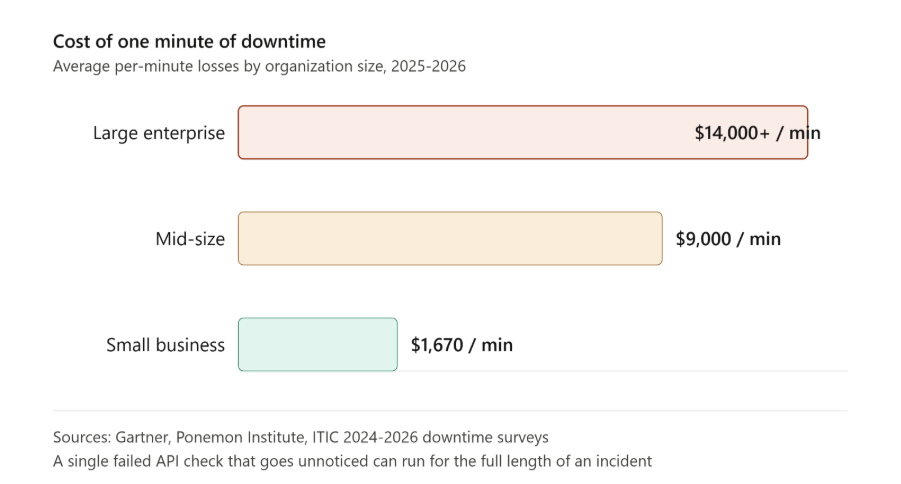
  1. Downtime is punishingly expensive. Industry analyses put the average cost of IT downtime at $5,600 to ~$9,000 per minute, and regulated verticals can exceed $5M per hour when you factor revenue loss, SLA penalties, and reputational damage. [atlassian.com] 
  2. Defects get exponentially more expensive the later you find them. NIST/IBM research has long shown that finding/fixing defects after release can cost up to 30× more than catching them early—exactly what automated, continuous testing is designed to prevent. [public.dhe.ibm.com] 

If your pipelines aren’t automatically validating API behavior at every merge and deploy, you’re effectively accepting a higher probability of costly production incidents. 

Automated API testing offers four decisive advantages

  1. Speed: API tests run faster (seconds vs. minutes) and integrate earlier in the pipeline, giving developers feedback per commit/PR. Faster feedback shortens lead time and lowers change failure rate—direct DORA wins.  
  2. Stability: API tests don’t break on CSS tweaks or DOM reshuffles; they validate the system’s contract and behavior, not presentation details—reducing false failures.  
  3. Coverage: You can test edge cases and error paths that are hard to reach via UI. With service virtualization, you can also simulate unavailable dependencies to test negative flows and peak loads safely.  
  4. Security: API tests can continuously validate auth, rate limits, data exposure, and other OWASP API risks—a critical gap when most organizations lack full inventories yet face rising attack traffic.  

The Hidden Tax You Can Eliminate: Endless Test Maintenance 

Many organizations have/are “automate everything” and ended up with the maintenance spiral: brittle assertions, hard‑coded payloads, failing tests after harmless changes. The result is toil: engineers stop trusting tests, and CI becomes noisy. 

What actually breaks the cycle: 

•  Contractaware assertions: Tie tests to API intent (schema/semantics), not to fragile field order or presentation quirks—so additive, backward‑compatible changes don’t fail.  

•  Changeaware test selection: Detect what changed (new field vs. contract break) and run only impacted tests; surface remediation context in PRs before a full CI red‑out. (This is the same “shift‑left” logic that improves DORA throughput and stability.)  

•  Behaviorlearning: Use real execution data to learn valid variability ranges and common call patterns, so your suite flags true regressions instead of benign drift (critical as AI‑driven API traffic increases).  

When teams adopt these patterns, maintenance drops, signal‑to‑noise improves, and developers treat CI failures as actionable reality, not background hum. 

Some Predictions: The Next 24 Months of Automated API Testing 

  1. APIfirst → AIfirst APIs. As agents and copilots become consumers of APIs, the volume, frequency, and variability of calls will grow—change aware and behavior learning testing will go from “its nice” to groundbreaking.  
  2. From tools to platforms. Testing will integrate tightly with API catalogs, gateways, and observability—blurring the line between design time testingpreprod checks, and runtime conformance. Organizations that centralize inventory and governance will have outsized reliability gains, addressing the full inventory gap.  
  3. Safety and speed converge. High performers will continue proving there’s no tradeoff between speed and quality (DORA). Expect leaders to emphasize test impact analysisruntime informed tests, and security validations in CI to keep change failure rates low while increasing deployment frequency.  
  4. Ops economics will rule decisions. With downtime costs at $5.6k–$9k/min and remediation at ~$591k per incident, CFOs will favor investments that demonstrably reduce incidents and MTTR—and automated API testing tied to DORA metrics will be central to that argument.  

Final Word 

The software market is building on a simple truth: APIs are where business happens—and automated API testing is how you protect that business while moving faster. The data is unambiguous: API adoption and AI‑driven traffic are rising, visibility gaps persist, incidents are frequent and expensive, and high performers prove that speed and stability can (and should) rise together.  

If you modernize testing around contracts, change awareness, behavior learning, and CI/CD guardrails, you’ll break the maintenance spiral, reduce risk, and ship confident changes continuously. That’s the future customers (and CFOs) will reward.  And you can do all that and still some more with ease on qAPI. 

When we talk about contract testing, it often looks and sounds more complicated than it actually is. The term itself has grown layers of jargon over the years, which is why many teams either misunderstand it or avoid it altogether.  

At its core, contract testing is simply about verifying that two systems can reliably communicate with each other—without having to deploy and run both systems at the same time. 

To understand it clearly, in this article we’ll discuss how contract testing helps to place them in context alongside other testing levels. 

Let’s talk about unit tests first; they work on a single function or method. It checks whether a small piece of logic behaves correctly in isolation. Unit tests are fast, deterministic, and sufficient for validating internal logic. The only problem is that they stop at the boundaries of a single codebase. 

On the other hand, a contract test operates one level above unit tests. It is concerned not with internal logic, but with how one service will interact with another service.  

If you are a restaurant and it depends on the chef, a contract test allows you to define and verify what that interaction will look like—even if chef is not working or not yet hired. 

In practical terms, this means you can simulate chef’s expected behavior based on an agreed contract. If you specify: 

chef’s expected behavior based on an agreed contract

•  What request restaurant will send 

•  What response restaurant expects in return 

•  Under which parameters that response should be returned 

If chef later changes something(like the menu) that violates this agreement—such as removing a field, changing a response code, or altering behavior—the contract test fails immediately.  

You can see the breakage early, clearly, and in isolation, rather than finding it days later during integration testing or, worse, in production. 

This is why teams need to realize the value of contract testing: it detects communication failures before services are integrated

What is the difference Between Contract Tests and Integration Tests 

A common point of confusion is the difference between contract tests and integration tests. 

With an integration test requires both restaurant and chef to be fully implemented, deployed, configured, and running. It validates that real services can talk to each other in a real environment.  

While integration tests are valuable, they are comparatively slower, fragile, and harder to debug because failures can be caused by environment issues, data setup problems, or unrelated changes in either service. 

Contract tests completely avoids these problems. They allow each service to be tested independently, based on a shared agreement.  

This makes contract tests faster, more reliable, and more easier to maintain as time passes, especially in microservice architectures where dozens or hundreds of services can grow at once. 

Now, let’s clear the air by explaining how schema tests are different 

Why Schema Tests Are Often Mistaken for Contract Tests? 

We see many QA teams believing they are doing contract testing because they validate API schemas. This is an understandable mistake—but it is still a very big mistake. 

Why? Because schema tests verify structure, not behavior. They can confirm requests and responses to a defined format: correct data types, required fields present, and to check if allowed values are respected.  

This is useful, but it does not prove that two systems actually agree on how the API should behave in real scenarios. 

A schema test will tell you that a field exists. A contract test shows you when and why that field matters

For example, a schema might say that a status field is optional. A consumer, however, may rely on that field being present to drive business logic. Removing it may still pass schema validation—but it will break the consumer. Schema tests won’t catch this. Contract tests will. 

This is why it is worth researching deeper whenever schema validation is being treated as “contract testing.” Without setting strong interaction expectations, teams are only validating grammar—not meaning. 

Let’s understand how contract testing actually addresses this challenge in the real system. 

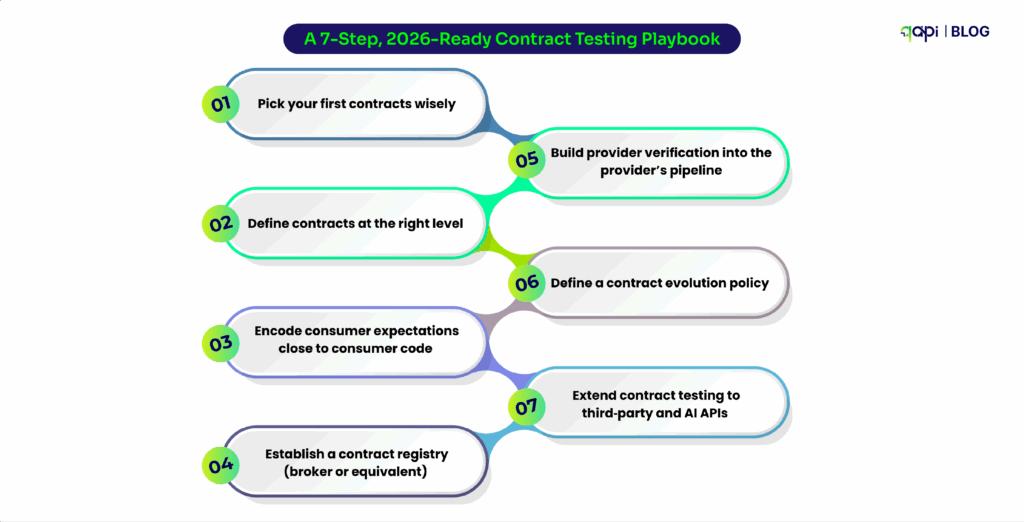
The Core Principles of Contract Testing 

It’s no surprise: Independent verification is the first principle. Instead of waiting for all services to be deployed and tested together, each service verifies its responsibilities independently.  

This reduces feedback cycles and prevents late-stage surprises. 

Your Consumer–provider contracts is the second principle.  

The consumer states what it needs, and the provider ensures it can meet those needs. If both sides satisfy the same contract, integration should and will work as expected.  

Backward compatibility protection is another critical upside that teams can get. Contract tests make it immediately visible when a change—such as removing a field or altering a response—will break existing consumers.  

This helps teams to evolve APIs safely instead of relying on assumptions about “non-breaking changes.” 

Finally, automation is essential. Contract tests are most effective when they run automatically as part of your CI/CD pipeline. Every change is validated against existing contracts, ensuring that breaking changes are caught early, when they are cheapest to fix. 

Why Contract Tests Belong in the Testing Pyramid 

For a large majority of testers and developers contract tests often feel like they don’t fit neatly into the traditional testing pyramid. 

But that’s mostly because the pyramid was designed for monoliths, not for distributed systems. 

In architecture systems we see now, contract tests act as the bridge between unit tests and integration tests. They reduce the need for excessive end-to-end testing while still providing strong system compatibility.

without Contract tests

Without contract tests, teams can either: 

•  Blindly trust on slow, brittle end-to-end tests, or 

•  Deploy changes with false confidence based on schema validation alone 

Neither of these options are good for business. 

he Real Goal of Contract Testing 

Contract testing is not about adding more tests. It is about reducing uncertainty

When done well, contract tests allow teams to: 

•  Develop services in parallel without fear 

•  Detect breaking changes before integration 

•  Scale APIs without slowing delivery 

In other words, contract tests exist to answer one simple but critical question: 

“If this service changes today, who or what will it break tomorrow?” 

Once teams understand that you will have no backlog and no burnout. 

How Contract Testing Works in Practice  

At a high level, contract testing follows a Consumer-Driven Contract (CDC) approach. This means the system that uses an API defines what it needs, and the system that provides the API proves it can meet those expectations. 

Let’s walk through what this looks like step by step. 

Step 1: The Consumer Defines Its Expectations 

Everything starts with the consumer—because in distributed systems, breakage is always seen by the consumer first

When you’re building Service A and it depends on Service B, you already have assumptions in your head: 

•  Which endpoint you’ll call 

•  Which fields you rely on 

•  Which response codes you handle 

•  Which error cases matter 

Contract testing simply makes those assumptions clear. 

From a developer’s perspective, this usually happens inside consumer tests. You write tests that simulate calling Service B, but instead of hitting a real service, you describe the interaction in a contract format—often as a pact file or schema-backed interaction definition. 

This contract includes: 

•  The HTTP method and endpoint 

•  Required headers or auth behavior 

•  Example request payloads 

•  Expected response status codes 

•  Required response fields and their meanings 

At this stage, you are not testing whether Service B actually works. You are documenting what you expect it to do

Step 2: Consumer Tests Generate and Publish Contracts 

Once these consumer tests run, they generate a contract which is usually a machine-readable file that describes the expected interactions. 

This file can prove everything. It is sent to a contract repository or broker that both teams can access. Importantly, this happens automatically as part of the consumer’s CI pipeline. 

a developer’s workflow perspective

From a developer’s workflow perspective, this feels natural: 

•  You change code 

•  Tests run 

•  Contracts update if expectations change 

If you intentionally modify how you use an API. 

For example, let’s say you start relying on a new field—that change is reflected immediately in the contract.  

No meetings, no emails, but you have results. 

Step 3: Providers Verify Against the Published Contracts 

Now the responsibility shifts to the provider. 

When service B pulls the published contracts and runs provider verification tests, these tests check whether the provider can satisfy every contract that consumers can depend on. 

If the provider passes verification: 

•  It has proven that it still supports all existing consumers 

•  It is safe to deploy from a contract perspective 

If verification fails, it means something meaningful: 

•  A field was removed 

•  A response code changed 

•  Behavior no longer matches expectations 

At this point, developers have clear options: 

•  Fix the provider to restore compatibility 

•  Update the consumer and version the API 

•  Introduce backward compatibility logic 

The failure is early, isolated, and actionable—which is exactly what you want. 

Step 4: Resolving Issues Without Slowing Teams Down 

One of the biggest advantages of contract testing is how cleanly it handles mismatches. 

Instead of discovering breakage during integration or production testing, teams can respond deliberately: 

•  Providers can introduce non-breaking extensions 

•  Breaking changes can be gated behind new API versions 

•  Consumers can migrate incrementally 

This turns API evolution into a controlled process instead of a risky guessing game. 

Handling Multi-Version APIs and Feature Flags 

Real systems don’t stand still, and contract testing supports that reality well. 

When APIs grow, contracts can be versioned alongside code. Older contracts remain valid until consumers migrate, while new contracts define new behavior. Providers can support multiple versions simultaneously and verify compatibility independently. 

Feature flags add another layer of safety. New behavior can be introduced behind a flag, with contracts clearly written for that path. Once consumers are ready, the flag can be rolled out confidently—knowing the contract has already been validated. 

It’s all about reducing risk without reducing speed. As it allows you to: 

•  Refactor APIs safely 

•  Deploy independently 

•  Avoid breaking consumers you don’t even know exist 

•  Replace guesswork with executable agreements 

When contract testing is in place, API changes stop being scary. They become routine, predictable, and boring—in the best possible way. 

Isnt’ that what you and your team needs? 

And now, the testing industry needs to take the next logical step: Letting a smart tool to fill the gap. 

How qAPI Makes Contract Testing Simple 

qAPI removes the manual work from contract testing. That means you don’t have fuss about the work needed for running tests, qAPI can provide all that and support 24×7 for all your API testing needs 

With qAPI, teams can: 

•  Generate contracts directly from OpenAPI specs 

•  Auto-create contract tests for requests and responses 

•  Validate schema changes on every build 

•  Run contract tests in CI/CD without writing code 

•  Share contracts across teams in one workspace 

When a change breaks the contract, qAPI flags it instantly—before it reaches production. So have complete visibility on what’s happening, less doubt and more confidence. 

It’s easy to be a skeptic, there’s so much to care and figure out about: API privacy, data safety and what not. 

After all, the stakes are always high, it’s just the technicality that’s overly bloated contract testing is necessary and it can be a cakewalk without any serious implications. 

You can take care of your APIs and contract tests all one place with qAPI.  

Give yourself a break before you read this blog. Let’s take a walk a few years back, to a time when you would struggle to get answers to your specific research. Didn’t you wish you had a way to find all the answers you need within a click, all in one place?  

In 2026, mobile applications don’t just “search” anymore; they solve. 

 Whether it’s generating the perfect recipe based on the three ingredients left in your fridge, syncing health metrics across a dozen wearable devices, or providing real-time AI-driven answers to complex queries, mobile apps have become the essential “operating system” for daily life. 

 However, powering every one of these seamless interactions is the API—the backend engine that drives the data flow. 

API testing for mobile applications is no longer just a “check-the-box” activity; it is the process that ensures these critical services perform reliably under messy, unpredictable, real-world conditions. Without robust testing, the “magic” of 2026 quickly turns into a frustrating user experience. 

How Do I Pick the Right Mobile App Performance Testing Tool? 

 Let’s answer the real question: Why do you and your teammates spend so much time testing APIs, only to see a drop in user engagement? That shouldn’t be the case. 

You are doing what you know best: monitoring latency, tracking error rates, and simulating loads. Yet performance still falls short during peak usage, users complain about lag, and retention suffers.  

 The short answer? Your tools and the metrics you’re prioritizing might be holding you back. 

The Five Roadblocks to Performance 

Five Roadblocks to Performance

• Fragmented Workflows: Keeping functional tests in one tool and performance tests in another forces a context switch. This leads to duplicated effort and inconsistent results. 

• Manual Overhead: Endless time spent on scripting, setup, and maintenance eats resources without guaranteeing accuracy. 

• Limited Realism: Many tools struggle with mobile-specific traffic. They rarely replicate network variability, device fragmentation, or authentic user spikes accurately. 

• Scalability Gaps: Simulating thousands of concurrent users often requires heavy infrastructure or expensive, complex add-ons. 

• Collaboration issues: Static reports and local runs make it difficult for developers, QA, and product teams to align quickly when turnaround times are short. 

The result?  

Poor API performance drives massive user loss. In fact, 53% of mobile users abandon apps that take longer than 3 seconds to load, making latency, throughput, reliability, and scalability critical for survival. 

The Questions You Aren’t Asking (But Should Be) 

Most teams focus on obvious features like load capacity or scripting languages.  To truly scale, you need to dig deeper: 

•  Does it unify functional and performance testing? Can one tool handle both seamlessly so you don’t have to maintain separate suites? 

•  How much manual work is truly eliminated? Does the tool have the ability to reduce some burden or are you still handwriting scripts? 

•  Can it simulate real mobile chaos effortlessly? Can it mimic variable networks, device differences, and sudden spikes without requiring custom coding? 

•  Is scaling simple and cost-effective? Can you instantly scale virtual users, or do you have to provision and manage servers yourself? 

•  Does it improve team collaboration? Does it improve the way teams interact and improve their turnaround time? 

•  Will it grow with you? Can it handle the transition from a small startup to an enterprise-level ecosystem without forcing a tool migration later? 

Curious to know which tool checks all these boxes? Teams using qAPI report 60% faster testing cycles and dramatically better mobile app performance. 

Why API Testing Is Essential for Mobile App Success 

Your mobile app is only as strong as its APIs. A slow or unreliable backend will turn your polished UI into a frustrating experience. 

 The problem is that many teams test only what they can see. They polish animations, tune layouts, and squash UI bugs. But the “heartbeat” of a mobile app—and its most common point of failure—lies in: 

•  Multiple API calls 

•  Authentication tokens 

•  Network reliability 

•  Backend performance 

When these APIs misbehave, the UI is the least of your problems. 

 Let’s look at the specific dimensions API testing brings to the development process. 

  1. Latency Breaks Flows

 In the mobile world, latency isn’t just a number on a dashboard; it’s the difference between a completed checkout and an abandoned cart. 

If a user taps “Pay” and a slow API call blocks the entire screen, the app feels frozen. Users don’t see “latency”—they see a broken app. Most teams miss this because they test for success responses (status 200) but ignore response times under real-world pressure. In production, those extra milliseconds add up quickly, especially across chained APIs. 

 Google’s research continues to show that even micro-delays have a massive impact on user abandonment (source). 

  1. Mobile Networks Expose API Assumptions

 APIs are usually built and tested in “perfect” conditions: stable office Wi-Fi and low-latency environments. But your users live in the real world: 

•  They switch from Wi-Fi to 5G. 

•  They lose signal in elevators. 

•  Packets drop, and requests need to retry. 

If APIs aren’t tested for retries, idempotency, and partial failures, you get duplicate transactions, corrupted data, and the “dreaded” endless loading screen. 

According to the Ericsson Mobility Report, network variability contributes to a significant portion of failed mobile sessions (Ericsson). Users rarely blame the network—they blame the app. 

  1. API Payloads Quietly Drain Performance

 A heavy API response does more than just slow down the app; it actively degrades the device’s health: 

•  Data Usage: Expensive for users on limited plans. 

•  Battery Drain: Constant radio activity for large downloads kills battery life. 

•  Thermal Throttling: Large payloads force the CPU to work harder, triggering OS-level slowing. 

Older devices feel this pain first. 

Yet most teams never test payload size, over-fetching, or response efficiency. They validate correctness — not cost. 

GSMA research shows inefficient mobile data usage directly impacts engagement and retention. 

If your API returns more than the screen needs, your users pay the price. 

  1. Authentication APIs Fail in the Edges

 Authentication flows usually work fine during the “happy path” of logging in. The real failures happen at the edges: 

•  Tokens expire in the middle of a session. 

•  Refresh calls fail under heavy load. 

•  Chained APIs reject requests inconsistently due to sync issues. 

 The result is random logouts that feel like “bugs” to the user. The Verizon Data Breach Investigations Report consistently highlights authentication issues as a top API risk. Testing auth once at login isn’t enough; you must validate the entire token lifecycle under stress. 

  1. Scale Reveals Problems Too Late

 Data is the purest form of proof. Most APIs behave perfectly with ten test users or a small beta group. But growth changes the rules. When traffic spikes during a launch, queues back up and dependencies fail. 

•  App Annie reports that the majority of high-impact app failures occur during growth events, not during development (Business of Apps). 

 If your APIs aren’t load-tested independently of the UI, you’re essentially waiting for your users to tell you when you’ve reached your limit. 

  1. Offline & Sync Issues Destroy Trust

Imagine you and a teammate working on the same test case. You add new fields, update endpoints, and refine the dataset. 

Later, you realize their changes overwrote yours entirely. You’ve got no alerts, no warning, but still you lost your entire progress. 

Users might see missing updates, overwritten changes, or corrupted data across devices, as in note-taking apps where offline edits don’t sync properly.  

This destroys trust instantly. A study by the Mobile Ecosystem Forum (2025) found that 40% of mobile app complaints involve sync issues. Offline support is one of the hardest problems in mobile development. Without rigorous API testing: 

•  Data overwrites itself silently. 

•  Conflicts are never resolved. 

•  Sync failures go undetected until the user reopens the app to find their data gone. 

Once trust is lost, it is rarely regained. 

The Real Cost of Ignoring API Testing 

Every row in the table below represents an avoidable cost. In 2026, mobile performance is no longer decided by UI polish; it is decided at the API layer. 

Cost of Ignoring API Testing
API Testing Gap Estimated Cost Impact Impact on Services & Users How qAPI Addresses It
No API contract testing $5K–$25K per incident (rework, rollback, redeploys) (IBM SSI) Breaking changes reach production; downstream services fail silently Schema validation & consumer-driven contracts catch breaking changes before release
Untested API latency 10–30 engineering hours per issue, debugging performance regressions (Google Web Performance) Slow screens, abandoned sessions, poor app ratings Built-in performance checks highlight slow APIs early
No real mobile network testing 20–40 QA + dev hours per cycle, fixing flaky issues (Ericsson Mobility Report) Inconsistent behavior on 4G/5G, duplicate actions End-to-end workflow testing validates APIs under real-world conditions
Poor auth & token flow testing $10K–$50K per incident, including security review & hotfix (Verizon DBIR) Random logouts, failed payments, trust erosion Pre-request flows + contract validation ensure auth behavior stays consistent
No API load testing $50K+ during peak failures (infra + lost revenue) (AWS Architecture Blog) Outages during launches, degraded performance Cloud execution & parallel testing validate APIs before traffic spikes
Missing schema validation 15–25 engineering hours per defect cleaning corrupted data (Martin Fowler) App crashes, incorrect data, broken UI logic Automatic request & response schema validation enforces contracts on every run
No end-to-end workflow testing Delayed releases by days or weeks (DORA Report) Partial flows fail (checkout, onboarding, sync) Visual workflow builder (AutoMap) tests API chains, not just endpoints
Offline & sync logic untested High support & recovery cost (often weeks of cleanup) (Mobile Ecosystem Forum) Data loss, conflicts, negative reviews Stateful API testing validates retries, conflicts, and resync behavior

Why This Matters to Your Team 

Every screen load, tap, and background sync depends on APIs behaving predictably under real-world conditions—scale, network instability, and evolving contracts. When APIs fail, no amount of frontend optimization can save the user experience. 

The Takeaway 

Mobile users don’t care about your architecture. They care about whether the app works — every single time. 

Avoid These Failures with qAPI 

Most teams don’t struggle because they lack tools. They struggle because their tools don’t reflect how mobile systems actually behave. 

Relying only on mobile app performance testing tools open source or basic mobile application performance testing tools open source can help at an early stage—but these tools often focus on isolated performance checks, not real API-driven workflows.  

They rarely catch issues like schema drift, chained API failures, or data inconsistency across sessions. 

Similarly, many performance testing tools for Android apps and performance testing tools for Android mobile applications measure screen-level behavior. They miss  what’s happening underneath: API latency, contract breaks, and sync issues. 

This is where qAPI changes the approach. 

qAPI helps teams: 

•  Test complete workflows: Move beyond testing endpoints in isolation to testing the entire user journey. 

•  Validate contracts continuously: Ensure that a change by the backend team doesn’t break the mobile experience. 

•  Detect regressions early: Identify performance dips before they reach a single user. 

•  Scale effortlessly: Run massive tests without heavy scripting or complex infrastructure management. 

By shifting testing to the API layer—and making it part of every run—teams stop reacting to production issues and start preventing them. 

 The result? Faster releases, fewer incidents, and mobile apps that feel consistently fast and reliable—no matter the device, network, or scale.

The Challenge 

Performance testing has traditionally been limited by licensing constraints—especially when it comes to the number of Virtual Users (VUs) you can simulate. These caps often prevent teams from generating the level of load needed to truly evaluate system performance at scale. 

While testing for average traffic is manageable, replicating high-intensity scenarios—like flash sales or peak traffic events—becomes difficult. Teams either hit usage limits or are forced to pay for costly add-ons, making large-scale testing inefficient and restrictive. 

The Solution 

We’re removing that barrier. 

With Unlimited Virtual Users now available in our Enterprise plan, you can simulate any level of traffic your application demands—without being constrained by predefined limits. 

Whether you’re testing moderate loads or extreme spikes, the platform now scales with your needs. 

What This Means for You 

This update enables more realistic and powerful performance testing: 

The product is a hit but now you have new problems. How much traffic can the current APIs handle? How many APIs need changes? And how do you track it over time? 

These questions aren’t easy to answer, but as a founder/product owner, a goal that everyone would like to find themselves in.  

You’ve just reached your 3-year goal in a single year. Now it’s time to lock in and make decisions that  will lay the foundation for the product’s future. 
Congrats — now your APIs are about to get absolutely hammered. 

According to SQmagazine many companies now handle 50–500M API calls per month at an average. That’s ~19–193 requests/second peaks are often 5–15x higher. 

But with this growth there are a few key areas that we should be on the lookout for, let’s look at this closely: 

How Do You Scale API Traffic Without Breaking Performance or Blowing Up Cloud Costs? 

As API traffic grows, most teams hit the same wall: at some point in time: systems that usually worked at a few hundred requests per second start slowing down, error rates increase. 

This is a classic API scalability problem, but the issue isn’t related to volume; it’s that high-traffic APIs behave very differently under pressure than they do in normal conditions. 

A big part of this comes down to how the API is scaled. Many teams start with Vertical Scaling—adding more CPU or memory to a single server. While this provides short-term relief, it has hard limits and gets expensive fast. 

Horizontal scaling, on the other hand,  allows you to add more instances as traffic grows by spreading the load across multiple machines..  

 But here’s the catch: horizontal scaling works best when APIs are stateless.,  This means any request can be handled by any instance without relying on local memory or session data. a.  

Context: Stateless design is what makes an API truly scalable at high traffic levels. 

Load balancing  is the most effective way to manage costs. Instead of overloading one server, a load balancer distributes incoming API requests evenly across healthy instances. When traffic spikes, auto-scaling groups can spin up new instances automatically and remove them when demand drops.  

This ensures your high-traffic APIs stay responsive without forcing you to pay for peak-capacity hardware all year long. Your goal as a product owner isn’t just to survive a single traffic spike; it’s to handle fluctuating traffic every single day. 

The biggest mindset shift is designing for change, not just for peak numbers. Many teams size infrastructure for “maximum traffic” and hope it covers future growth. In reality, API traffic growth is uneven.  

Flash sales, product launches, partner integrations, and viral campaigns create sudden bursts that basic setups can’t handle efficiently.  

By building scalable APIs that expand automatically, your performance stays stable while API cost optimization. 

How Should API Design and Governance Evolve as You Go from One Team to Many? 

As teams grow from a single squad to multiple cross-functional groups, the challenge of scaling APIs shifts from infrastructure to design consistency and governance. 

However, once infrastructure stops being the limiting factor, a different problem emerges: API design issues. When every team defines its own API patterns, surface conventions, error formats, and versioning strategies, the ecosystem becomes a mess.  

This design gap slows down – integration, increases cognitive load for developers, and kills reusability.  Research shows that without strong API governance, reusability can drop by more than 30% in large organizations. 

To solve this, teams must scale along two dimensions: the system (to handle workload growth) and the design (to maintain consistency).  

On the design side, teams must adopt API style guides that define URL structures, pagination schemes, error objects, naming consistency, pagination standards, authentication flows, and versioning rules.  

These guides help you ensure in future that whether API X was built by Team A or Team B, it behaves predictably and integrates cleanly. 

Design governance should also be followed by a dedicated group for review processes and contract-first validation. Rather than detecting breaking changes in staging or production, teams should validate API contracts early, ideally during CI runs. This prevents minor changes, like a renamed field or changed response order, from becoming major issue at scale.  

Companies with formal API governance and contract validation report fewer integration failures and smoother scaling during peak traffic events, according to API industry reports. 

Testing Your APIs: What is the Ideal Way? 

 We’ve looked at how to grow your APIs infrastructure, manage costs, and handle design and governance specifications. Once these are done, the only challenge that remains is testing them. 

With API testing, you put your APIs through a series of tests to ensure they work as designed. To test the limitations, there are several types of tests, so mature teams don’t just check if the API works. 

They will confirm if it is reliable, secure, and delivers on its business promise. This is how teams should plan to test their APIs once the design process begins. 

  1. Run Functional Tests  

Functional tests ensure the API always matches the expected output. 

Focus Area  Example 
Endpoint Behavior  If you ask for information (GET), you will get information. If you ask to change something (POST/PUT), you should confirm the change happened exactly as requested. 
HTTP Method   Ensure measures in place to validate that unauthorized POST requests are rejected with a 405 Method Not Allowed, and that PUT is used for full replacements rather than partial updates (which should be PATCH). 
Expected Schema  Validate that the response structure for a successful transaction includes all required fields, as specified in the OpenAPI/Swagger documentation. 

2. Check Data Accuracy & Integrity 

Let’s look at it closely, because wrong data spreads silently and is extremely hard to fix later. So when your API usage grows ensure to run data accuracy checks. Here are some examples that you can use as a reference: 

Focus Area  Example 
Calculated Values  If an API calculates sales tax or discounts, test the logic against known financial benchmarks. For example, updating a customer’s address must reflect that exact change in the database immediately. 
Persistence Verification  After a PUT /inventory/{sku} update, run a follow-up query on the database layer  (or a separate read-only API) to confirm the write transaction committed the value correctly. 
Data Type Fidelity  Validate that fields intended as a Big Decimal (e.g., currency) are not accidentally converted to floating-point numbers, which introduces rounding errors that are invisible at the surface level. 

3. Business Logic Validation  

To build high-quality software, teams will have to go beyond to see if an API returns a response and focus on enforcing real business logic through API testing. Business logic refers to the rules and workflows that reflect how a real application should behave in real use cases.  

 When business logic fails, entire processes—from order handling to payments—can break your product, even if the API itself technically “works.” 

Focus Area  Example 
Workflow   In a typical order lifecycle, confirming that an order status cannot transition directly from PENDING to SHIPPED without first passing through PROCESSING. 
Eligibility Checks  If a customer is tagged as “Bronze”, the API should automatically reject any request for “Platinum-only features, even if the request is technically valid in every other way. 
Rate Limiting & Limits  If an API allows 10 withdrawals -per minute—the first 10 go through successfully, but the 11th request must be blocked with a 429 Too Many Requests error. 

Another key measure is integrating automated testing into the development workflow. API automation enables teams to run these logic-focused tests every time code changes are made, giving fast, reliable feedback without adding manual burden.  

Automated API tests run in seconds compared with much slower UI tests, sometimes up to 35× faster, enabling more frequent checks and broader coverage across business rules and edge conditions.  

This drastically improves confidence in releases because of the logic paths that matter most—such as eligibility checks for premium features or rate limiting thresholds—are deployed at scale with less to no human intervention. 

Teams should also treat API testing as an important flagging metric, and start to define it’s own guardrails to ensure product stability and increase customer retention. Because APIs operate independently from user interfaces, it is a good practice to test API logic before the UI is even built, allowing logic issues to be caught early when they are cheaper and easier to fix.  

Early testing of business logic through automated testing tools integrated into CI/CD pipelines ensures that every change reinforces—or at least does not break—the expected real-world behavior.  

Finally, “teams should measure and evolve their API testing strategy”  

Because at the end of the day, enforcing business logic in API testing is not optional—it’s essential to sustainable software quality and fast delivery cycles, and robust automated testing practices are the most effective ways to achieve stability at scale. 

4. Performance & Reliability  

Focus Area  Example 
Latency Consistency  Measure the 95th and 99th percentile response times, not just the average to check the average consistency. 
Stress Testing & Saturation  Put load that exceeds documented throughput (e.g., sending 150% of expected peak traffic) to confirm the API returns 503 Service Unavailable, rather than corrupting data or crashing. 

How Do You Test APIs With Incomplete Documentation? 

 In short: You don’t—at least not by following the docs.  

Outdated or missing docs  forces teams to guess behavior, hunt for old specs or re-learn things the system already knows. 

 Instead, teams should observe how the API actually behaves (we’ve already talked about this above) by sending real requests, inspecting real responses, and treating runtime behavior as a reference point.  

With qAPI’s AI summarizer, you get a complete AI assistance that makes it easier for you to populate documentation end-to-end and understand what the API is designed to do. 

How Do You Test for API Chaining? 

You test them as one continuous flow, not as separate calls, because that’s how real users experience the system. In most applications, one API depends on data from another, so a single failure can break the entire journey. 

Example (E-commerce Checkout): 

  1. POST /cart/checkout → returns a temporary checkoutId 
  1. POST /payment/{checkoutId} → returns paymentTransactionId 
  1. GET /order/{paymentTransactionId} → verify status is PROCESSING 

The most critical test here is what happens when something fails. If the payment is declined in step 2, the system should clean up properly—mark the cart as abandoned or roll back the checkout—rather than leaving the order in an incomplete state.  

This matters a lot because broken workflows cause data inconsistencies, failed orders, and customer frustration – something businesses ignores when growth becomes too big to handle. 

Wrapping up 

Growing teams often assume API scaling is a future problem—something to solve once traffic explodes or systems slow down.  

Just like Google search has shifted from “pages” to “answers,” new systems have shifted from UI-driven flows to API-driven architectures. If you’re not testing APIs with scale in mind early on, you’re already digging your own grave. 

Mature teams don’t wait for failures to tell them their APIs don’t scale. They instrument, test, and observe continuously. This level of ownership turns API testing from a defensive task into a strategic advantage: it tells teams where they will break next, not just where they broke last time. 

Your approach to scaling APIs depends on what you want to protect.  

If it’s reliability, you focus on load, rate limits, and graceful failure. If it’s velocity, you invest in automated testing that runs on every change and across every dependent service. If it’s cost and performance, you measure real request patterns instead of assumptions.  

It is simple if you state out what you want. 

We’re in a similar messy middle with APIs as we are with AI-driven search: patterns are changing faster than best practices can keep up. Teams that start treating API testing as a first-class scaling strategy today will have a massive advantage tomorrow.— When the growth hits, you won’t be guessing. You’ll already know. 

 We have exciting news to share: qAPI has been recognised by leading industry analysts – Gartner for our innovative approach to API testing. We’re proud of this milestone, we wanted to take a moment to talk about what Gartner recognition really means—not just for us, but for the teams evaluating API testing solutions in an increasingly crowded market. 

Why does this matter? 

Developers, QA teams and even Product Managers face challenges with APIs across their enterprise. These challenges include ensuring trust and safety in API usage and having an optimised stack to manage updates and scale accordingly. qAPI was developed to equip such people with the tools they need to build, deploy, and launch applications faster across the enterprise. 

Integrating AI-led API testing has become a way for teams to reduce their workload and make API testing more efficient and effective. qAPI is one of it’s kind in the market that readily offers capabilities to mitigate the challenges teams face. It supports test case creation, real-time analysis, end-to-end API testing, load/performance testing, and an automap feature to help teams identify API bugs faster. 

Flexibility and Simplification 

APIs need a range of tools and frameworks to connect the impactful products for their businesses. qAPI’s vision gives its users the flexibility and simplification they need when building a product or service. 

Alongside seamless integration with your existing tools and frameworks, teams can leverage qAPI solutions wherever their API ecosystem lives, without any lock-ins. This cloud application is built for teams to simply import their API collections and test the APIs end-to-end without compromising on safety. 
 
AI-Powered Test Automation: Automatically generating robust test suites from API specifications and collections. 

Codeless Testing Experience: Empowering non-developers like QA engineers and product owners to create, run, and maintain tests without writing a single line of code. 

Performance & Load Testing at Scale: Enabling teams to simulate hundreds or thousands of virtual users to validate reliability under stress. 

Collaboration: Shared workspaces and role-based access control ensure test environments and test logic stay in sync across cross-functional teams. 

Seamless Import Support: Easily ingest Postman collections, OpenAPI/Swagger specs, cURL commands, and more — streamlining the transition from design to testing. 

Let’s look at it closely to see how qAPI changes things for regular users: 

1. Automap Workflow Automation: Your Test Logic, Rebuilt by AI 

Traditional API testing expects QA teams to manually stitch together endpoints, write assertions, and update workflows when APIs change. Teams waste hours just keeping tests “alive.” 

Automap changes everything.

•  You import your Postman, Swagger/OpenAPI, cURL, link or files.

• qAPI analyses all endpoints, parameters, schema definitions, and dependencies using our Nova AI engine.

• It automatically generates:

End-to-end workflows

•  Multi-step test scenarios

•  Suggested assertions

•  Data mappings and dependency logic

•  When your APIs change, Automap intelligently revalidates and updates tests—no manual rewiring required. 

Teams upgrading from tools often report:

•  Breaking workflows after every minor API update.

•  Constant version mismatch issues.

•  Hours lost debugging chained API calls.

•  Error-prone manual assertions. 

qAPI eliminates all of these by treating your API like a living system—not a pile of disconnected requests. 

2. Virtual User Balance: Built-in Load & Performance Testing 

Postman, Insomnia, and many traditional API tools lack built-in load testing or require separate and complex tools. 

This creates a major problem: 
You test functionality in one tool and performance in another → your results never match. 

qAPI solves this with virtual user balance, included right inside the platform. 

What qAPI enables you to do

•  Simulate real-world traffic from 1 to thousands of virtual users.

• Run load, stress, spike, and endurance tests

• Mix functional + performance tests in a single workflow.

• See latency, throughput, and error breakdowns in one dashboard.

•  Reuse the same API collections you already imported.

• Build performance SLAs and automate alerts. 

And yes — we give 1000 virtual users free during Black Friday so teams actually stress-test production-scale scenarios. 

Other platforms force teams into:

• Multiple licenses

• Separate setups

• Script-heavy load simulations

• Integration headaches between functional tests and load tests 

3. 100% Cloud-Native. Zero Setup. Zero Maintenance. 

Teams using Postman locally or REST Assured/Katalon on-premise often hit:

Slower execution

• System crashes with large collections

•  Limits on environment sync

•  Local CPU/memory bottlenecks

• Lost test state across devices

• Difficult handover between QA and Dev 

    qAPI removes all that complexity. It also gives you an option to run the application locally on your device. 

    What Cloud-Native Means For you:

    • Tests run on distributed cloud runners

    • No local performance overhead

    • Auto-saved environments, data, and collections

    •  Real-time collaboration

    • Access from any browser

    Parallel execution at scale

    No installation, patching, or infrastructure planning 

    Your entire testing ecosystem is just there ready in minutes. 

    4. Collaboration Built In: Workspaces That Simplifies 

    Postman’s free tier allows 3 collaborators. 
    Other tools require expensive “Enterprise add-ons.” 

    qAPI offers team-wide access, even in the free plan. 

    With shared workspaces, you get:

    Real-time visibility into tests

    Role-based access (Owner, Editor, Viewer)

    •  Branch-like environments for different projects

    •  Centralized API specs and test logic

    •  Shared execution reports

    •  Immediate handoff between Dev → QA → Product 

    This eliminates the problems you regularly face like:

    •  Sending JSON files on Slack

    “Which version are we using?”

    •  Manual syncing of environments

    •  Local configuration mismatches

    •  “Do I again have to write the test cases?” 

    5. End-to-End Testing, Without Writing a Line of Code 

    Most tools still require JavaScript, Java , Groovy , or YAML scripting. 

    qAPI helps you to go fully codeless

    You Can Build:

    •  Auth flows

    •  Chained workflows

    •  Condition-based tests

    •  Trigger-based tests

    •  Multi-environment execution

    •  Data-driven test suites 

    All without scripting, dependencies, or IDE setup. 

    Why our users love this, because you don’t need:

    •  A senior developer to fix API tests

    •  A framework architect

    •  Debugging skills

    •  Script maintenance 

    Anyone can create scalable, stable tests — QA, BA, PM, SDET, or Developer. 

    qAPI Eliminates the Real Problems Teams Face 

    qAPI Eliminates Real Problem

    Here’s the truth developers won’t say publicly — but face every day: 

    Common Problem in Other Tools  How qAPI Solves It 
    Collections break when APIs change  AI-powered Automap updates tests automatically 
    Heavy coding for every test  Entire platform is codeless 
    Slow local execution  Cloud-native parallel runners 
    No built-in load testing  Virtual user balance included 
    Version mismatches  Shared workspaces + versioned imports 
    Manual assertion writing  AI-generated assertions 
    Difficult test maintenance  Automated updates + smart suggestions 
    Limited formats  Import Postman, Swagger, OpenAPI, cURL, Insomnia, WSDL collection 

    In the current market and environment—application instabilities and changes in development strategies has posed challenges for organisations so far in 2025. This has lowered average consumer confidence, reflecting widespread uncertainty. 

    Despite these potential obstacles, we have seen that business leaders and companies with experience in building new ventures remain committed to rethinking and updating their API testing approaches. 

    In fact, experienced business builders are doubling down. Leaders from companies that have built new ventures in the past five years are more likely than others to have increased their prioritisation of adopting new tools to streamline their testing process. 

    Sticking to the same testing setup often feels like the safer choice. Teams get comfortable with how things work, even when the process feels heavy, repetitive, or unreliable. 

    But familiarity doesn’t always mean efficiency. Many API testing tools today still rely on outdated workflows that slow teams down — manual setup, script-heavy test creation, scattered version control, and test suites that break the moment an API changes. 

    This is exactly where qAPI takes a different path. Instead of forcing teams to keep wrestling with rigid tools, qAPI rethinks the experience entirely. It gives teams a testing environment that is flexible, adaptive, and built for the way modern engineering actually works. qAPI isn’t just another tool — it’s a new approach to testing. 

    Adapt and Trust 

    In an engineering world where teams are expected to deliver faster without sacrificing stability, qAPI removes the very problem that legacy testing workflows introduce. It gives developers and testers a cleaner, clearer, and more scalable way to handle APIs — with the confidence that nothing gets lost, broken, or forgotten along the way. 

    It’s not about abandoning what you use today; it’s about upgrading to a platform that finally matches your pace and demands of software development. 

    Whether you’re testing a handful of APIs or managing complex microservices architectures, whether you’re a seasoned QA professional or a developer who needs testing tools that don’t slow you down, we built qAPI for you. 

    Ready to experience the difference? 

    Start testing with qAPI today—no credit card required. 

    Read more about the skills QAs need in the Gartner report Essential Skills for Quality Engineers, Sushant Singhal 10 November 2025. 

    A note from Raoul Kumar, Director of Platform Development & Success, Qyrus 

    As this year comes to a close, I want to begin with a simple but heartfelt thank you. 

    To every tester, developer, and team that chose qAPI—tried it, challenged it, broke it, and helped shape it—this journey would not have been possible without you. 

     2025 was not just a year of shipping features. 

     It was a year of listening deeply, questioning assumptions, and doubling down on what truly matters: helping teams test APIs with confidence, clarity, and speed—without friction

    This is our look back at what we built, why we built it, and what the world of real testing taught us along the way. 

    Here’s to everything we learned in 2025—and to an even stronger 2026 ahead. 

    — Raoul Kumar Director of Platform Development & Success, Qyrus 

    It Started With a Problem We Knew Too Well 

    We’ve been testers. We’ve seen the frustration of juggling tools that weren’t designed for QA teams.  

    We’ve seen how API testing was often treated as an afterthought — complex, code-heavy, and disconnected from real business flows. 

    So we asked a simple but powerful question: What if API testing actually worked the way testers think? 

    Not just functional checks. Not just scripts. But end-to-end confidence — from functional to process to performance — all in one place. 

    That question became qAPI. 

    A Strong Start: Reimagining qAPI from the Inside Out 

    We started the year by asking ourselves a hard question: 

    Is qAPI truly aligned with how teams test APIs today—or how they need to test them tomorrow? 

    That insight led directly to the qAPI rebrand and UI refresh. We had decided then that the goal wasn’t just to improve UI/UX.  It was go a step ahead and make an easy to use and seamless.  

    To answer that we began with one of the largest internal, cross-functional gatherings we’ve ever had. Engineering, product, sales, marketing, and customer teams came together with one shared goal: to deeply understand how qAPI fits into real testing workflows — and how it could do even more. 

    It was a session to show how the new platform works end-to-end, how no-code automation can remove barriers for testers, how developers can move faster without sacrificing quality, and how organizations can eliminate manual overhead without losing control.

    qAPI Launch

    We answered several questions, gave a live demo, and helped our teams understand and get used to the qAPI application. With this, we got the push we needed as the word spread internally and to other folks in the testing space. 

    It worked in our favour because- 

    We Listened Closely: What the Market Needs 

    As teams globally started running their API tests with qAPI, we saw a different kind of problem that they faced. 

    Tests existed, but teams didn’t always trust them. Failures were sometimes caused by timing issues, shared environments, unstable data, or inconsistent API responses rather than real regressions.  

    This created a problematic situation for teams, as they either ignored failures or spent too much time trying to determine whether a test was lying. At this stage, we realized we needed to solve this so teams could gain predictability and structure

    This is where our development team shifted focus toward improving how teams manage environments, validate responses, and maintain consistency across APIs. So that APIs can have clear response structures, better handling of test data, and cleaner separation between environments, which helped reduce noise and make failures meaningful again. 

    Read more about Shared workspaces. 

    Around this time, we also released the Beautify feature in qAPI. It may seem small, but it addressed a real pain: the code developers write is mostly messy/hard to read. Whether you’re testing APIs or preparing to deploy, beautify ensures your code is always clean and structured.  

    Reliability, Scale, and the Pressure to Move Faster 

    In the next few months we saw a growing concern around reliability, users asking questions like: “This API works but how to check it’s limitations?” “Will the API be stable and work under real traffic?” 

    When we interacted with testers and other users, they told us  

    That they wanted a way to flood the service with multiple requests and test it to identify any lapse in performance under load. But because current load testing methods felt disconnected—heavy tools, separate workflows, and long setup times. Our teams decided to solve this by creating a pay-as-you-go load testing feature update Virtual User Balance (VUB)

    The goal was never to replace performance engineering. It was to close the gap between correctness and scale—so teams could catch performance issues before they reached production

    We gave away free 500 virtual users no questions asked just to get the ball rolling! 

     Next, we also hosted a webinar to address the misconceptions holding teams back. In our session, “Debunking the Myths of API Testing,” we removed the confusion surrounding API quality—challenging the persistent ideas that it is too complex, requires heavy coding, or is secondary to UI testing. By breaking down these barriers, we demonstrated how qAPI , an end-to-end API testing tool can make API testing accessible and essential for early bug detection, empowering teams to shift left with confidence. 

    Watch the Webinar Here 

    APIs Moved to the Center Stage 

    At API World (September 3–5)APIdays London (September 22–25)StarWest (September 23–25), and APIdays India (October 8–9) We had some interesting conversations with engineering leaders who described their problems.  

    We used those problem statements to demonstrate the power of qAPI. By showing attendees how they can execute end-to-end tests—seamlessly transitioning from functional, process to performance load within a single interface—we proved that you don’t need a complex, disjointed toolchain to build scalable APIs. 

    A snippet from API world https://www.youtube.com/watch?v=ZVIa7kDMF9I 

    Raoul Kumar took the stage twice—first with a hands-on workshop on using agentic orchestration to test APIs, and later with a keynote that explored the future of API testing through a no-code, cloud-first lens.  

    At APIdays India, Ameet Deshpande gave a talk that really resonated with the crowd. He explained why old ways of testing just can’t keep up with today’s complex, AI-powered world. He stated that we need smarter, AI-led tools to manage the workload. The next day, Ameet hosted a workshop along with Punit Gupta, where attendees saw qAPI in action. They learned how using AI “agents” to run tests can help them check much more of their software and ship it faster. 

    These conversations directly influenced our push toward shared workspaces in qAPI, enabling teams to collaborate, manage environments, and scale testing together — rather than working in disconnected groups. 

    With this update teams can now easily view and make changes in dedicated environments and the other involved teammates can directly access the updated APIs without having to check with each other and get the updated dataset. 

    Developers at the Center 

    APIdays India, Bengaluru – Oct 8–9 

    India’s scale demands a different approach to quality. Through talks and hands-on workshops, Qyrus demonstrated how agentic orchestration can dramatically expand API test coverage without slowing delivery.

    Hackathon

    Our team spent two energizing days connecting with developers, QA leaders, and digital architects who are building API-first systems for one of the world’s fastest-growing digital economies. Ameet Deshpande’s talk on why API testing needs to change struck a strong chord, highlighting how traditional QA struggles in AI-driven, highly connected ecosystems, and why agentic orchestration and multimodal testing are becoming essential.  

    That thinking came to life during a packed, hands-on workshop with Ameet and Punit Gupta, where attendees saw firsthand how directing AI agents can dramatically expand API test coverage and accelerate delivery.  

    HackCBS 8.0, New Delhi – Nov 8–9 

    We partnered with India’s largest student-run hackathon reminded us why accessibility matters. Students embraced API testing as an enabler — validating ideas faster and building with confidence from day one. 

    Being surrounded by thousands of passionate student builders, innovators, and problem-solvers was a powerful reminder of why quality and experimentation matter from day one.  

    Through hands-on workshops led by Punit Gupta and engaging conversations at our booth, we introduced qAPI as a practical, developer-friendly way to test and validate prototypes faster without slowing creativity. What stood out most was the curiosity and confidence with which students approached API testing, asking thoughtful questions and immediately applying what they learned to their ideas.  

    Before we ended the year, we added a few more updates! 

    Import via cURL 

    Developers already use cURL to debug APIs. Turning that into an automated test used to mean manual rework. With Import via cURL, a working command becomes a test in seconds—closing the gap between manual checks and automation. 

    Expanded Code Snippets 

    By adding C# (HttpClient) and cURL snippets, testers and developers can now share executable logic—not screenshots or assumptions. Testing feeds development instead of running parallel to it. 

    AI Summaries 

    As workflows grow complex, understanding why a test exists becomes harder than running it. AI Summaries make tests readable, explainable, and safer to maintain—especially during onboarding and incident reviews. 

    As we step back and look at everything that unfolded over the year—the product decisions we made, the conversations we had across global stages, and the feedback we heard directly from developers and testers—a clear pattern emerges. Each update solved the problems we’d seen repeatedly — in conversations, workshops, and real customer workflows.

    Annual Stat

    Over the past year, qAPI has grown from an API testing tool into a platform teams rely on every day—across development, QA, and delivery—to move faster with confidence. What started as a way to simplify API testing has evolved into something much bigger: a system that helps teams design better APIs, test earlier, collaborate more effectively, and trust their releases in increasingly complex environments. 

    As we look ahead, the ambition only grows. The coming year will bring deeper intelligence, tighter workflows, and even more ways for developers and testers to work in sync—without friction, without guesswork, and without compromising quality. 

    Thank you for building with us, challenging us, and shaping qAPI along the way. There’s a lot more coming—and we’re just getting started.