
As part of the evolving qAPI platform, we’re bringing you qTokens which will serve as the consumption model behind your advanced testing and evaluation workflows. Whether you’re evaluating LLM outputs or running large-scale end-to-end API performance tests, qTokens will now be used to power the compute and infrastructure required behind each operation.
qTokens is a tokenized system to simplify usage across the platform by giving teams a transparent way to track and manage resource consumption while scaling their testing needs efficiently.
Using qTokens for LLM Evaluation
The new feature from qAPI: LLM Evaluator uses AI models to automatically assess the quality, correctness, and reliability of your API and LLM responses. Each time an evaluation is run, qTokens are consumed based on the size, complexity, and computational requirements of the request.
To use the LLM Evaluator, all you have to do is navigate to the Evaluator tab within the qAPI dashboard, select the LLM tool you’ve built to test, and configure the evaluation criteria. These criteria may include factors such as accuracy, latency, schema compliance, semantic relevance, and contextual appropriateness depending on the testing objective.
Once the evaluation is submitted, qAPI processes the request and deducts the corresponding qTokens automatically. After completion, users receive a detailed evaluation report containing AI-generated insights, scoring metrics, and pass/fail outcomes to help identify response quality issues before deployment.
Because LLM evaluations require substantial computational resources, the number of evaluations available within a given token balance is determined by the average compute cost per run. This allows teams to scale their evaluation processes while maintaining visibility into usage. You can use it to test Functional tests, performance tests and even workflow tests
During these tests, qTokens power Virtual Users (VUs)—simulated concurrent users that generate traffic against your APIs to test scalability, throughput, and system stability under load.
To begin a performance test, users can access the Performance Testing section of the qAPI dashboard and define their desired test scenario. This includes selecting endpoints, configuring ramp-up profiles, setting test durations, and establishing assertion thresholds for acceptable performance.
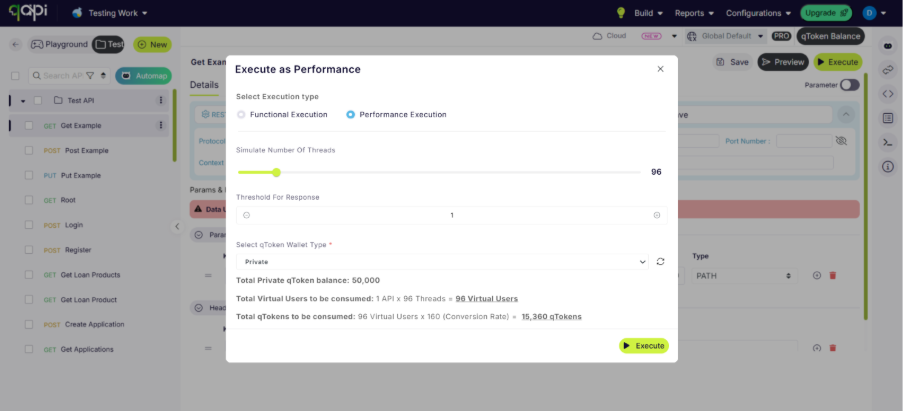
If you can see in both images the tokens will be utilized based on the parameters you select.
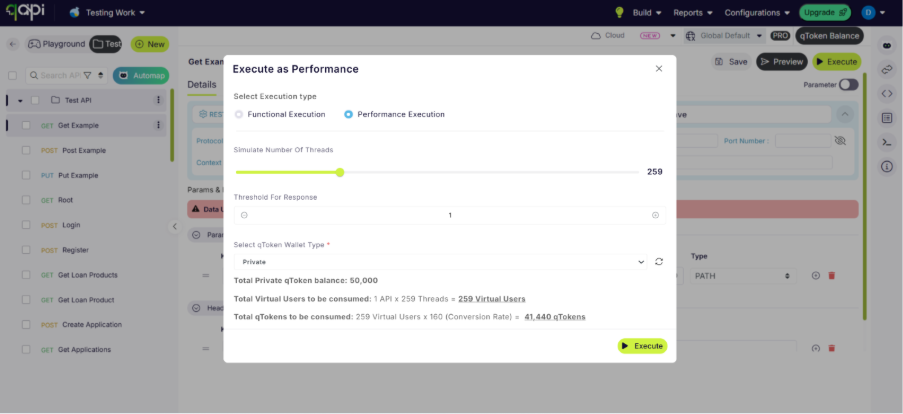
Once configured, teams can allocate the required number of virtual users based on their testing goals. qAPI will display the expected qToken consumption before the test begins, allowing users to understand the impact of the load configuration before execution.
As the test runs, teams can monitor real-time performance metrics including throughput, response times, and error rates. Once completed, qAPI generates a detailed performance report to support optimization and troubleshooting efforts.
This capability enables organizations to simulate real-world traffic conditions and validate API reliability before pushing updates into production.
Managing Your qToken Balance
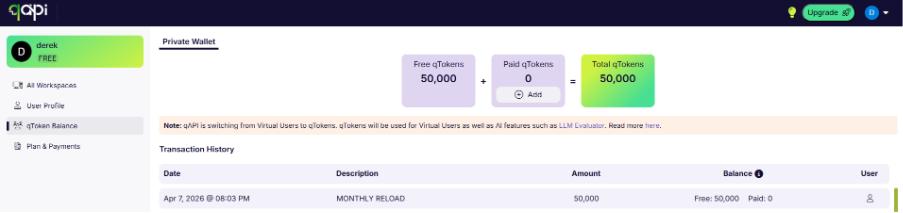
Your qToken balance can be monitored directly from the qAPI dashboard, giving full visibility into consumption across all modules and services. Teams can track usage patterns, monitor token burn rates by feature, and configure alerts to notify them when balances are running low.
This centralized tracking helps engineering teams plan testing cycles more effectively while maintaining control over resource utilization across evaluation and performance workflows.
In case you run out of tokens’ there’s a simple way to buy as many tokens as you need. All you need do is select the number of tokens you want complete the payment process, and the testing can begin.
Who qTokens Are For
qTokens are designed for:
• QA and test engineers validating API correctness and response quality
• AI and LLM teams evaluating model outputs before production release
• Platform and infrastructure teams stress-testing APIs under real-world traffic
• Engineering teams running functional, performance, and workflow tests as part of CI/CD
No matter the role, qTokens will ensure that every test is powered appropriately and measured consistently.
How qToken Usage Is Calculated
qToken consumption is based on the computational resources required to complete a test or evaluation. Usage may vary depending on:
• Request size and payload complexity
• Type of test (LLM evaluation, functional test, performance test, or workflow test)
• Test duration and execution time
• Number of concurrent virtual users (VUs) • Underlying model or infrastructure requirements
This approach ensures that lightweight tests remain efficient, while more demanding workloads scale proportionally and predictably.
Getting Started
Getting started with qTokens is simple: sign in to your qAPI account, open your test suite from the dashboard, and begin configuring your evaluation or performance test workflows. Your qToken balance updates in real time as jobs run, giving you clear visibility into usage and making rapid iteration effortless.
With the qAPI rebrand now officially live, qTokens sit at the core of what comes next—powering a smarter, more scalable generation of API testing, evaluation, and performance analysis. This marks just the beginning of a more unified, intelligent platform built to grow with your needs.