
You’ve been handed a task. Maybe it’s “pick the best LLM for our product.” Maybe it’s “figure out why our AI responses are getting worse.” Maybe it’s “build a system that tells us when our model is failing before a customer notices.”
Whatever the task, you quickly run into the same problem: everyone has an soft corner for some, the benchmarks look cooked, and “just try GPT-5/Gemini or etc.” it’s not an engineering decision.
All this started when GPTs actually was released to public and we are still trying to play catch up on the pace these tools and their capabilities are evolving.
So where do you go from here?
Let’s say the existing tools are no longer enough. Maybe the reports aren’t accurate, the research quality is inconsistent, or the outputs simply don’t meet your expectations. You decide to build your own solution using platforms like Replit, Emergent, or custom infrastructure.
This guide is for the people who have to make real decisions — engineers building production systems, architects choosing vendors, business people building interactive chatbots, researchers building eval pipelines from scratch.
We’ll start with what the models actually are, walk through how to compare them honestly, go deep on methods and math, and end with the exact tools you need to build something that works.
What is an LLM?
Large language models (LLMs) are being developed by using Artificial Intelligence to make them capable of understanding and generating natural human language so it can understand prompts and generate human-like responses.
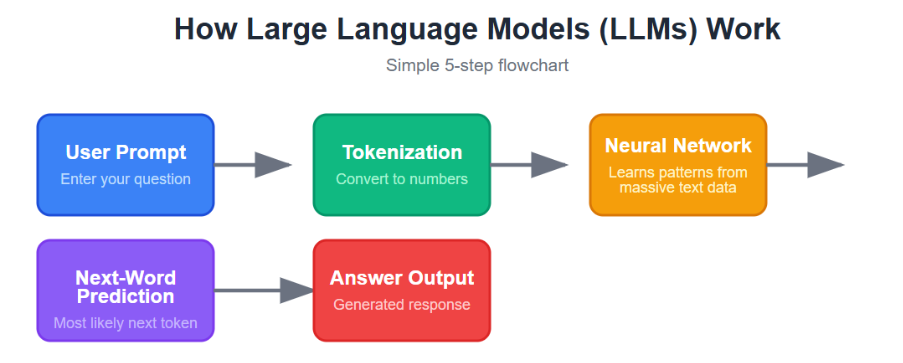
How Does an LLM Work?
LLM is a computer program that is trained through large data sets, from where it learns and understands context. And with the power of AI it puts it all together and gives us the output. It works by predicting and learning based on the patterns it learned during training.
An LLM works by first breaking your text into smaller pieces called tokens, then turning those tokens into numbers the model can process. It uses a transformer architecture with attention to understand how words and phrases relate to each other, including context and meaning, and then predicts the next token one step at a time to create a response.
In simple terms, it is like a very advanced autocomplete that reads the whole sentence, understands the relationships between words, and writes the most likely answer in a natural way.
How to Evaluate any LLM?
Before you can evaluate anything, you need to understand what you’re evaluating. “Best LLM” is a question that can only be answered by finishing the sentence: best for what.
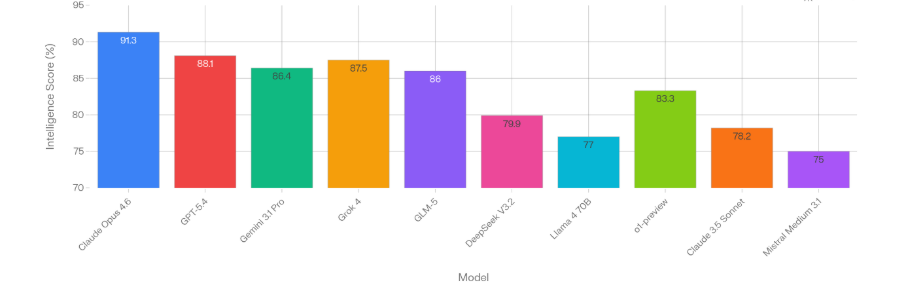
If you can see in the image above, the LLMs have been mapped for intelligence, but is that useful for your usecase?
| Model | Best For |
|---|---|
| Claude Opus 4.6 | Reasoning, coding |
| GPT-5.4 | General production |
| Grok 4 | Math, agentic tasks |
| Gemini 3.1 Pro | Multimodal, value |
| GLM-5 | Open-source leader |
| o1-preview | Chain-of-thought |
| Claude 3.5 Sonnet | Long context |
| DeepSeek V3.2 | Coding efficiency |
| Llama 4 70B | Fine-tuning |
| Mistral Medium 3.1 | Cost-effective |
To an extent, yes—but what if you’ve used one of these tools to develop your own LLM?
How will you evaluate or check that it works as expected? How do you identify its limitations, edge cases, or failure points before it reaches users? These tools are just the starting point, and while there are many available to help build models, building is only half the equation.
The real challenge begins after development: validation.
An LLM might perform well in a demo environment yet fail when exposed to some random prompts, domain-specific questions, or large-scale production traffic. Without structured evaluation, teams are left relying on subjective testing. That approach does not scale, nor does it provide measurable confidence in model quality.
This is why LLM evaluation has become a critical part of the development lifecycle. You and your teams need frameworks to benchmark outputs against expected results, score responses for relevance and accuracy, compare prompt or model versions, and continuously monitor regressions over time.
Much like software testing transformed application development, systematic LLM evaluation ensures that AI systems are not just functional—but reliable, measurable, and production-ready.
What an LLM Evaluator Actually Does
An LLM evaluator is just like your exam supervisor — a person, a script, another model, or a combination — that takes an LLM’s output and validates it through a preset or custom made parameters about its quality.
That’s a deliberately broad definition, because the field has fractured into several distinct evaluation paradigms and each is appropriate for different contexts.
LLM-as-judge is the approach that’s taken over the field in the last two years. You use a capable model — usually GPT-5 or Claude — to score another model’s outputs on a scale. You can evaluate, without paying for human annotators, and you can evaluate open-ended outputs that would break any reference-based metric.
The catch is judge bias: LLM judges are known to favor responses over concise ones, to prefer the first response shown in a pairwise comparison, and to represent stylistic preferences that may not match human preferences.
Mitigation: use multiple judges, randomize presentation order, and calibrate against human judgments to estimate your bias.
Execution-based evaluation is the gold standard for code and structured output tasks. You run the generated code against a test suite and count whether the tests pass. No subjectivity, no rubric — it either works or it doesn’t. HumanEval and MBPP (the standard code benchmarks) use this approach. SWE-bench goes further and evaluates whether a model can actually close real GitHub issues, which is a much harder test.
In practice, a mature evaluation system uses all of these. Automated metrics run on every deployment for regression detection. LLM-as-judge handles the open-ended quality signal. Execution-based evaluation handles any tasks where the output can be mechanically verified. Human evaluation happens on a sample basis to keep the automated signals calibrated.
How to Actually Compare LLMs
Most LLM comparisons fail for the same reason: they use someone else’s benchmark results to make a decision about their own use case.
The benchmarks are real and they’re useful, but they’re measuring performance on a distribution of tasks that may have nothing to do with what you’re building. A model that leads on MMLU (a knowledge breadth benchmark spanning 57 academic subjects) might perform mediocre on your customer support tickets. A model that’s mediocre on HumanEval (Python coding) might be excellent at the specific SQL generation your team needs.
Here’s how to evaluate LLM the effective way.
Step one: Create and deploy your LLM.
Once your LLM is deployed, the next step is to configure your output XPath/JSON mapping.
You’ll find the LLM output wherever your model returns its response after inference—typically in one of these places depending on how you’re deploying/testing it:
If your LLM is deployed behind an API, the output is usually inside the JSON response.
Example:
{ “id”: “chatcmpl-123”, “choices”: [ { “message”: { “content”: “The capital of France is Paris.” } } ] }
In this case your output JSON path would be:
$.choices[0].message.content
If you’re using:
• OpenAI Playground
• Azure AI Studio
• Hugging Face
• Internal LLM dashboards
The raw response/output panel will show exactly what the model returns.
In case If you are using frameworks like:
• LangChain
• LlamaIndex
• Haystack
The output may be wrapped in another object, e.g.:
{ “result”: { “answer”: “Paris” } }
Path becomes:
$.result.answer
This defines where the required values are extracted from the model’s response so evaluating systems can process them correctly. If the mapping is incorrect, even valid outputs can break integrations. So we suggest that teams should also standardize response formatting, validate schema structure, and handle incomplete or malformed outputs before moving forward.
Step two: Define your evaluation criteria.
What does “good” mean for your specific task? For a customer support use case, you might care about: accuracy, consistency, reasoning and edge-case handling.
Test prompts should be validated against expected outputs, repeated runs should be checked for response drift, and failure scenarios should be tested to ensure stable behavior under unexpected input. In addition, teams should implement monitoring, prompt/model versioning, confidence thresholds, and rollback mechanisms to maintain reliability after deployment.
Step three: Generate outputs blindly.
Run each model on your full prompt set without any model-identifying information in the evaluation process. If you’re using LLM evaluator, you should run tests with different models. This is harder to enforce than it sounds but it makes it easy to compare differences between different models.
Step four: Score pairwise.
For each prompt, compare outputs reports for all. Which is better, or is it a tie? Pairwise comparison is more reliable than absolute scoring because it’s easier to judge relative quality than to assign a consistent score on an abstract 1–5 scale. Aggregate your pairwise results into a win rate or an Elo score (the same rating system used in competitive chess).
Step five: Segment your analysis.
We recommend that you don’t just look at overall win rate. Break your results down by task category — if Model A wins on 70% of reasoning tasks but loses on 60% of extraction tasks, and your product is mostly extraction, the overall win rate is misleading. Find the model that wins on the tasks that matter most to you.
The Evaluation Method That Actually Works
qAPI has launched LLM evaluator feature here’s how you can use it to evaluate your LLM.
Step 1: once you’ve logged into the application, open your test suite.
Step 2: Click on LLM Eval tab.
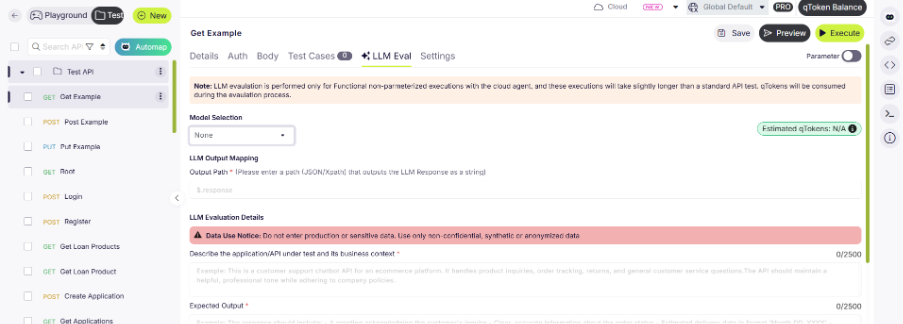
Step 3: select the model you want to evaluate with
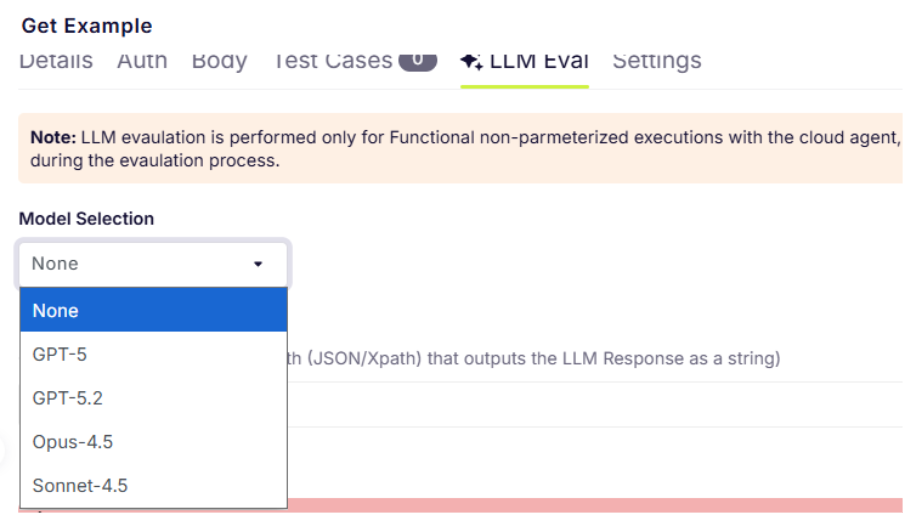
Step 4: Give context
Describe the application / API under test and its business context
You can:
- State what the application or API is
- What kind of system it is (e.g., chatbot API, order management API, payment API).
- Mention the business or product it supports
- Industry or platform (e‑commerce, banking, healthcare, SaaS, etc.).
- Explain the main purpose
- What problem it solves or what functionality it provides.
- Describe who uses it
- End users, customers, internal teams, partners, etc.
- Add any important behavior or tone expectations (if applicable)
- Example: professional, friendly, policy‑compliant responses.
Example structure:
This API is used for … It supports the business function of … The primary users are … It is expected to behave in a … manner.
Or you can just put a one liner like we did.
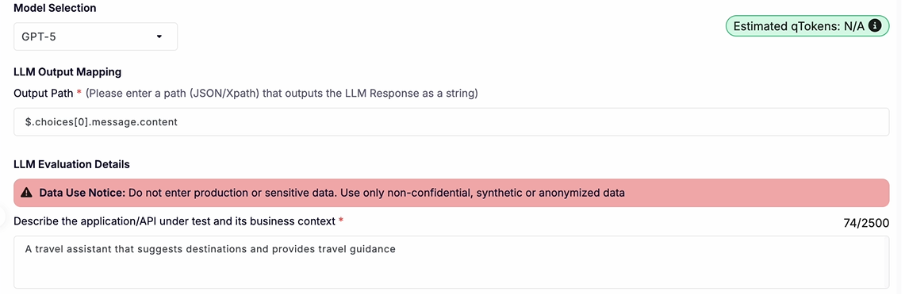
Step 5: Define Expected Output
Again, you can:
- Describe what a successful response should include
- Give the order or structure of the response
- Greeting → main information → additional details → closing (if applicable).
- Add accuracy requirements
- Data must be correct, complete, and relevant.
- Mention formatting rules
- Date formats, field names, response structure, etc.
- Include tone or clarity expectations
- Clear, concise, professional, helpful.
Example :
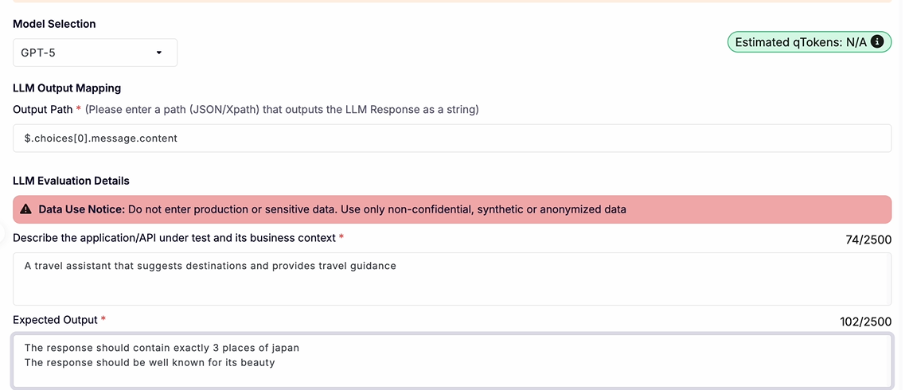
Step 6: Add some Rules/Guardrails (Optional)
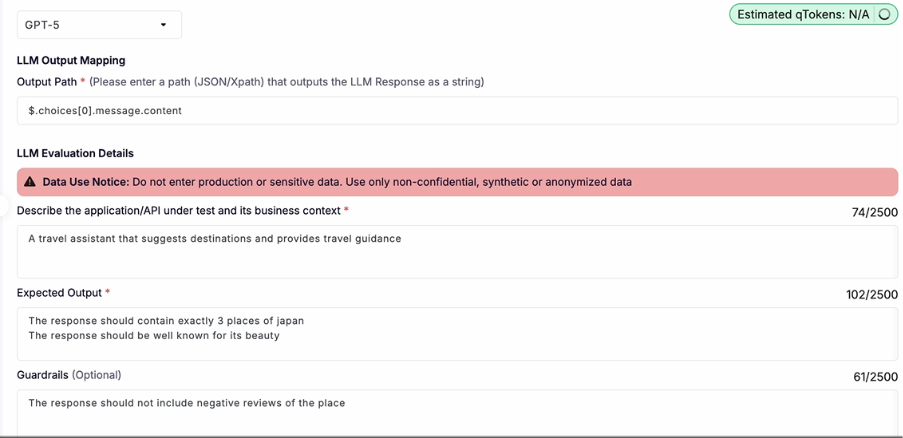
Step 7: Click on save and hit on execute.
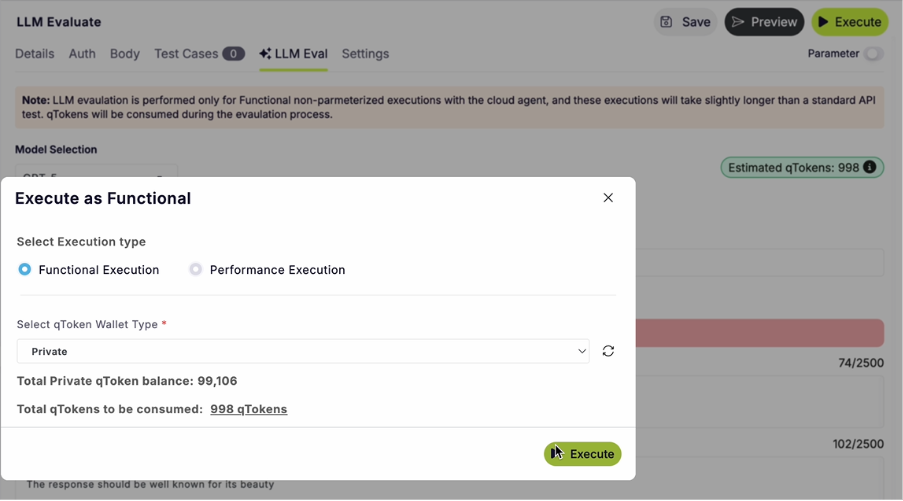
Select the functional execution type, select the token wallet type. And click on execute.
Step 8: Evaluate results.
Once the evaluation is complete, you’ll find it in the reports tab as shown below. Click on the test script to get the detailed report.
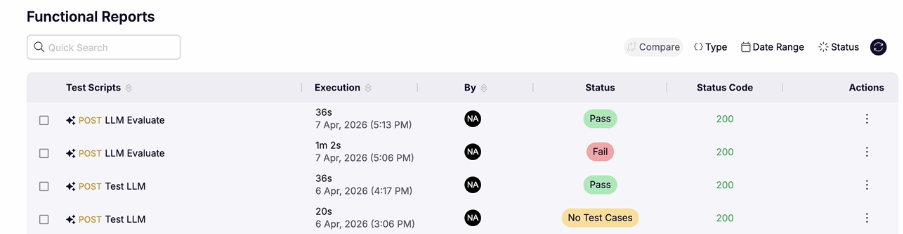
Once the report is open click the LLM evaluation tab.
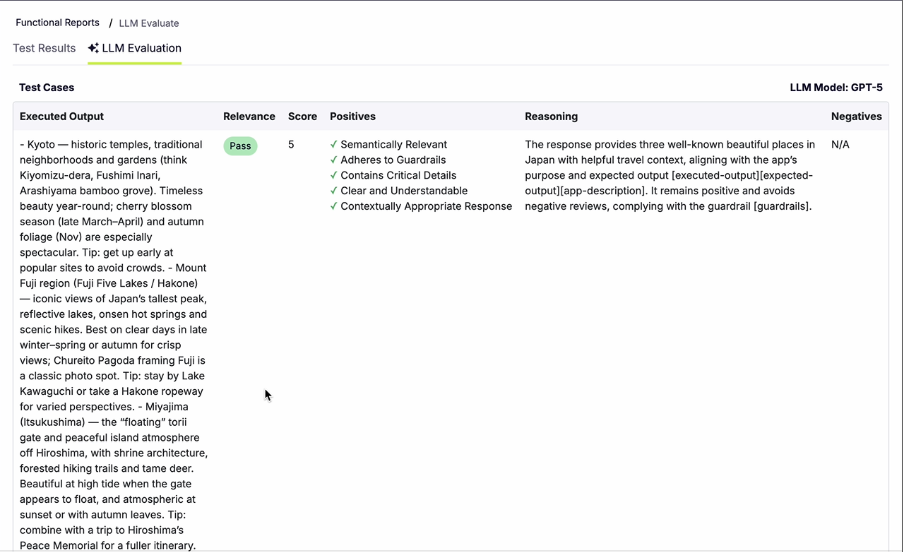
As you can see here the report shows if the LLM passed the tests, and also rates it form 1-5(5 being the highest) and also lists down the positives it was tested against.
Now you can run the process again with different model and then compare the evaluation results for your LLM.
In Closing
Most teams evaluate whether their LLM answers are correct. Almost no teams evaluate whether their LLM answers are confidently wrong in a way that causes harm.
Most teams today evaluate LLMs in the simplest way possible: “Was the answer correct?”
But that’s no longer enough.
The real risk isn’t just when a model gets something wrong — it’s when it gives a confident, polished, believable answer that is wrong, and traditional evaluation tools fail to catch it.
Most current LLM evaluation platforms are still lagging behind because they focus heavily on binary scoring:
- Right vs wrong
- Pass vs fail
- Keyword match vs no match
What they often miss is quality beyond correctness.
That’s where qAPI’s LLM Evaluator changes the game.
Instead of limiting evaluation to surface-level correctness, qAPI helps teams assess whether responses are:
- Semantically relevant to the prompt
- Adherent to defined guardrails and policies
- Inclusive of critical required details
- Clear and understandable for end users
- Contextually appropriate to the intended use case
Build your LLM and get it evaluated on qAPI